Ptolemy: A Semantic Map of Exploratory Data Analysis



Have you ever stopped to get your bearings while doing data analysis? Have you ever asked yourself “Where am I going with this line of inquiry?” or “Did I already cover this?” or “Did I miss something?”
These questions become increasingly difficult as an analysis grows. A single investigation can branch into dozens of views, transformations, and hypotheses, leaving us to keep track of where we have been and decide where to go next. When we undertake data analysis, we often describe the process spatially: maybe our north star is understanding which factors contribute to profit, or we start with data cleaning and then fan out in different directions to see what clustering, regression, and semantic analysis tell us. Or maybe we just think about where we’ve been and do gap analysis to figure out which areas we haven’t explored yet.
At Tableau Research, we wanted to explore this spatial orientation to data analysis. Is it a legitimate way of looking at data exploration and, if so, could we build tools that leverage it to help people in their data analysis journey?
Ptolemy: A map in the data analysis wilderness
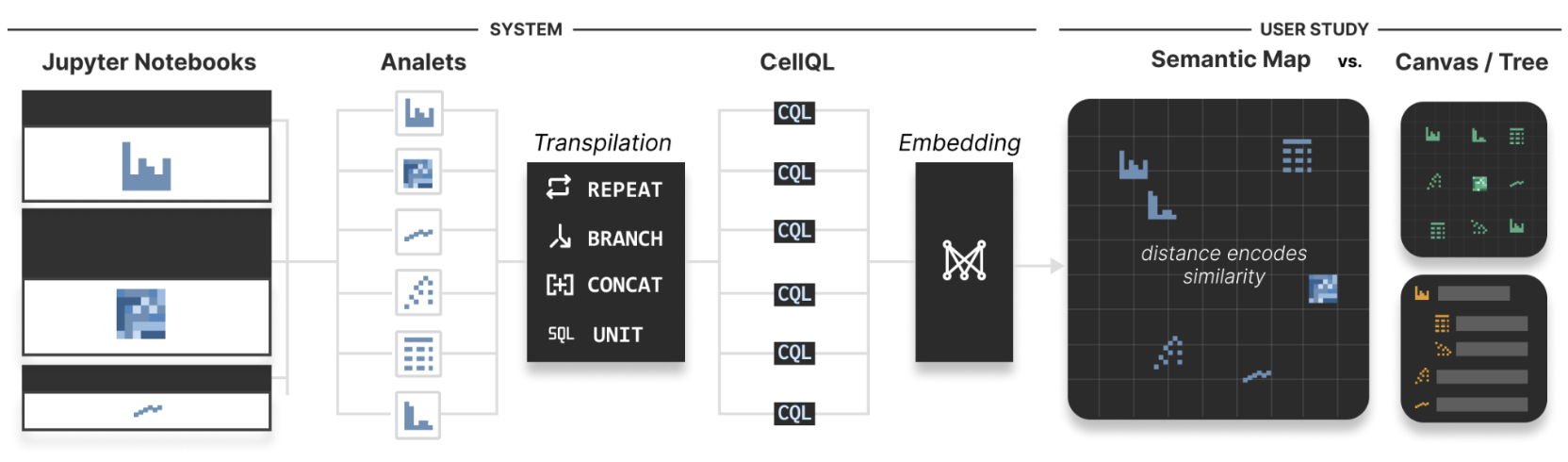
Figure 1: The Ptolemy Pipeline. Python cells are extracted and turned into analets representing a single analysis step. Analets are transpiled from Python into CellQL, a lightweight query language that models an analet’s data consumption needs. From the CellQL representation, an embedding model is used to extract vectors of semantic similarity, which are then visualized to the analyst via a UMAP. Drawing on Tversky’s account of how space can express grouping, order, and distance (Tversky, 2000), we compare a neighborhood-preserving semantic map, a semantically arbitrary grid, and an ordered hierarchy for analytical wayfinding.
To investigate this notion of an analysis space, we created Ptolemy, a navigational interface that externalizes data analysis history as a 2D semantic map (Figure 1, right). Analysis notebooks such as Jupyter are the primary source. Each notebook cell becomes a small piece of the analysis that we call an analet. Rather than arranging these analets by when they were created or where they happen to appear in the notebook, Ptolemy arranges them by what they do. Analyses that perform similar operations appear near one another; those that differ appear farther apart.
The code inside of the analets is then semantically normalized using CellQL (more about that below). These semantically normalized analets are embedded in a high-dimensional semantic space and then projected down into 2D, giving us an interactive 2D analysis space where each analet (notebook cell) is positioned according to what its code does, and where its neighboring analets have similar functionality.
CellQL: Normalizing analytical code
Two pieces of code can look completely different while doing essentially the same thing. Imagine we have a notebook with multiple cells doing clustering and multiple cells doing regression, but the clustering cells differ from each other—different APIs, iteration instead of recursion, different variable names; code cells that are functionally identical can look very different. But if we want to arrange these analets in a shared space, and we want analets with similar functionality to occupy the same region of that space, then we need to keep the semantics (what the code is doing) but normalize the syntax (how it was implemented).
We created CellQL as a lightweight intermediate representation for doing this. CellQL translates Python analyses into a more structured description of the data they consume and the transformations they perform. It also provides constructs such as REPEAT, BRANCH, and CONCAT that normalize common programming patterns. For example, the same repeated operation might be expressed with iteration, recursion, or another Python construct; CellQL can represent these using the same REPEAT operation.
This gives Ptolemy a common language for comparing otherwise heterogeneous notebook cells. We can then embed those normalized representations according to their analytical similarity and use those embeddings to determine where analets appear on the map. In other words, CellQL helps turn differences in code into meaningful distances in Ptolemy's analysis space.
What happened when people used the map?
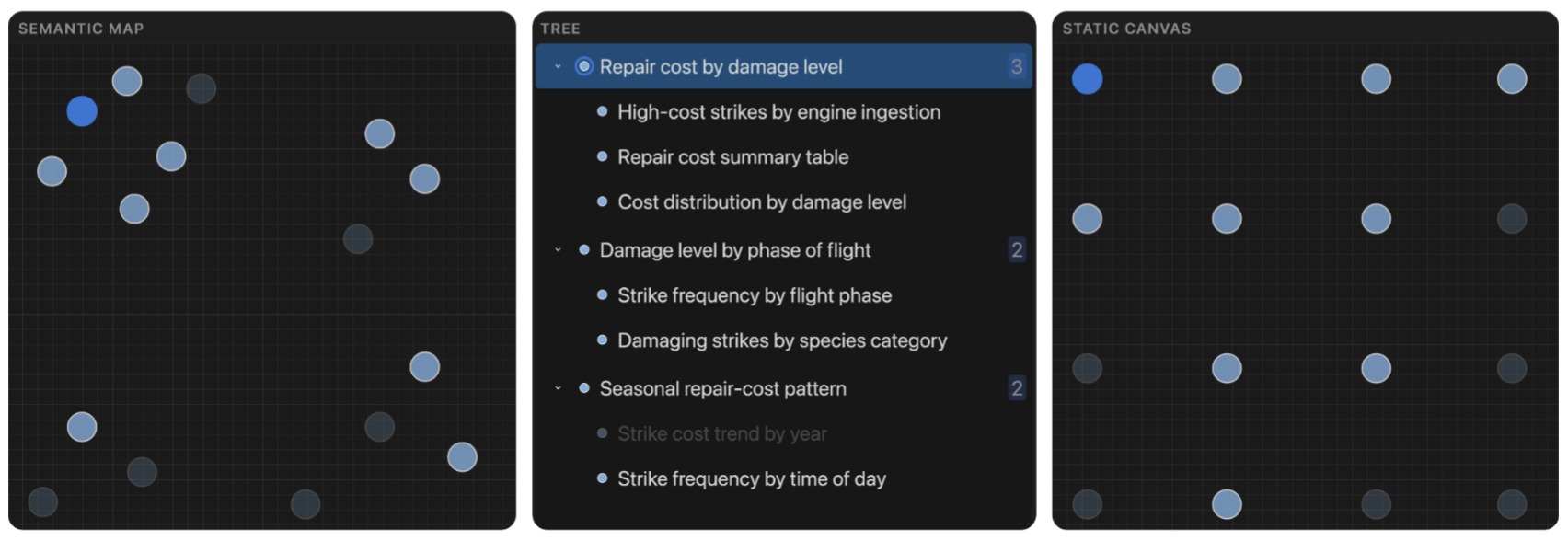
Figure 2: Side-by-side overview of the three interface conditions used in the study. The Semantic map uses local proximity to represent similarity among analets; the tree presents analets as a labeled, user-organized hierarchy; and the static canvas places analets in a fixed grid whose positions have no semantic meaning. The selected analet is shown in bright blue across all three conditions.
We asked 12 participants with backgrounds ranging from computer science and data science to research and academia to evaluate Ptolemy. Participants were given the choice of exploring one of three different data sets. To examine how spatial semantics affect navigation in data analysis, we compared the three interface conditions shown in Figure 2:
- Semantic map: Analets are embedded using feature representations derived from their effective data-view structure and projected into 2D using UMAP (McInnes et al., 2020). Local proximity in the 2D layout reflects semantic similarity between analysis steps. Although UMAP lacks strong guarantees of global consistency, it enables intuitive neighborhood-based reasoning and weak global arrangement.
- Tree: Analets are arranged in a 1D scrollable list based on alphanumeric order. Participants organize the list into a user-defined hierarchy. This condition emphasizes route-based structure and lineage but lacks spatial embedding.
- Static canvas: Analets are arranged in a fixed alphanumeric order on a static 2D canvas. Spatial proximity carries no semantic meaning. This condition serves as a visual baseline where layout is inert.
The results revealed an interesting tension: seeing the analysis space more clearly did not necessarily make it easier to decide what to do next.
Participants found Ptolemy’s semantic map engaging, but also more cognitively demanding than a tree or grid (Figure 3). The map helped participants understand the overall structure of their analysis and compare nearby analyses. Clusters and proximity gave them cues about which analyses were related and where they had been exploring. But that richer overview came with a cost: several participants hesitated when deciding where to go next. The tree and static canvas, by contrast, imposed a natural “reading order”: top-to-bottom or left-to-right, which functioned as a to-do list. This structure reduced decision overhead and made next steps feel obvious, even though it offered fewer signals about global coverage or conceptual relationships.
These findings reveal a core design trade-off: spatial encodings that prioritize survey afford strategic reasoning (e.g. tracking coverage, promoting diversity), while those with strong route affordances lower planning friction but can encourage shallow, enumerative interactions.
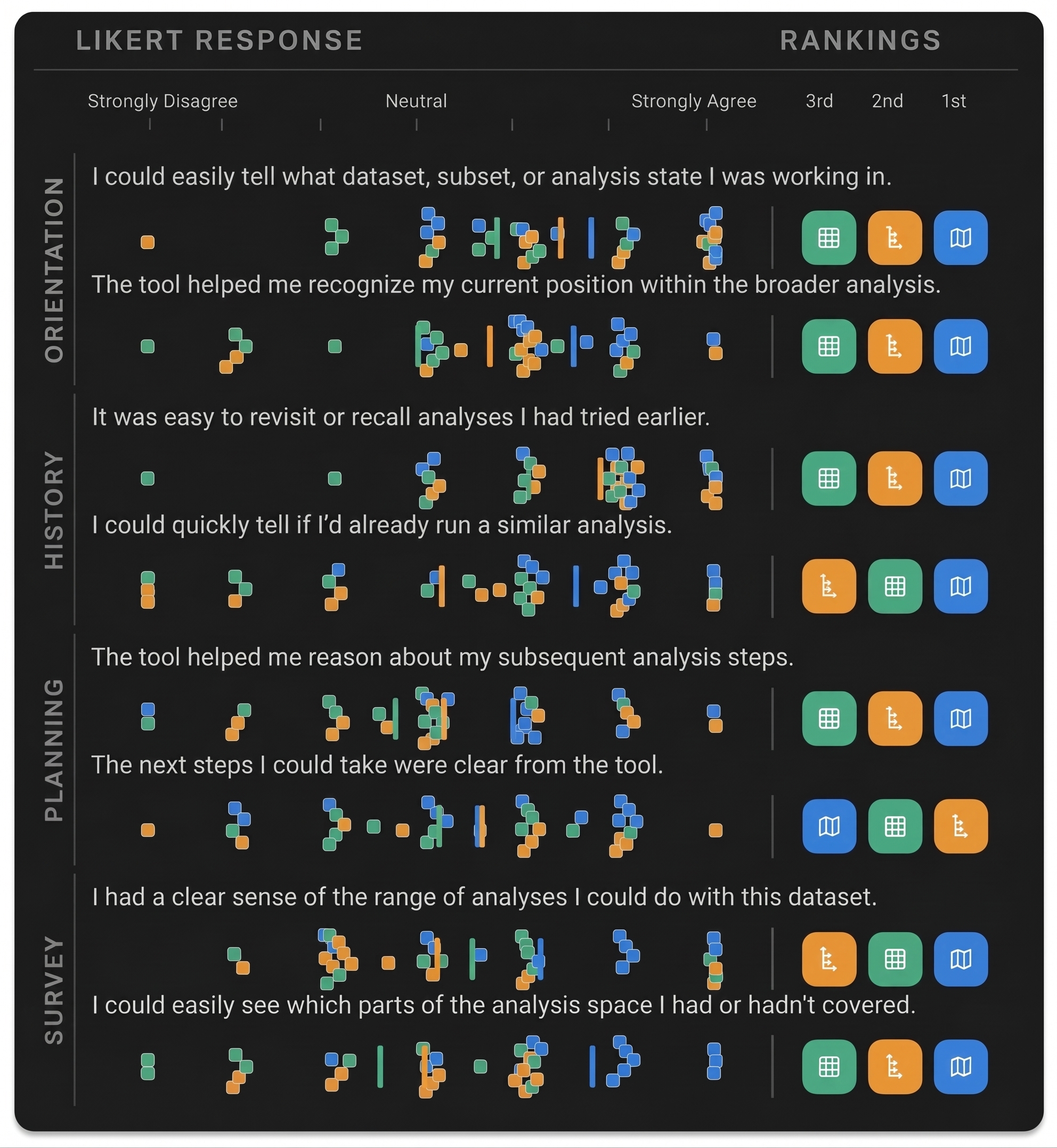
Figure 3: Subjective ratings and per-item rank preferences across interfaces. Left panels show beeswarm Likert responses (1 = Strongly disagree, 7 = Strongly agree) with interface means; right panels show rank preferences (1st/2nd/3rd).
This produced one of our most surprising findings. The static canvas actually led participants to cover the most ground. But this did not necessarily mean they were navigating more strategically. Participants described their behavior as “push all the buttons” where breadth emerged quickly from enumerative sampling. The tree condition exhibited a milder version of the same effect: its sequential structure created a natural to-do flow, encouraging participants to move linearly down a branch.
The semantic map prompted a different pattern of exploration. Participants often explored one conceptual neighborhood in depth before jumping elsewhere, supporting local comparisons and strategic reconnaissance, but reducing short-term dispersion. But we caution against interpreting the grid’s breadth advantage as evidence against semantic maps. Rather, this highlights an early-stage decision-cost issue: global awareness demands cognitive effort unless paired with low-friction next steps.
Conclusion
EDA is not just about generating visualizations, but about navigating a conceptual space of ideas, hypotheses, and interpretations. Yet most tools externalize results without exposing the structure of the analytic journey itself. Ptolemy helps to change that and represent data analysis as a space in which you can move, navigate, and explore.
If you are interested in reading more, please read the full paper. We will be presenting this work in November at the User Interface Software Technology (UIST) conference and would love to see you there. If you have questions, please drop us a line; we are always excited to hear from you!
Related Stories

Best Practices for Creating a Performant Semantic Model in Tableau Semantics
How Tableau Built Agentic Analytics at Salesforce: A Four-Part Framework
 October 12, 2026

The Knowledge Engine: How We Built Trustworthy Agentic Analytics
 September 30, 2026