Work Smarter with the Tableau Add-on for Google Workspace




The way enterprises work with data has changed rapidly with the rise of AI, but the process of getting to that data from everyday workflows hasn't kept up. Teams lose precious time navigating between tools, manually exporting data, copy-pasting, and reformatting, only to restart the entire process once the numbers change.
This cycle quietly consumes hours that should go toward analysis and decisions. Aligning on a strategy can be challenging, but accessing the data to justify it shouldn’t be.
That is why we introduced the Tableau Add-on for Google Workspace, making it effortless for any user to embed dashboards and Pulse metrics directly into Google Slides and Docs. But we were just getting started.
To streamline analytics workflows, the Tableau Add-on in Google Sheets brings Tableau data into the universal grid interface. With this expansion, teams that depend on spreadsheets for analysis and modeling can seamlessly connect to their trusted data in the format they are most familiar with.
"Data should flow freely to where decisions are made — and that's exactly what the Tableau Add-on for Google Workspace delivers. By bringing Tableau's trusted analytics directly into Google Sheets, Slides, and Docs, we're eliminating the gap between data and decision-making. This is the kind of seamless collaboration our joint customers have been demanding, and we're proud to deepen our partnership with Salesforce to make it a reality."
— Sam Sharaf, Global Product Solutions Lead, Google
Tableau Add-on in Google Sheets
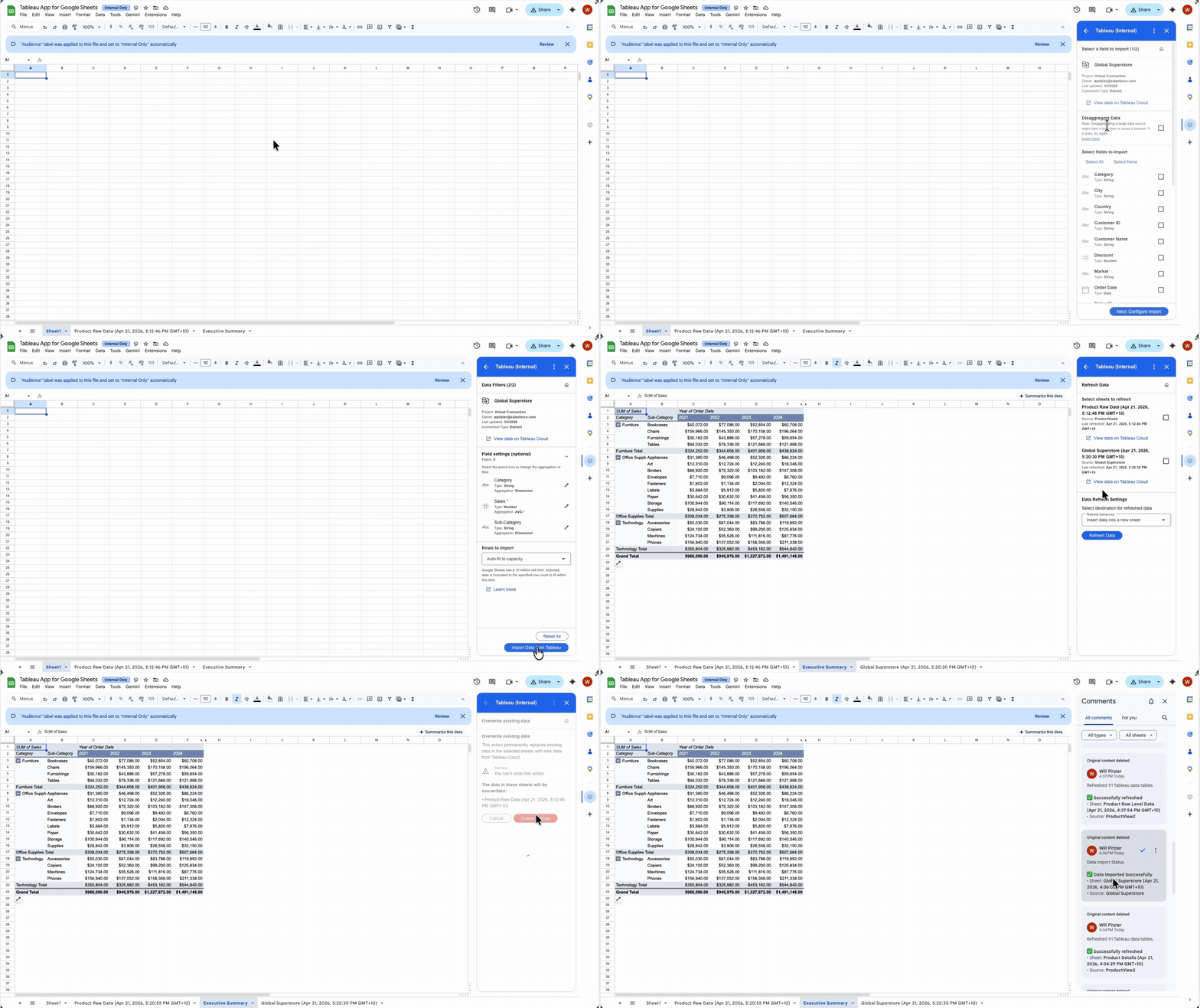
For organizations that use Tableau for analytics and Google Workspace for collaboration, the Tableau Add-on in Google Sheets closes the gap between your trusted data and the work that depends on it. Instead of downloading, copy-pasting, and reformatting, you can connect directly to any Tableau view or Published Data Source, query the exact data needed, and pull it directly into your spreadsheet, where you perform analysis. Then, you can refresh the import instantly, ensuring all linked reports and models are running on the latest numbers.
- Query with precision: Use the built-in Query Builder to select specific fields, filters, and aggregations from any Published Data Source, so your sheet contains the precise data you need, nothing more.
- Maximum freshness, minimum effort: Refresh all or select data on demand with a single click, so you can spend more time building the insights and less time pulling data.
- A two-way connection: Import Tableau data into Sheets for analysis and modeling, then export it back to Tableau Cloud for robust exploration and visualization capabilities.
Tableau Add-on in Google Slides and Docs
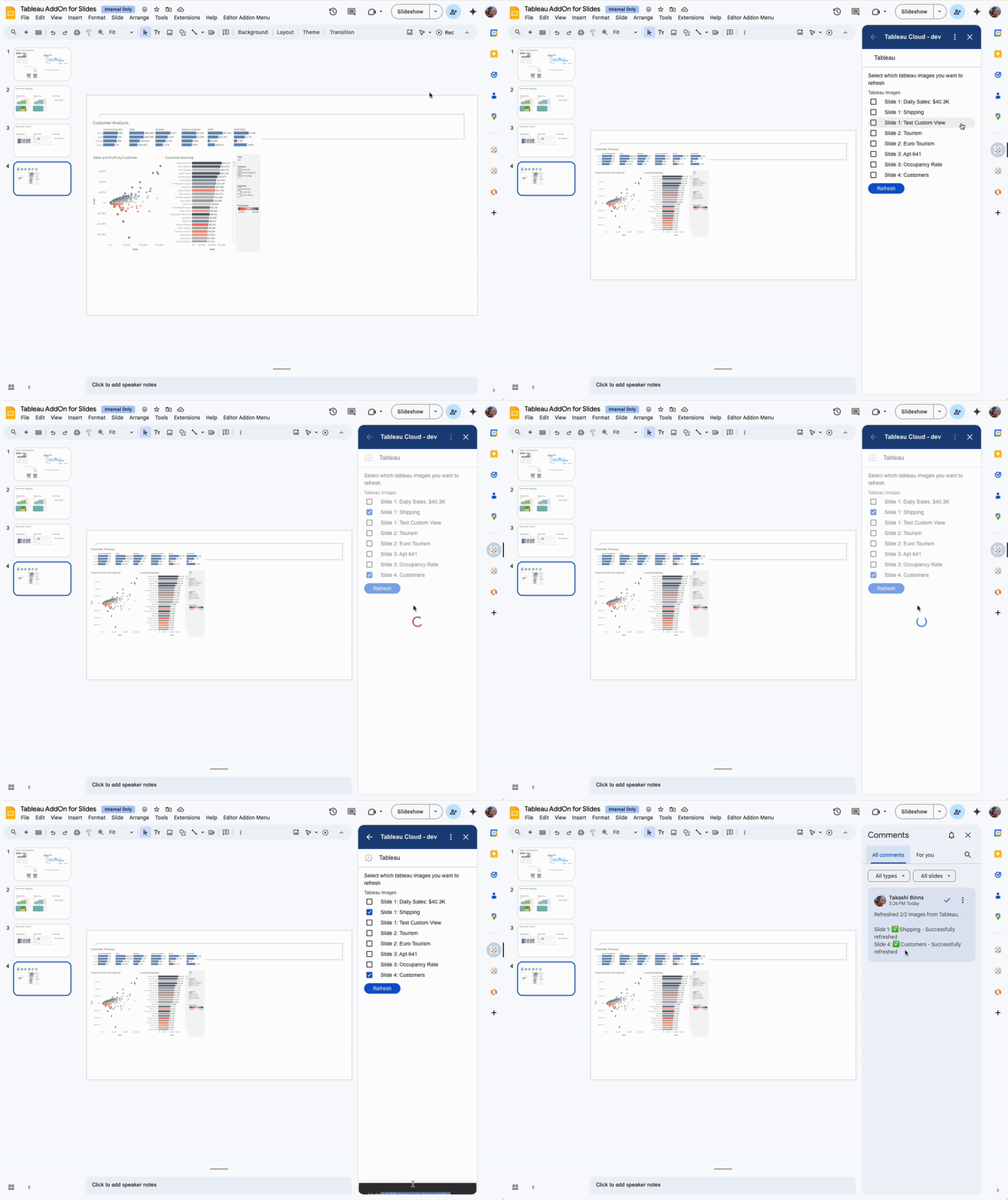
In addition to the latest spreadsheets integration, teams can incorporate Tableau dashboards and Pulse metrics directly into presentations and documents, turning static reports into dynamic, data-driven narratives. Every business review, executive briefing, and quarterly report tells a story, and with the Tableau Add-on in Google Slides and Docs that story is always backed by trusted insights.
- Embed insights natively: Browse and insert Tableau dashboards and Pulse metrics directly within slides and documents, without switching tabs or breaking focus.
- Stay presentation-ready: Update Tableau content in one click, so every deck and report reflects the latest data, whether moments before or even during a meeting.
- Deeper exploration awaits: Double click into the dashboard or metric effortlessly as all embedded Tableau content is linked to their source, made possible by Google Smart Chip technology.
Three core benefits of the Tableau Add-on for Google Workspace:
- Governed by design: The add-on inherits your existing Tableau Cloud and/or Tableau Server permission model, so admins can be confident that data is secure and users can trust the data is accurate.
- Right place, right time: By eliminating the cycle of manual exports, copy-paste updates, and ad hoc requests, the Tableau Add-on gives Google Workspace users direct access to their trusted data inside the tools they already use while freeing data teams to focus on higher impact work.
- Strengthening the ecosystem: The Tableau Add-on for Google Workspace is the latest in a series of investments for joint Tableau and Google customers. It extends existing integrations, including BigQuery connectivity and broad Google Cloud support, into the productivity tools where millions of teams work.
Get started with the Tableau Add-on for Google Workspace
Visit the Google Workspace Marketplace to get the Tableau Add-on. For a detailed setup guide, see our help documentation here. You can also learn more about how to use the add-on here.
Related stories

How to Embed a Data Viz from Tableau Cloud into Your Google Docs
 16 August, 2023

Fast and Flexible Access to Data with Tableau's Google BigQuery (JDBC) Connector
 3 April, 2023

Self-Service Analytics for Google Cloud, now with Looker and Tableau
 12 October, 2021