Trusted, Real-Time Insights for All: Tableau Brings Conversational Analytics to Cloud & Server




Organizations rely on dashboards to report important insights, but dashboards are just the start of the conversation. A chart shows revenue is down 12% quarter-over-quarter and the follow-ups immediately stack up: Which region? How many product lines? Those questions pile up in an analyst's queue, and by the time the answers are prepared, the moment to act may have already passed.
LLMs seem like an obvious fix, but an LLM alone creates a new problem: it doesn't know your business. For example, if you use a popular AI agent to query a dataset, the AI won’t recognize that “active customer” and “managed account” mean the same thing at your company, resulting in an inaccurate answer.
Enterprises need conversational analytics that's governed, so every answer is accurate and consistent — not the LLM's best guess. That's exactly what Tableau Agent delivers to every user, where they work and when they need it.
Trustworthy insights in real-time, for every user
Tableau Agent is embedded directly inside your Tableau dashboards*, bringing trusted conversational analytics to business users where they work.
When a question emerges, anyone can ask in natural language and get instant insights grounded in their governed data. It's built to handle a range of business questions and prompts: What happened? Why did it happen? Show me the top X. From there, Tableau Agent breaks them down into specific sub-queries that it submits to the underlying data source and if a question is unclear, it seeks clarification before answering.
Once the analysis is complete, Tableau Agent builds an intuitive response consisting of text, tables, and visualizations**. Because it's aware of any active dashboard filters in your current session, it returns contextual insights for a connected visual and conversational experience. Plus, you can ask as many questions as you’d like, with each answer building on the last.
*Currently in Open Beta for Tableau Cloud. Coming soon to Tableau Server.
**Visualizations will be included in responses later this year.
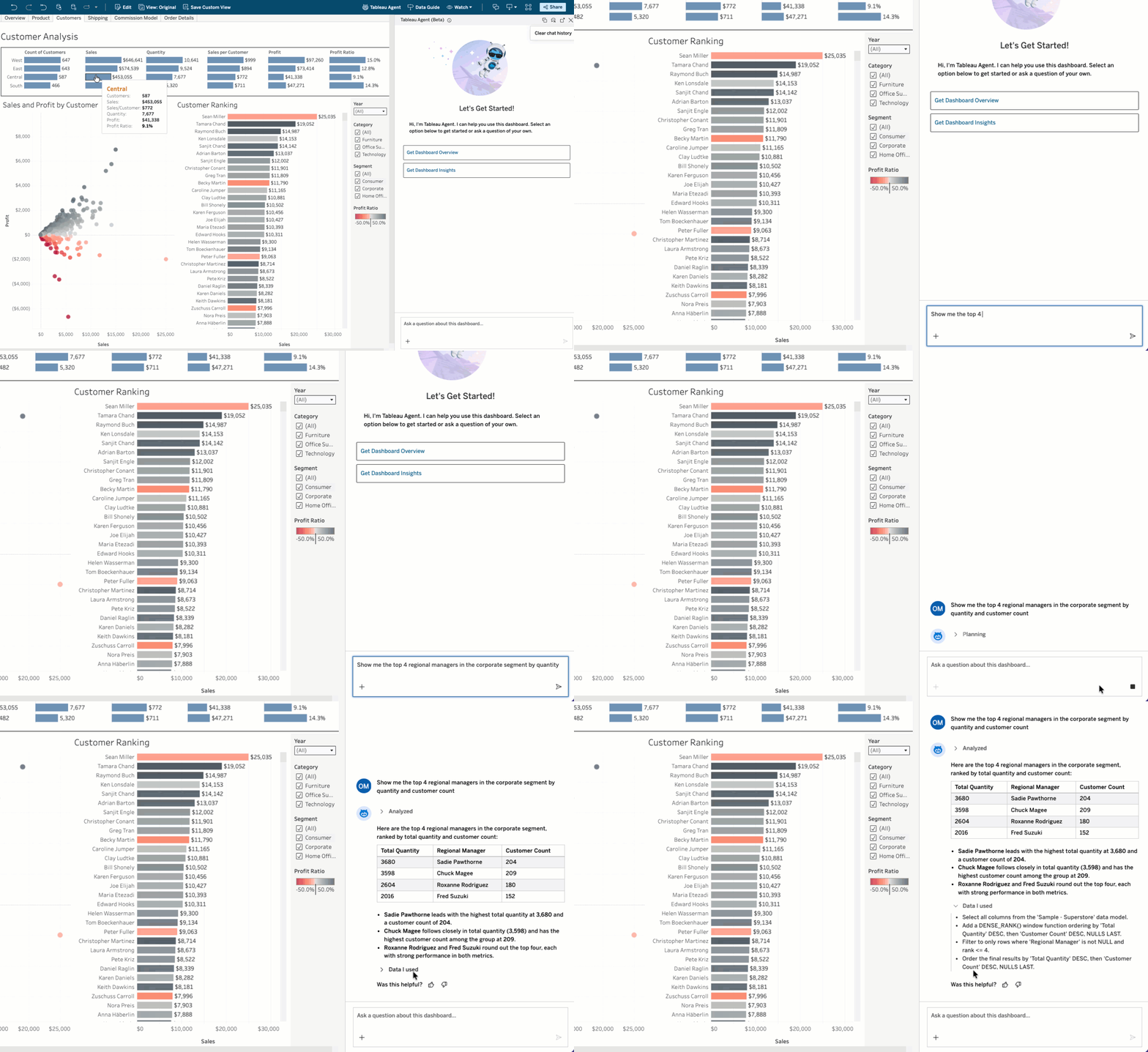
New to the dashboard or unsure where to start? You can generate a dashboard overview and insights summaries for each viz to kick off the conversation. Then ask a follow-up question on anything that stands out.
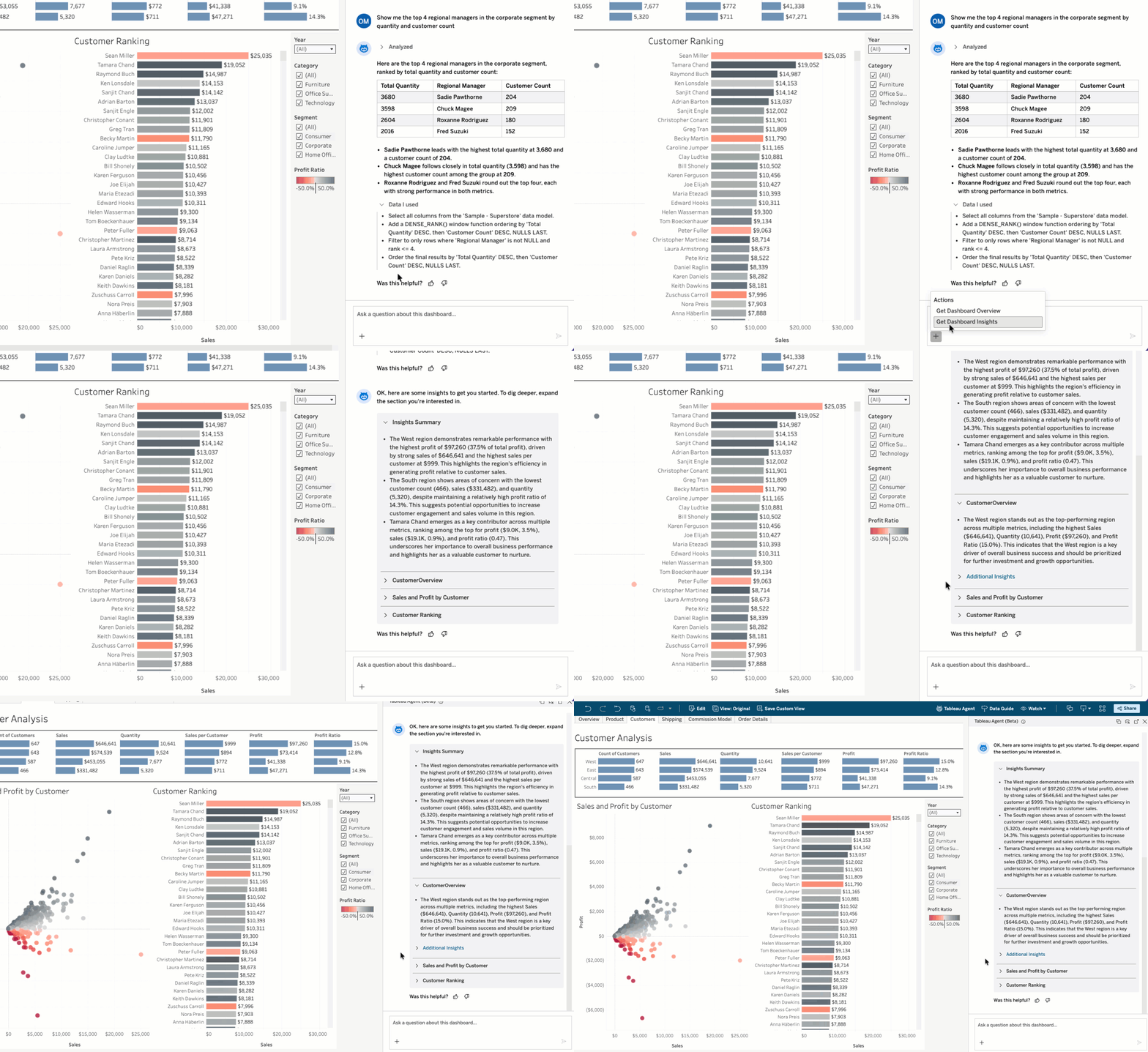
Built for accurate and consistent responses
What makes Tableau Agent different from a generic AI agent isn't the interface. It's the business context and permissions encoded in your existing Tableau content.
When you ask a question, Tableau Agent doesn't guess at what you mean. It draws on the semantics already encoded in your organization's Tableau content: field names and descriptions, pre-defined calculations, and relationships and joins between data objects and tables, respectively.
This business context, already defined by your data and analytics team, gets applied to every interaction—so responses are accurate and consistent, and it’s only getting smarter. Tableau is developing additional metadata types, allowing you to define even more context.
Underpinning all of this is your existing security model. Tableau Agent works within your established permissions and row-level security. With new workbook-level permissions on the horizon, you will have greater control over who can use Tableau Agent and on which workbooks.
Empowering teams with self-service analytics
The impact is greatest for anyone whose job depends on data, but has never had a direct line to it. With Tableau Agent’s trusted conversational analytics available to every single user,
- The insight lag disappears: Analytical questions get answered when they arise, not when it’s too late.
- Everyone works from the same facts: Tableau's semantic layer enforces consistent definitions across the org, so insights are aligned across the organization.
- Your data stays secure: Tableau Agent honors your existing permissions and security controls, so responses are within your access boundaries.
- Analysts focus on more essential work: Your data teams get back to the strategic analysis that only they can do.
The questions that required numerous requests and days to get answered, now take moments with Tableau Agent. This is a fundamental shift in how business users engage with their data to make data-driven decisions and take timely action.
Getting your data ready for Tableau Agent
If you're a data leader or admin, here's how to prepare your dashboards to work best with Tableau Agent. The good news is if your data is already well-governed in Tableau, you're most of the way there.
1. Invest in your metadata and semantic layer: Equip Tableau Agent with the context it needs, like clean field names, clear descriptions, and certified data sources, so it can return accurate, useful answers. The more intentional, the better the experience for business users.
2. Review row-level security configurations: Tableau Agent respects all your existing Tableau permissions and row level security (RLS). We recommend applying RLS using data source filters for conversational analytics.
3. Set expectations for what it is: Tableau Agent is not a generic LLM tool that guesses the best response to open-ended questions. It is built into dashboards so users can ask questions about their governed data and get trustworthy insights.
When you're ready to get set up, our help documentation and FAQs walk you through everything you need to enable Tableau Agent in your dashboards and get the most out of it across your organization.
Start the conversation
If you're a Tableau+ or Tableau Cloud+ customer, Tableau Agent is already available in your dashboards (in Open Beta), just enable it in site settings and start asking questions. If you’re a Tableau Server customer, you will be able to enable Tableau Agent in your dashboards soon.
Not on Tableau+ or Tableau Cloud+ yet? Start your Tableau free trial and try Tableau Agent today.
Zugehörige Storys

The Tableau+ Bundle with Premium AI, Enterprise Capabilities, and Premier Success
 1 Oktober, 2026
What is Tableau Knowledge?
 30 September, 2026
How Tableau is Expanding Access to Agentic Analytics Across the Enterprise
30 September, 2026