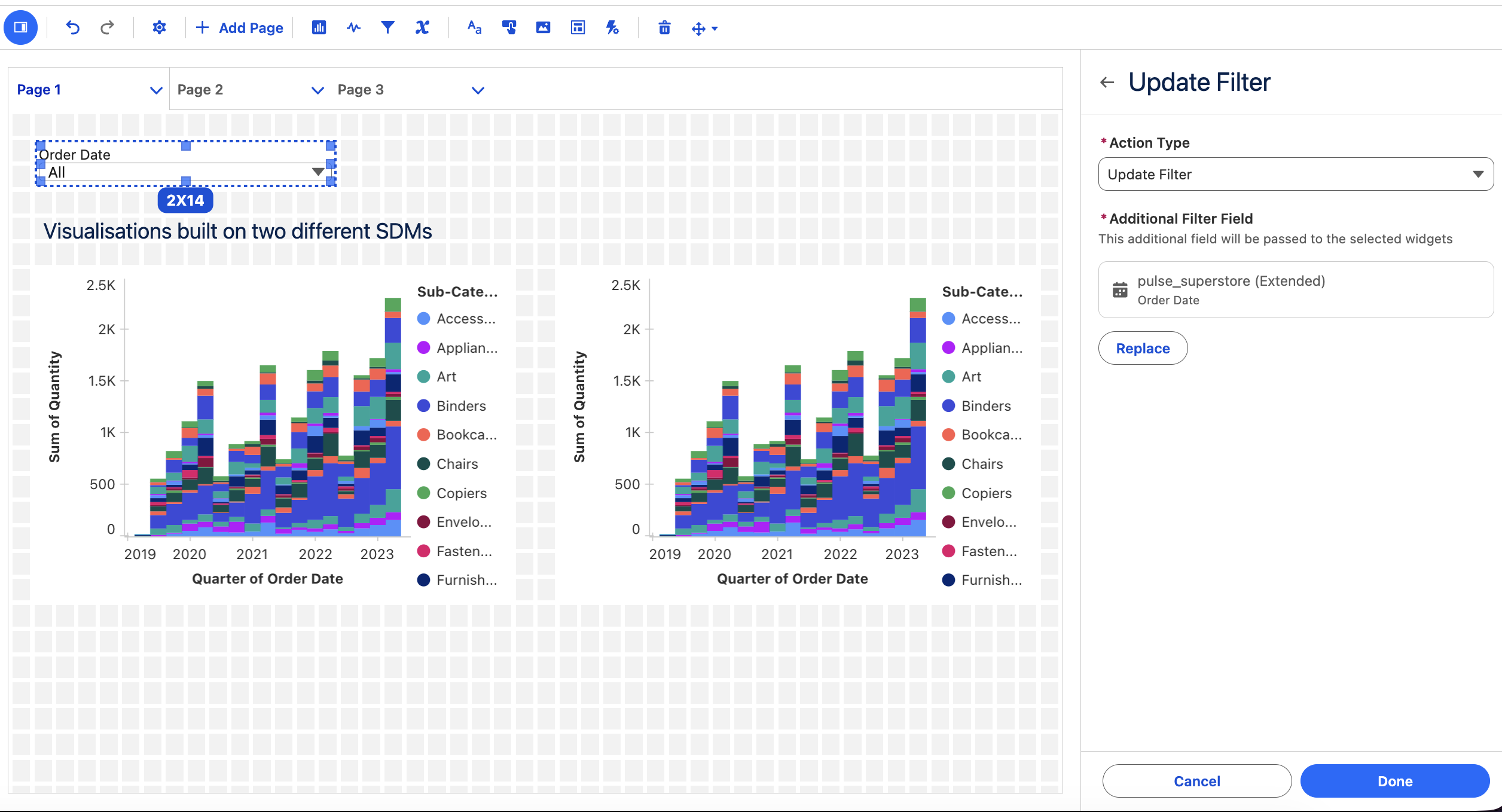
Tableau Next: ์•ˆ๋‚ด๊ฐ€ ์žˆ๋Š” ์„ค์ •

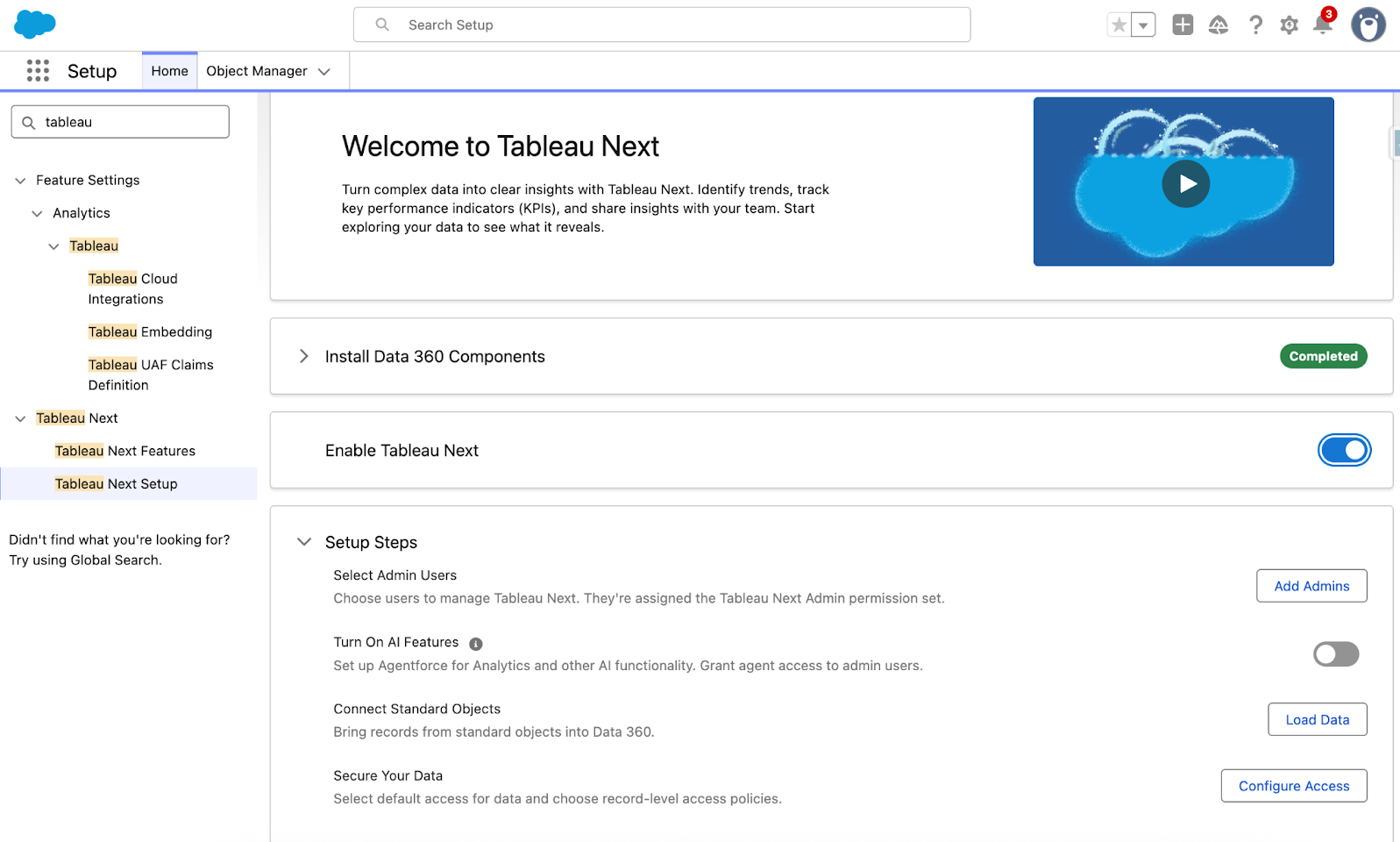
์ƒˆ๋กœ์šด ์•ˆ๋‚ด๊ฐ€ ์žˆ๋Š” ์„ค์ •์œผ๋กœ ๋” ๋น ๋ฅด๊ฒŒ ๊ตฌํ˜„ํ•  ์ˆ˜ ์žˆ์Šต๋‹ˆ๋‹ค. ๊ด€๋ฆฌ์ž๋Š” ๋ฉ”ํƒ€๋ฐ์ดํ„ฐ ์„ค์น˜, ํ‘œ์ค€ ๋ณด์•ˆ ์ •์ฑ… ์„ค์ •, ์ฃผ์š” AI ๊ธฐ๋Šฅ ํ™œ์„ฑํ™”๋ฅผ ๋ชจ๋‘ ๊ฐ„์†Œํ™”๋˜๊ณ  ์ž๋™ํ™”๋œ ์„ค์น˜ ํ”„๋กœ์„ธ์Šค๋ฅผ ํ†ตํ•ด ์ˆ˜ํ–‰ํ•  ์ˆ˜ ์žˆ์Šต๋‹ˆ๋‹ค. ํŒ€์—์„œ๋Š” ์•ˆ๋‚ด๊ฐ€ ์žˆ๋Š” ์„ค์ •์„ ํ†ตํ•ด ๋” ๋น ๋ฅด๊ฒŒ ๊ฐ€์น˜๋ฅผ ์ฐฝ์ถœํ•จ์œผ๋กœ์จ ์ค‘์š”ํ•œ ์ผ, ์ฆ‰ ๋ฐ์ดํ„ฐ๋ฅผ ์˜์‚ฌ ๊ฒฐ์ •์œผ๋กœ ์ „ํ™˜ํ•˜๋Š” ์ผ์— ์ง‘์ค‘ํ•  ์ˆ˜ ์žˆ์Šต๋‹ˆ๋‹ค.

์•ˆ๋‚ด๊ฐ€ ์žˆ๋Š” ์„ค์ •์€ Tableau Next์— ์ •์‹์œผ๋กœ ์ถœ์‹œ๋˜์—ˆ์Šต๋‹ˆ๋‹ค.

Tableau Next์— ๋Œ€ํ•ด ์ž์„ธํžˆ ์•Œ์•„๋ณด๊ธฐ

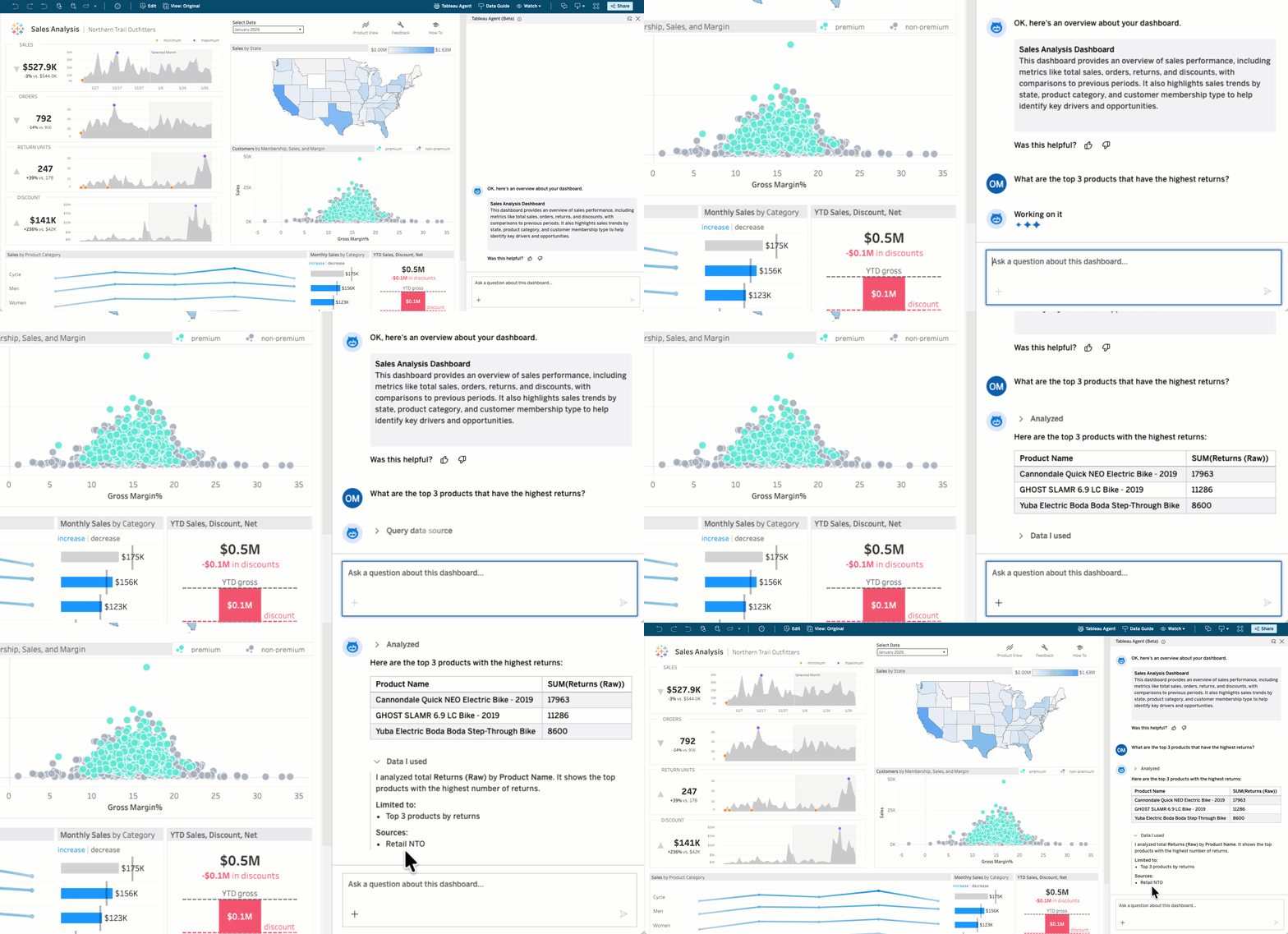
๋Œ€์‹œ๋ณด๋“œ์˜ Tableau Agent: ๋Œ€ํ™”ํ˜• ๋ถ„์„(๋ฒ ํƒ€)

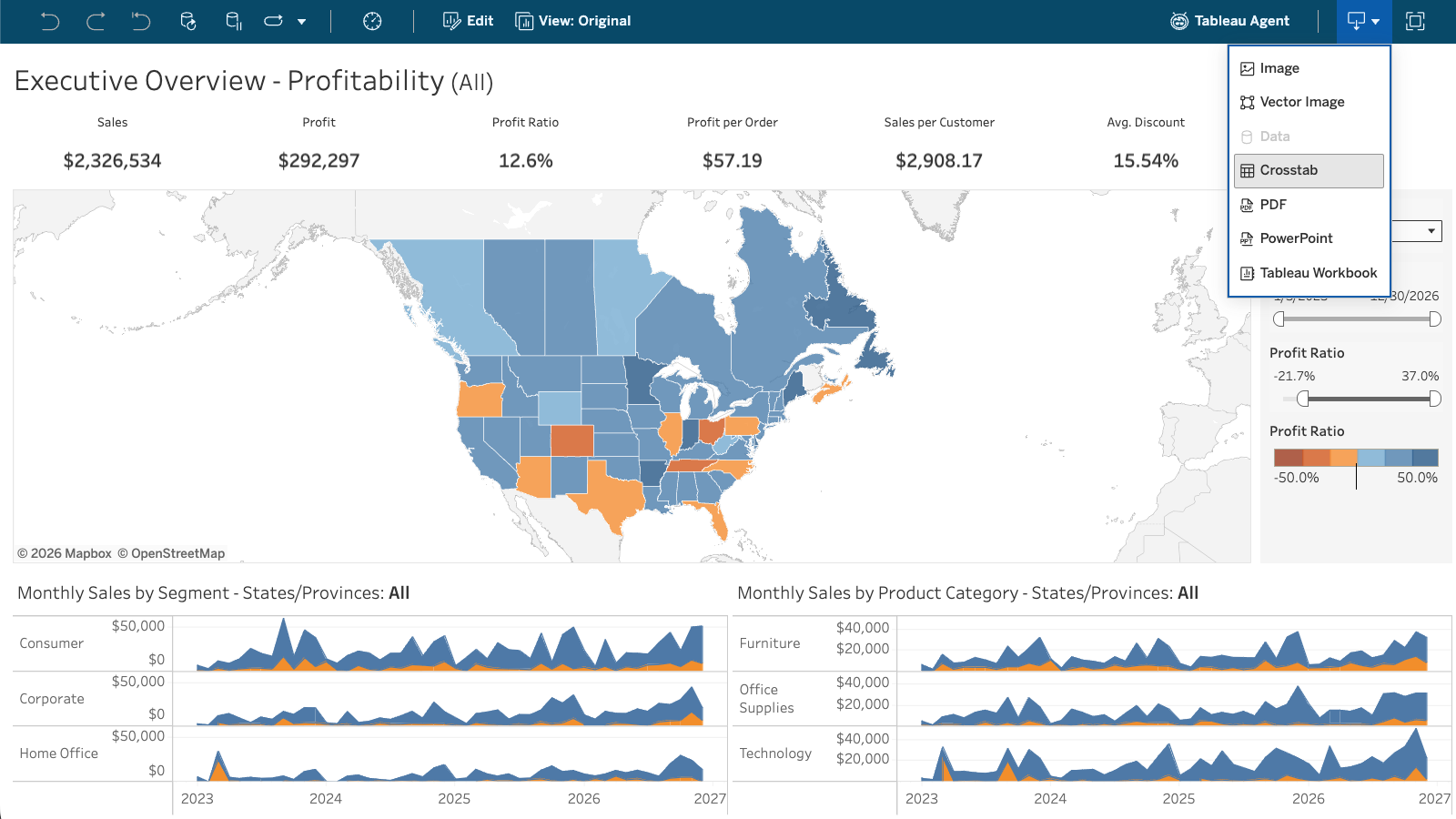
๋น„์ฆˆ๋‹ˆ์Šค ์‚ฌ์šฉ์ž๊ฐ€ ๋ฐ์ดํ„ฐ ์งˆ๋ฌธ์— ๋Œ€ํ•œ ๋‹ต์„ ์–ป๊ธฐ ์œ„ํ•ด ๋” ์ด์ƒ ๊ธฐ๋‹ค๋ฆด ํ•„์š”๊ฐ€ ์—†์Šต๋‹ˆ๋‹ค. ๋Œ€์‹œ๋ณด๋“œ์˜ Tableau Agent๋ฅผ ์‚ฌ์šฉํ•˜๋ฉด ๋ˆ„๊ตฌ๋‚˜ ์ผ๋ฐ˜์ ์ธ ์–ธ์–ด๋กœ ๋ฐ์ดํ„ฐ์— ๊ด€ํ•œ ์งˆ๋ฌธ์„ ํ•˜๊ณ  ์ฆ‰์‹œ ์‹คํ–‰ ๊ฐ€๋Šฅํ•œ ์ •๋ณด๋ฅผ ์–ป์„ ์ˆ˜ ์žˆ์Šต๋‹ˆ๋‹ค. ์ด ์…€ํ”„ ์„œ๋น„์Šค ๊ธฐ๋Šฅ์„ ํ†ตํ•ด ๋ชจ๋“  ์‚ฌ์šฉ์ž๊ฐ€ ๊ธฐ์ดˆ ๋ฐ์ดํ„ฐ ์›๋ณธ์„ ์ง๊ด€์ ์œผ๋กœ ์ฟผ๋ฆฌํ•˜์—ฌ ๋Œ€์‹œ๋ณด๋“œ์—์„œ ๋” ์‹ฌ์ธต์ ์ธ ์ธ์‚ฌ์ดํŠธ๋ฅผ ์–ป์„ ์ˆ˜ ์žˆ์Šต๋‹ˆ๋‹ค.

๋Œ€์‹œ๋ณด๋“œ์˜ Tableau Agent: ๋Œ€ํ™”ํ˜• ๋ถ„์„ ๊ธฐ๋Šฅ์€ 7์›”์— Tableau Cloud์—์„œ ๋ฒ ํƒ€ ๋ฒ„์ „์œผ๋กœ, Tableau Server์—์„œ๋Š” ํŒŒ์ผ๋Ÿฟ ๋ฒ„์ „์œผ๋กœ ์ œ๊ณต๋  ์˜ˆ์ •์ž…๋‹ˆ๋‹ค.
 

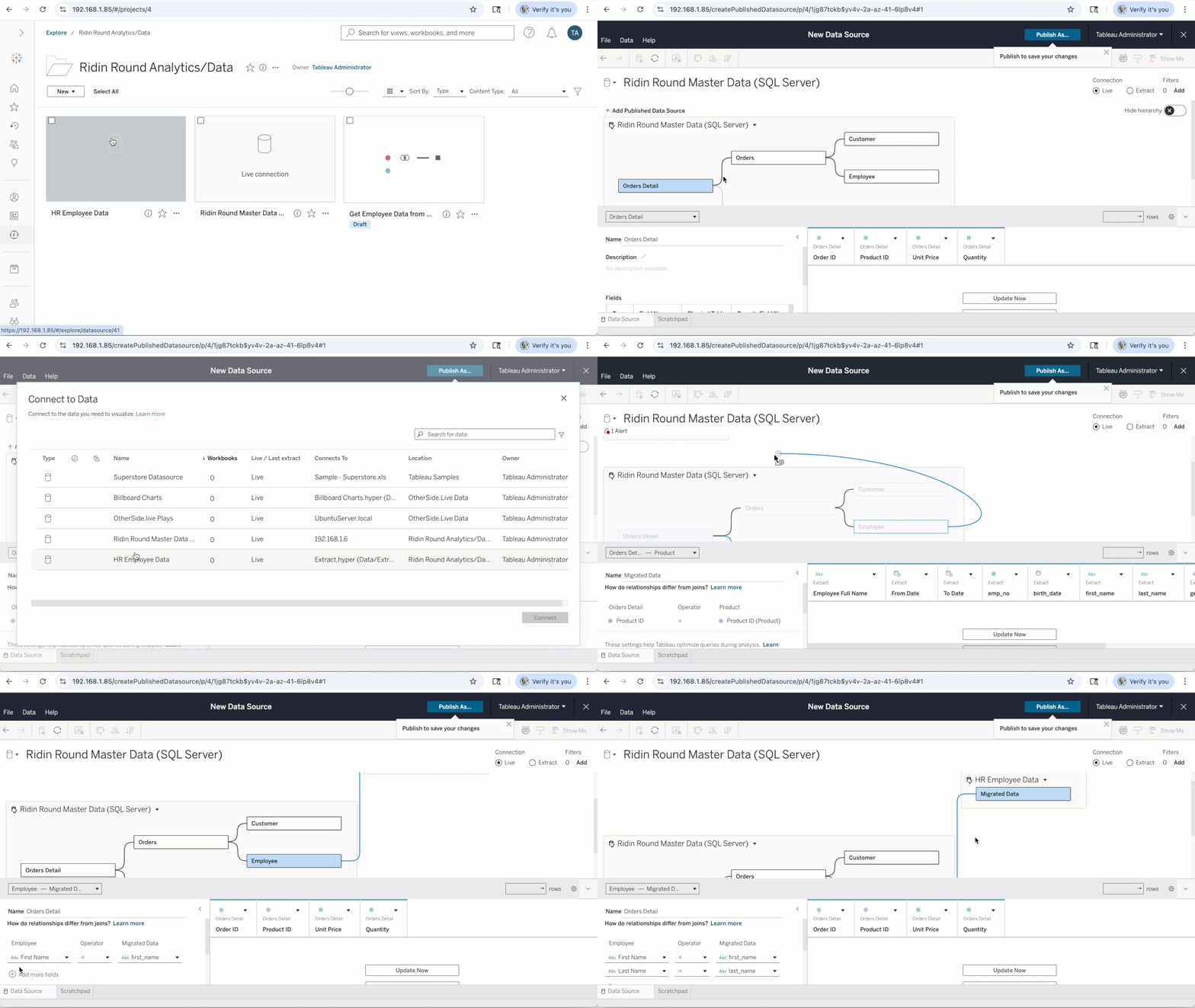
๊ตฌ์„ฑํ˜• ๋ฐ์ดํ„ฐ ์›๋ณธ

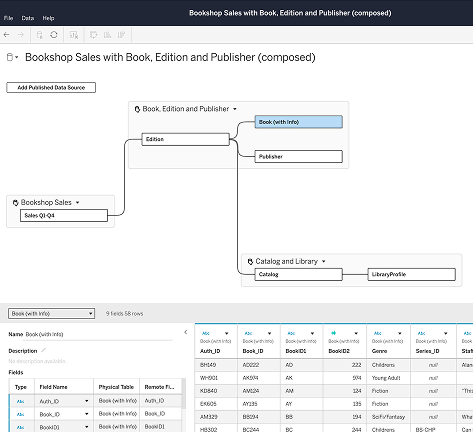
์ƒˆ ์‚ฌ์šฉ ์‚ฌ๋ก€๋งˆ๋‹ค ๋ฐ์ดํ„ฐ ์›๋ณธ์„ ์ฒ˜์Œ๋ถ€ํ„ฐ ๋‹ค์‹œ ์ž‘์„ฑํ•˜๋ฉด ํŒ€์˜ ์—…๋ฌด ์ง„ํ–‰ ์†๋„๊ฐ€ ๋А๋ ค์ง€๊ณ  ์กฐ์ง ์ „์ฒด์—์„œ ์ผ๊ด€์„ฑ์ด ์ €ํ•˜๋ฉ๋‹ˆ๋‹ค. ๊ตฌ์„ฑํ˜• ๋ฐ์ดํ„ฐ ์›๋ณธ์„ ์‚ฌ์šฉํ•˜๋ฉด ๊ธฐ์กด Tableau์— ๊ฒŒ์‹œ๋œ ๋ฐ์ดํ„ฐ ์›๋ณธ์„ ๋‹จ์ผ ํ†ตํ•ฉ ๋ชจ๋ธ๋กœ ๊ฒฐํ•ฉํ•˜๊ณ , ์‚ฌ์šฉ ์‚ฌ๋ก€์— ํ•„์š”ํ•œ ๋น„์ฆˆ๋‹ˆ์Šค ๋…ผ๋ฆฌ์™€ ์ปจํ…์ŠคํŠธ๋กœ ํ™•์žฅํ•˜๊ณ , ํ†ตํ•ฉ ๋ฌธ์„œ, Tableau Pulse ๋ฉ”ํŠธ๋ฆญ, API ์ „๋ฐ˜์— ์žฌ์‚ฌ์šฉํ•˜๋„๋ก ๊ฒŒ์‹œํ•  ์ˆ˜ ์žˆ์Šต๋‹ˆ๋‹ค. ์—…์ŠคํŠธ๋ฆผ์˜ ๊ฒŒ์‹œ๋œ ๋ฐ์ดํ„ฐ ์›๋ณธ์ด ๋ณ€๊ฒฝ๋˜๋ฉด ๊ตฌ์„ฑ๋œ ๋ฐ์ดํ„ฐ ์›๋ณธ์ด ์ƒˆ๋กœ ๊ณ ์นจ ์‹œ ์ž๋™์œผ๋กœ ์ด๋ฅผ ๋ฐ˜์˜ํ•ฉ๋‹ˆ๋‹ค.

๊ตฌ์„ฑํ˜• ๋ฐ์ดํ„ฐ ์›๋ณธ์€ Tableau Cloud, Tableau Server, Tableau Desktop์—์„œ 6์›”๊ณผ 7์›”์— ๊ฑธ์ณ ์ˆœ์ฐจ์ ์œผ๋กœ ์ถœ์‹œ๋  ์˜ˆ์ •์ž…๋‹ˆ๋‹ค.

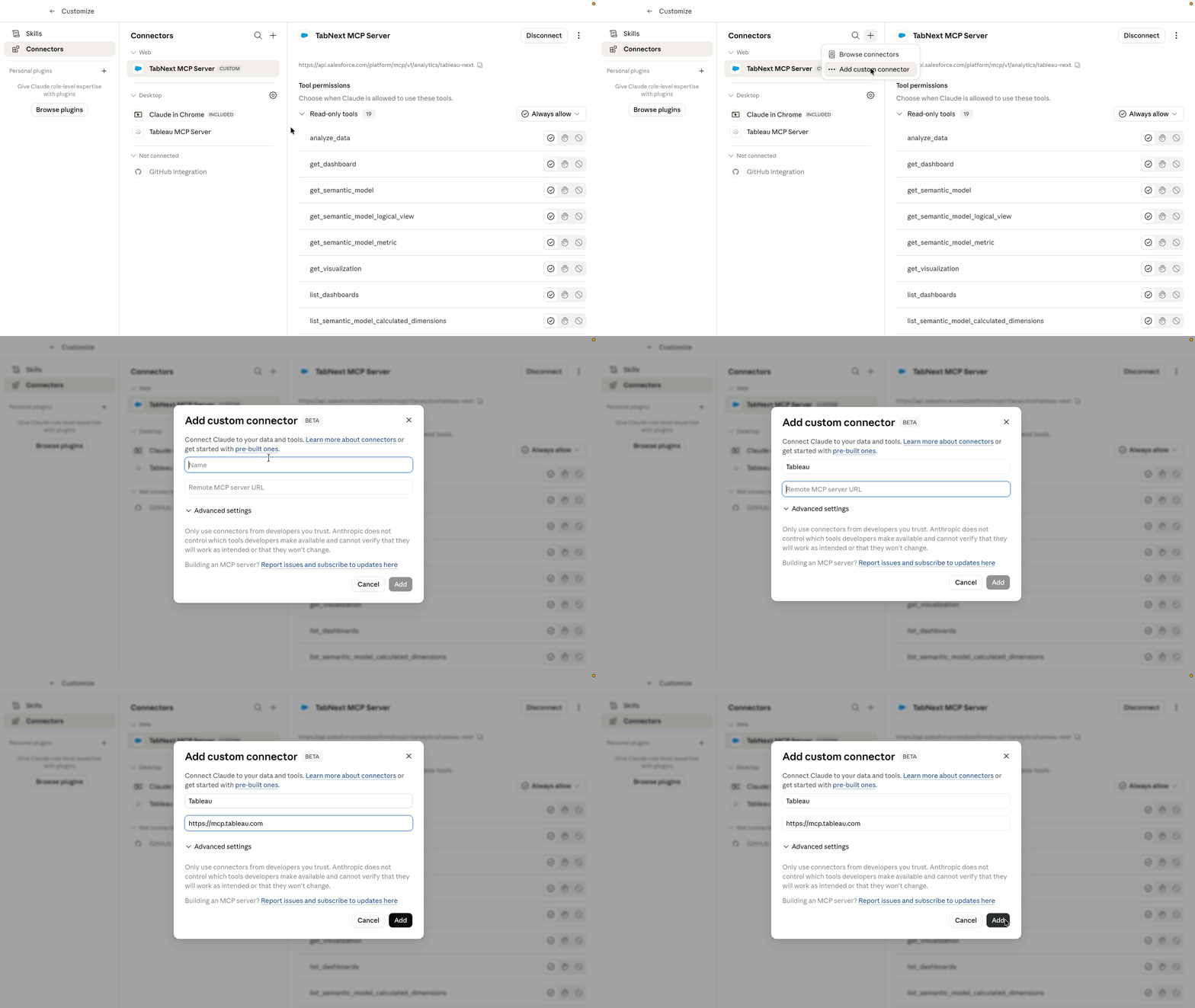
ํ˜ธ์ŠคํŒ…๋˜๋Š” Tableau MCP

Tableau MCP๋Š” ์ด์ œ Tableau Cloud์—์„œ ์™„์ „ํ•œ ํด๋ผ์šฐ๋“œ ํ˜ธ์ŠคํŒ…ํ˜• ์„œ๋น„์Šค๋กœ ์‹คํ–‰๋˜๋ฏ€๋กœ, ๊ณ ๊ฐ์ด ์ž์ฒด MCP ์„œ๋ฒ„๋ฅผ ์ž์ฒด์ ์œผ๋กœ ํ˜ธ์ŠคํŒ…ํ•˜๊ณ  ์œ ์ง€ ๊ด€๋ฆฌํ•  ํ•„์š”๊ฐ€ ์—†์Šต๋‹ˆ๋‹ค. ์ฆ‰, MCP์™€ ํ˜ธํ™˜๋˜๋Š” ๋ชจ๋“  AI ์—์ด์ „ํŠธ๋ฅผ, ์‹ ๋ขฐํ•˜๋Š” Tableau ๋ถ„์„์— ๋” ๋น ๋ฅด๊ณ  ํ›จ์”ฌ ์ ์€ ์˜ค๋ฒ„ํ—ค๋“œ๋กœ ์—ฐ๊ฒฐํ•  ์ˆ˜ ์žˆ๋‹ค๋Š” ์˜๋ฏธ์ž…๋‹ˆ๋‹ค. ๊ธฐ๋ณธ ์ œ๊ณต OAuth 2.1 ์ง€์›, ๊ฑฐ๋ฒ„๋„Œ์Šค, ์‹ ๋ขฐ์„ฑ์„ ํ†ตํ•ด ์•ˆ์ „ํ•œ ์—”ํ„ฐํ”„๋ผ์ด์ฆˆ์šฉ AI ํ†ตํ•ฉ์„ ์ฆ‰์‹œ ์‚ฌ์šฉํ•  ์ˆ˜ ์žˆ์Šต๋‹ˆ๋‹ค. 

์ด Tableau MCP ๊ฐœ์„  ์‚ฌํ•ญ์€ Tableau Cloud์— ์ •์‹์œผ๋กœ ์ถœ์‹œ๋˜์—ˆ์Šต๋‹ˆ๋‹ค.

ํด๋ผ์šฐ๋“œ ์šฉ๋Ÿ‰ ๊ด€๋ฆฌ

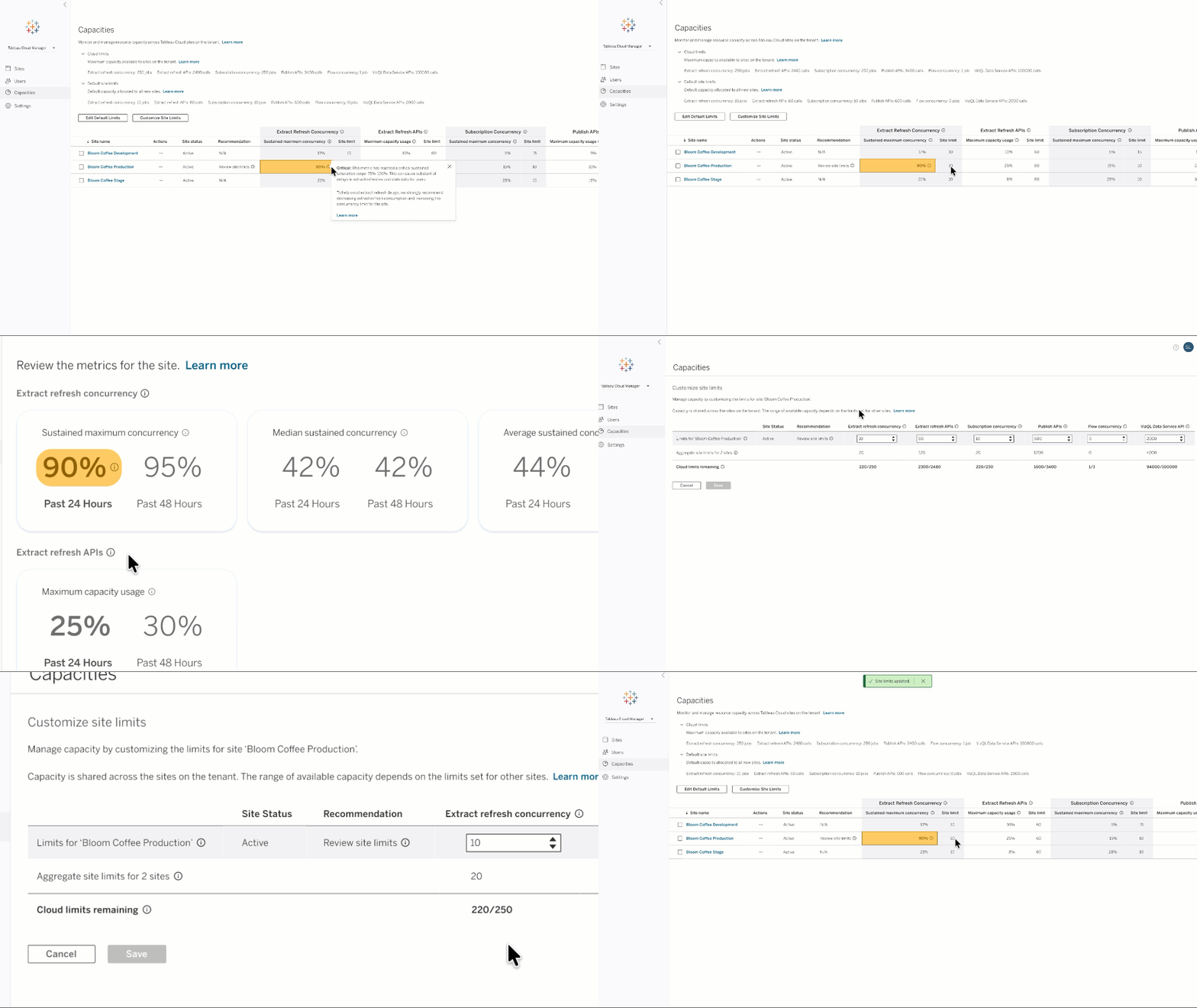
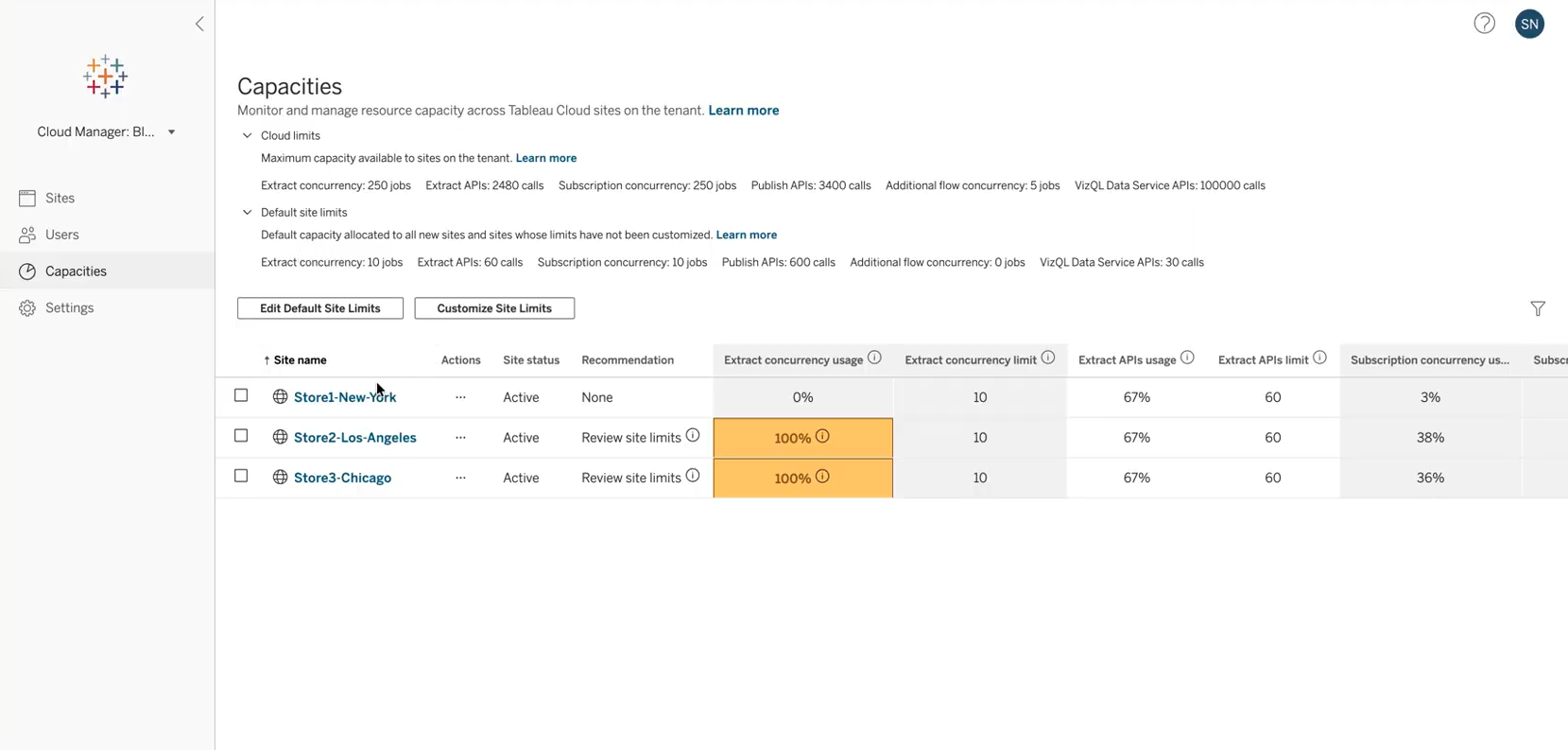
์ถ”์ถœ ์ƒˆ๋กœ ๊ณ ์นจ ๋™์‹œ์„ฑ ๋ฐ ๊ฒŒ์‹œ API์™€ ๊ฐ™์€ ์šฉ๋Ÿ‰ ์ œํ•œ์„ ํ™•์ธํ•˜๊ณ  ํˆฌ๋ช…ํ•˜๊ฒŒ ๊ด€๋ฆฌํ•  ์ˆ˜ ์žˆ๋„๋ก, Tableau Cloud ๊ด€๋ฆฌ์ž๋ฅผ ์œ„ํ•œ ์œ ์—ฐํ•œ ์šฉ๋Ÿ‰ ๊ฑฐ๋ฒ„๋„Œ์Šค ๊ธฐ๋Šฅ์„ ์ œ๊ณตํ•  ๋ฟ ์•„๋‹ˆ๋ผ, ์ด๋Ÿฌํ•œ ์šฉ๋Ÿ‰ ์ œํ•œ ์‚ฌ์šฉ์— ๋Œ€ํ•œ ์†Œ๋น„ ๋ฉ”ํŠธ๋ฆญ๋„ ๋ณผ ์ˆ˜ ์žˆ๊ฒŒ ํ•ฉ๋‹ˆ๋‹ค. ๊ด€๋ฆฌ์ž๋Š” ์‚ฌ์ดํŠธ ๊ฐ„์— ์šฉ๋Ÿ‰ ์ œํ•œ์„ ์ „ํ™˜ํ•˜์—ฌ ํ”„๋กœ๋•์…˜ ํ™˜๊ฒฝ์— ํ•œ๋„๊ฐ€ ๋” ๋Š˜์–ด๋‚˜๋„๋ก ๋ณด์žฅํ•˜์—ฌ ์œ ์—ฐํ•œ ์ œํ’ˆ ์‚ฌ์šฉ์„ ์ด‰์ง„ํ•  ์ˆ˜ ์žˆ์Šต๋‹ˆ๋‹ค.

ํด๋ผ์šฐ๋“œ ์šฉ๋Ÿ‰ ๊ด€๋ฆฌ๋Š” Tableau Cloud์— ์ •์‹ ์ถœ์‹œ๋˜์—ˆ์Šต๋‹ˆ๋‹ค.

Tableau ๋ฆด๋ฆฌ์Šค์— ๋Œ€ํ•ด ๋‹ค๋ฅธ ์‚ฌ๋žŒ๋ณด๋‹ค ๋จผ์ € ์•Œ์•„๋ณด๊ธฐ

DataFam Discovery ์‚ฌ์šฉ์ž ๊ทธ๋ฃน์—์„œ Tableau ์ œํ’ˆ ๊ด€๋ฆฌ์ž์™€ ํ•จ๊ป˜ ๊ณง ์ถœ์‹œ๋˜๋Š” ์ƒˆ๋กœ์šด ๊ธฐ๋Šฅ์— ๋Œ€ํ•ด ์•Œ์•„๋ณด์‹ญ์‹œ์˜ค. 
์ง€๊ธˆ ๊ฐ€์ž…

๊ด€๋ จ ๋ฆฌ์†Œ์Šค ํƒ์ƒ‰ํ•˜๊ธฐ

๋ธ”๋กœ๊ทธ

Tableau Cloud๋ž€?

์กฐ์ง ์ „์ฒด์— ๊ฑธ์ณ AI ๋ฐ ๋ถ„์„ ๊ธฐ๋Šฅ์„ ์›ํ™œํ•˜๊ฒŒ ํ™•์žฅํ•  ์ˆ˜ ์žˆ๋„๋ก ์„ค๊ณ„๋œ ์™„์ „ ํ˜ธ์ŠคํŒ…ํ˜• ์—์ด์ „ํŠธ ๋ถ„์„ ์†”๋ฃจ์…˜์œผ๋กœ ์‹ ๋ขฐํ•  ์ˆ˜ ์žˆ๋Š” ๋ฐ์ดํ„ฐ๋ฅผ ์‹คํ–‰์œผ๋กœ ์˜ฎ๊ธฐ๋Š” ๋ฐฉ๋ฒ•์„ ์•Œ์•„๋ณด์‹ญ์‹œ์˜ค.

๋ธ”๋กœ๊ทธ ๊ฒŒ์‹œ๋ฌผ

Tableau Conference 2026์˜ ์ฃผ์š” ๋ฐœํ‘œ ๋‚ด์šฉ

Tableau๊ฐ€ Tableau Cloud, Server, Desktop ๋ฐ Next ์ „๋ฐ˜์— ๊ฑธ์นœ ์—์ด์ „ํŠธ ๋ถ„์„ ํ”Œ๋žซํผ์„ ๊ณต๊ฐœํ•ฉ๋‹ˆ๋‹ค. ์ด๋ฅผ ํ†ตํ•ด ์—์ด์ „ํŠธ ์—”ํ„ฐํ”„๋ผ์ด์ฆˆ๋Š” ๋Œ€๊ทœ๋ชจ ์ง€์‹ ๋ฐ ์˜์‚ฌ ๊ฒฐ์ • ์—”์ง„์„ ์‚ฌ์šฉํ•˜์—ฌ ์ธ์‚ฌ์ดํŠธ๋ฅผ ์‹คํ–‰์œผ๋กœ ์˜ฎ๊ธธ ์ˆ˜ ์žˆ์Šต๋‹ˆ๋‹ค.

๋ฆด๋ฆฌ์Šค ํƒ์ƒ‰๊ธฐ

Tableau ๋ฆด๋ฆฌ์Šค ์ •๋ณด

์ƒˆ๋กœ์šด ๊ธฐ๋Šฅ์˜ ์ „์ฒด ๋ชฉ๋ก์€ ๋ฆด๋ฆฌ์Šค ํƒ์ƒ‰๊ธฐ์—์„œ ํ™•์ธํ•˜์‹ญ์‹œ์˜ค.

๋ชจ๋“  ๊ธฐ๋Šฅ

8์›”

Tableau Next: Inherit and Override Business Preferences

Inherit base semantic model preferences while retaining the flexibility to override them.

Tableau Next: Inherit and Override Business Preferences

Accelerate time to value and improve analytical accuracy with out-of-the-box business preferences inherited from base semantic models. Users retain full flexibility to override and customize these settings with organization-specific logic and terminology.

Inherit and Override Business Preferences is generally available in Tableau Next.

image

Tableau Next: Headless Regression Testing (Beta)

Programmatically test and validate semantic model updates to maintain AI response accuracy.

Tableau Next: Headless Regression Testing (Beta)

Maintain AI analytics accuracy without slowing down deployment. Programmatically test complex semantic data models against curated datasets to catch SQL logic variances before changes reach production users.

Headless Regression Testing is coming soon in beta in Tableau Next.

Tableau Next MCP: Authoring

Access and test emerging conversational AI tools across dashboard creation and semantic modeling.

Tableau Next MCP: Authoring

Gain early access to next-generation AI analytics capabilities across dashboards, semantic modeling, and proactive alerting. Opt-in to test emerging tools and shape product quality while accelerating conversational workflows.

Tableau Next: Authoring is coming soon in beta.

Tableau Next: Admin Home & Settings Experience

Simplify and accelerate system administration with a centralized home page, consolidated menus, quick actions, and conversational setup assistance.

Tableau Next: Admin Home & Settings Experience

Streamline administrative workflows and reduce navigation effort through a centralized landing page equipped with quick actions and consolidated settings menu navigation. Interactive Agentforce assistance guides administrators conversationally through complex setup tasks across integrated environments.
Admin Home and Settings Experience is generally available in Tableau Next.

Tableau Next: Auto-Enable Preference Setup

Automatically enable Slack integration preferences upon provisioning to streamline setup.

Tableau Next: Auto-Enable Preference Setup

Connect analytics to team collaboration instantly upon org provisioning without manual toggles. Automated domain configuration and setup guidance eliminate setup friction and get teams sharing insights faster.

Auto-Enable Preference Setup is generally available in Tableau Next.

Tableau Next: Pace to Threshold Insight

Track metric trajectories automatically to anticipate when limits and targets will be reached.

Tableau Next: Pace to Threshold Insight

Anticipate metric breaches before they occur by tracking forecasts against defined limits. Surface actionable timelines directly on metric cards to make SLA, budget, or capacity targets proactive.

Pace to Threshold Insight is generally available in Tableau Next.

Tableau Next: Tableau Agent - Data Connection and Analytics Creation (Beta)

Go from data discovery to a semantic model to your first viz all in one conversation with Tableau Agent.

Tableau Next: Tableau Agent - Data Connection and Analytics Creation (Beta)

Accelerate data discovery, semantic modeling, and viz building conversationally with Tableau Agent. Automatically locate semantic models, enrich data relationships, and generate editable visual assets to move from data to insight faster.

Tableau Agent - Data Connection and Analytics Creation is available in beta in Tableau Next.

Tableau Next: Ingestion Support for DLO Creation

Configure data copying and refresh intervals when creating Data Model Objects for better performance.

Tableau Next: Ingestion Support for DLO Creation

Control whether external data sources are read live or copied into Data Cloud with custom refresh frequencies. Improve visualization performance and optimize governance by seamlessly integrating source tables into Data Cloud.

Ingestion Support for DLO Creation is generally available in Tableau Next.

Tableau Next: Agentic Data Monitoring

Query and verify data asset freshness across workspaces using natural language prompts.

Tableau Next: Agentic Data Monitoring

Verify data freshness and workspace asset status using natural language questions. Save time and reduce human error by replacing manual checks with conversational data monitoring.

Agentic Data Monitoring is generally available in Tableau Next.

Tableau Next: Data Interpreter, Review Results

Review and verify automated data preparation results with complete visual transparency.

Tableau Next: Data Interpreter, Review Results

Inspect cleaned and restructured data directly before publishing to ensure underlying tables were parsed accurately. Interactive summaries detail automated transformations, offering complete transparency into structural fixes and data preparation steps.

Data Interpreter, Review Results is generally available in Tableau Next.

Tableau Next: Semantic Model Builder - Smart Canvas

Easily navigate and group complex, multi-domain semantic models using a smart, auto-arranging canvas.

Tableau Next: Semantic Model Builder - Smart Canvas

Author and explore semantic models at any scale with an enhanced canvas experience in Tableau Semantics. Smart auto-layout, infinite navigation, inline editing, and domain-based grouping handle enterprise complexity so your team can iterate faster.

Semantic Model Builder - Smart Canvas is generally available in Tableau Next

Tableau Next: Predictive Insights (Beta)

Bring ML scores, key drivers, and predictions directly into everyday visualizations.

Tableau Next: Predictive Insights (Beta)

Embed machine learning predictions, explainable drivers, and recommendations directly inside charts and dashboards. Shift from historical reporting to forward-looking decision-making without leaving the flow of work.

Predictive Insights is available in beta in Tableau Next.

Tableau Next: Calculated Field and Metric Overrides

Tailor inherited KPI metrics and calculated fields in semantic models to match specific organizational logic.

Tableau Next: Calculated Field and Metric Overrides

Customize formulas and KPI calculations inherited from base semantic models without breaking overall model synchronization. Ensure extended models reflect unique organizational requirements while maintaining non-overridden definitions automatically.

Calculated Field and Metric Overrides is generally available in Tableau Next.

Tableau Next: PDS Integration Authentication

Connect to Tableau Cloud PDS seamlessly using simplified dropdown authentication and setup.

Tableau Next: PDS Integration Authentication

Connect to Tableau Cloud PDS using standard cross-cloud dropdown selection instead of manual site parameters. Speed up deployment, reduce setup errors, and unlock personal environment support for testing.

PDS Integration Authentication is coming soon in Tableau Next.

Tableau Next: Organizational Hierarchy Support (Beta)

Streamline team analytics with native filtering and drill-downs for Salesforce organizational hierarchies.

Tableau Next: Organizational Hierarchy Support (Beta)

Flatten complex Salesforce role, manager, and territory structures right in the semantic layer, simplifying team-level reporting and cutting down on manual data manipulation. Dashboard authors and business users can then filter metrics by personalized scopes like "Me," "My Team," or "Org," and drill down or roll up across managerial chains.

Organizational Hierarchy Support is available in Beta in Tableau Next.

C360 Semantic Model - AI-Ready Verified Questions & Business Preferences

Get accurate AI answers fast with built in business preferences and pre-verified cross-cloud questions for Sales, Service and Marketing built on Salesforce's domain expertise.

C360 Semantic Model - AI-Ready Verified Questions & Business Preferences

Get accurate insights from Tableau Agent on day one with built-in business preferences and pre-verified cross-cloud questions for sales, service, and marketing. Built on Salesforce's domain expertise, teams start fast with trusted insights to common questions, with room to tune further as needs evolve.

Verified Questions & Business Preferences for Customer 360 are generally available in Tableau Next

Tableau Next Apps for Salesforce: Verified Questions & Business Preferences for Service Insights

Get accurate AI answers fast with built in business preferences and pre-verified questions for service built on Salesforce's domain expertise.

Tableau Next Apps for Salesforce: Verified Questions & Business Preferences for Service Insights

Get accurate insights from Tableau Agent on day for questions service teams ask most โ€” case volume, escalations, wait and handle time, and agent performance. Built-in business preferences apply service-specific logic, like how escalations and priority are defined, so you can get started fast, with room to tune further as needs evolve.

Verified Questions and Business Preferences for Service Insights are generally available in Tableau Next.

Tableau Next Apps in AgentExchange

Discover and install enterprise-ready dashboards and semantic models directly from AgentExhange

Tableau Next Apps in AgentExchange

Tableau Next Apps brings an embedded AgentExchange marketplace directly into Tableau Next. Customers can browse, discover, and install partner-built analytics apps including industry-specific dashboards, dashboard extensions, semantic models, and MCP server registrations all without leaving their workflow.

Agent Exchange Integration is generally available in Tableau Next.

Tableau Next: Radar Chart

Compare multi-dimensional data quickly using native radar chart visual layouts.

Tableau Next: Radar Chart

Compare performance across multiple dimensions at a glance to identify opportunities quickly. Build radar charts natively without writing tedious calculated fields.

Radar Chart is generally available in Tableau Next.

Tableau Next: Formatting Visualizations and Dashboards

Fine-tune typography, color palettes, and component styles using a unified formatting panel.

Tableau Next: Formatting Visualizations and Dashboards

Gain granular control over fonts, colors, line styles, and alignment across visual components. Apply unified design formatting to ensure brand consistency and clarity with data storytelling.

Formatting Visualizations and Dashboards is generally available in Tableau Next.

Tableau Next: Dark Mode for Embedded Components

Automatically match embedded visual components to dark mode Lightning pages.

Tableau Next: Dark Mode for Embedded Components

Synchronize embedded dashboards automatically with dark mode. Eliminate harsh visual contrast and deliver accessible, WCAG-compliant design experiences.

Dark Mode for Embedded Components is generally available in Tableau Next.

Tableau Next: List View UX Update

Style filter dropdowns and parameters as visual cards or lists for improved dashboard layouts.

Tableau Next: List View UX Update

Transform dashboard filter inputs and parameters into space-saving list layouts or card widgets. Customize layout styles while preserving active user selections.

List View UX Update is generally available in Tableau Next

Tableau Next: Regional Themed Maps

Visualize geospatial trends using choropleth maps powered by geographic field tagging.

Tableau Next: Regional Themed Maps

Map geographic fields using dedicated spatial mark types to uncover location-based patterns. Transform location data into interactive choropleth maps to spot territory opportunities and monitor performance.

Regional Themed Maps is generally available in Tableau Next.

Tableau Next: Viz Authoring Enhancements

Speed up visual creation using multi-field selection, new canvas menus, and simplified chart recipes.

Tableau Next: Viz Authoring Enhancements

Accelerate visual creation through multi-field selection, instant "Add To" canvas menus, and additional layout options. Build complex charts like waterfall views effortlessly and shorten time-to-insight.

Viz Authoring Enhancements is generally available in Tableau Next.

Tableau Next: Dashboard Authoring Enhancements

Streamline multi-page dashboard authoring using right-click context menus and drag-and-drop page ordering.

Tableau Next: Dashboard Authoring Enhancements

Duplicate widgets, copy visual styles, and manage multi-page tabs through right-click grid interactions. Streamline layout design and dashboard organization with intuitive drag-and-drop actions.

Dashboard Authoring Enhancements is generally available in Tableau Next.

Tableau Next: Dashboard Extensions, Dynamic Data Binding

Reuse custom web component extensions across multiple datasets using dynamic field mapping.

Tableau Next: Dashboard Extensions, Dynamic Data Binding

Build custom Lightning Web Component extensions once and map them across different semantic models via property panels. Scale custom visualizations effortlessly without editing code for each new dataset.

Dashboard Extensions, Dynamic Data Binding is generally available in Tableau Next.

image

Tableau Next: Dashboard MCP Support

Build and modify multi-page dashboards using conversational AI commands powered by MCP.

Tableau Next: Dashboard MCP Support

Generate, assemble, and update multi-page dashboards conversationally using natural language through Model Context Protocol (MCP) integration. Conversational tools automatically format visual widgets and map underlying semantic models into complete dashboard layouts.

Dashboard MCP Support is generally available in Tableau Next.

Tableau Next: Enhanced Explore

Instantly analyze data further with CSV downloads and live metric values.

Tableau Next: Enhanced Explore

Accelerate self-service discovery and workflows with data interaction directly within your worksheets. Download aggregate visualization data directly to CSV for external analysis, and keep your business aligned with your metrics.

Enhanced Explore is generally available in Tableau Next.

Tableau Mobile: Dark Mode in Tableau Pulse

Work comfortably across Tableau with dark mode now available for Tableau Pulse in Tableau mobile.

Tableau Mobile: Dark Mode in Tableau Pulse

Work comfortably on Tableau, no matter your theme settings. Tableau Pulse now supports Dark Mode on mobile, increasing accessibility and eliminating the jarring visual transition from other parts of Tableau, where some users have dark mode enabled, to Pulse. Once enabled in your device's settings, Dark Mode applies throughout the entire Pulse mobile UI.

Dark Mode in Tableau Pulse is generally available in Tableau Mobile.

Tableau Mobile: Data Details

Check viz metadata and lineage right from your phone, no desktop needed.

Tableau Mobile: Data Details

Check a viz's data lineage and metadata right from your phone, no desktop browser needed. Just tap 'View Data Details' on any viz to view workbook, project, author details, and more. With Data Details available on mobile, you can surface data provenance information from anywhere, at any time.

Data Details is generally available in Tableau Mobile.

Tableau Mobile: Guided Onboarding Prompts

Get started faster on Tableau Mobile with automatic, guided in-app prompts.

Tableau Mobile: Guided Onboarding Prompts

Getting started on Tableau Mobile is now effortless with guided onboarding prompts on mobile. The prompts automatically introduce mobile users to key features, eliminating the friction of navigating a new app. From an interactive 5-step tour for new users to targeted tips for Pulse features, mobile users can get started faster without sifting through help docs or contacting support..

Guided Onboarding Prompts is generally available in Tableau Mobile.

Inbound Private Connect

Route user and API traffic to Tableau Cloud over private network connections without public internet exposure.

New inbound connect feature for Tableau Admins

Inbound Private Connect

Establish dedicated, private connections from your corporate network to Tableau Cloud via AWS PrivateLink to protect sensitive analytics traffic. All web sessions, API calls, and publishing workflows route securely across private IP space without traversing the public internet.

Inbound Private Connect is generally available in Tableau Cloud.

image

External Key Management

Protect extract encryption using customer-managed KMS keys for enhanced security and compliance.

External Key Management

Maintain direct control over your encryption key lifecycle by leveraging customer-managed KMS keys for extract encryption at rest. Centralized key management reinforces compliance, security posture, and data sovereignty across enterprise deployments.

External Key Management is generally available in Tableau Cloud.

7์›”

Tableau Pulse: Dark Mode

Work comfortably across Tableau with dark mode now available for Tableau Pulse.

Tableau Pulse: Dark Mode

Work comfortably across Tableau, no matter your theme settings. Tableau Pulse now supports Dark Mode, increasing accessibility and eliminating the jarring visual transition from Tableau, where some users have dark mode enabled, to Pulse. Once enabled in Tableau Account Settings, Dark Mode applies throughout the entire Pulse UI.

Tableau Pulse: Dark Mode is generally available in Tableau Cloud.

Tableau Pulse: Modification Tracking

Enhance governance and data trust by tracking who last updated a metric definition.

Tableau Pulse: Modification Tracking

Know who to contact the moment a metric definition changes without having to dig through change logs. Tableau Pulse now shows the last modifier directly on the Browse Metrics page, Metric Detail panel, and Related Metric page, so when metrics change, teams can resolve questions faster and stay aligned on a shared, trusted definition of their data.

Tableau Pulse: Modification Tracking is generally available in Tableau Cloud.

Tableau Agent in Pulse on GPT 5.2

Tableau Agent in Pulse is now powered by GPT 5.2, for sharper intent recognition and richer responses.

Tableau Agent in Pulse on GPT 5.2

Ask complex, multi-part questions and unlock deeper analytical synthesis and reasoning. Tableau Agent in Pulse is now powered by GPT 5.2, expanding the context window to 400,000-tokens, for sharper intent recognition and richer responses. With Tableau Agent in Pulse running on an upgraded model, you spend less time working around AI limitations and more time uncovering what matters.

Tableau Agent in Pulse on GPT 5.2 is generally available in the Tableau Cloud+ Edition and Tableau+ Bundle.

Tableau Agent in Pulse: 60-day Free Trial

Activate a 60-day free trial of Tableau Agent in Pulse in your own site with your metrics, users, and permissions.

Tableau Agent in Pulse: 60-day Free Trial

Try Tableau Agent in Pulse with your own metrics and data. Standard and Enterprise customers can now activate a 60-day free trial of Tableau Agent in Pulse directly on their existing Tableau Cloud site, using their own governed metrics, users, and permissions. Admins can open it to everyone or limit it to a specific user group.

Tableau Agent in Pulse: 60-day Free Trial is generally available in Tableau Cloud to customers on Standard and Enterprise editions.

Tableau Agent in Pulse: User Access Control

Target deployment of Tableau Agent in Pulse to a single user group, making it easy to run pilots before expanding access.

Tableau Agent in Pulse: User Access Control

Roll out Tableau Agent in Pulse at your own pace, on your own terms. Admins can now target deployment to a single Tableau user group, instead of enabling it site-wide, making it easy to run focused pilots before expanding access.

Tableau Agent in Pulse: User Access Control is generally available in the Tableau Cloud+ Edition and Tableau+ Bundle.

Tableau Next: Tableau Agent Conversational Analytics Enhancements

Get deeper, more consistent insights with a broader range of analysis, new visualizations โ€” and the ability to act, all in one conversation.

Tableau Next: Tableau Agent Conversational Analytics Enhancements

Trust that answers are accurate and consistent, thanks to enhanced orchestration across your business' knowledge. Tableau Agent's conversational analytics capabilities now support a broader range of analysis โ€” trend, composite, and period-over-period comparisons โ€” richer visualizations including donut charts, heat maps, scatter plots, and more, and the ability to act on those insights directly in conversation.

Tableau Agent Conversational Analytics Enhancements are generally available in Tableau Next.

Tableau Next: Slackbot Integration

Ask Slackbot analytical questions and get accurate insights from Tableau Next that you can act on.

Tableau Next: Slackbot Integration

Get conversational analytics in Slackbot, grounded in your trusted business knowledge from Tableau Next โ€” delivering accurate, governed insights where your teams work. Business users can schedule recurring intelligence briefs, ask data questions, and take action directly with Slackbot across team messages, Salesforce records, and all of Slackbot's connected apps.

Slackbot and Tableau Next integration is generally available via Tableau Next MCP.

Tableau Next: Grouped Tables with Subtotals

Native interactive table groupings allow users to seamlessly expand or collapse rows to drill into details.

Tableau Next: Grouped Tables with Subtotals

Easily navigate complex data hierarchies natively using collapsible row groups that show subtotals at a glance. Drill from high-level management rollups down to individual line-item details in a single view.

Grouped Tables with Subtotals is generally available in Tableau Next.

Tableau Next: Page Navigation Widget

Instantly build responsive multi-page dashboard navigation using a configuration-driven widget.

Tableau Next: Page Navigation Widget

Slashed page-navigation setup times from minutes to seconds with an automated, responsive button group. Creators can easily drag, drop, and configure multi-page journeys that automatically match the dashboard's core theme.

Page Navigation Widget is generally available in Tableau Next.

Tableau MCP: New AI Integrations for Claude, ChatGPT, and Codex

Turn your favorite AI agent into the front door to your Tableau data estate.

Tableau MCP: New AI Integrations for Claude, ChatGPT, and Codex

Accelerate time to insight by using your favorite AI agent. New integrations for Anthropic's Claude and OpenAI's ChatGPT and Codex bring Tableau's trusted insights and curated semantic models directly into the AI experiences your teams already use. Simply install the Tableau connector or app from each platform's marketplace, sign in to your Tableau Cloud site, and start asking questions of your data from wherever you work. 

Hosted Tableau MCP built-in integrations are coming soon. 

Learn more about Hosted Tableau MCP.

Slackbot and Tableau Cloud Integration

Turn Slackbot into your analytics agent.

Slackbot and Tableau Cloud Integration

Your team can now get trusted answers to their analytical questions where they work. Slackbot connects to your Tableau Cloud environment through MCP, bringing governed metrics, dashboards, and data sources directly into the conversation. Ask a question and Slackbot queries your trusted Tableau data to surface insights and visualizations directly in Slackโ€”no more context-switching to chase down answers.

Slackbot and Tableau Cloud integration is coming soon via Tableau MCP.

Tableau Next: GDrive Search and Refresh (Beta)

Streamline Google Drive connectivity with flatlist searching and automated refresh schedules.

Tableau Next: GDrive Search and Refresh (Beta)

Eliminate manual file management by connecting directly to Google Drive. With automated refresh schedules on an hourly, daily, weekly, or monthly basis, dashboards stay current.

GDrive Search and Refresh is available in Beta in Tableau Next.

Tableau Next: Embedded Dashboards in Mobile

Access fully responsive, embedded dashboards on mobile devices anytime, anywhere.

Tableau Next: Embedded Dashboards in Mobile

Empower your team to make data-driven decisions on the go with fully mobile-rendered dashboards embedded in lightning pages. Responsive layouts automatically adapt your existing widgets to maximize screen real estate and readability.

Embedded Dashboards in Mobile is generally available in Tableau Next.

Tableau Next: Service Insights DC1 Support

Simplify multi-data space deployments and eliminate redundant system maintenance.

Tableau Next: Service Insights DC1 Support

Deploy Service Insights across non-default Data Spaces without the operational burden of multi-instance installations, streamlining backend maintenance.

Service Insights DC1 Support is generally available in Tableau Next.

Tableau Next: Profile Source Tables via Data Lens

Preview and profile external data quality instantly via live connections, prior to ingestion.

Tableau Next: Profile Source Tables via Data Lens

Ensure your analysis produces expected results by validating schema, completeness, and distributions before bringing external data in. Detect anomalies, null spikes, duplicates and more with self-service data profiling.

Profile Source Tables via Data Lens is generally available in Tableau Next. No additional configuration required.

Tableau Next: Data Transform Builder (Beta)

Build analytics-ready datasets directly within Tableau Next's native, embedded transform environment.

Tableau Next: Data Transform Builder (Beta)

Accelerate the delivery of dashboards-ready data with intuitive join and transformation flows directly in Tableau Next. This embedded environment allows you to clean, combine, and transform multi-object datasets for fast and consistent outputs.

Data Transform Builder is available in Beta in Tableau Next.

Tableau Next: Data Monitor

Centralize health and refresh tracking across all data connections, objects, and transforms.

Tableau Next: Data Monitor

Track the health, execution history, and freshness of all your data assets in a single, centralized location. Ensure your analysis remains trusted by easily monitoring refresh completions and detect failures early.

Data Monitor is generally available in Tableau Next. No additional configuration required.

2026.2

image

ํ˜ธ์ŠคํŒ…๋˜๋Š” Tableau MCP

์„ค์ •์ด ํ•„์š” ์—†๋Š” ์—”ํ„ฐํ”„๋ผ์ด์ฆˆ๊ธ‰ AI ํ†ตํ•ฉ.

ํ˜ธ์ŠคํŒ…๋˜๋Š” Tableau MCP

Tableau MCP๋Š” ์ด์ œ Tableau Cloud์—์„œ ์™„์ „ํ•œ ํด๋ผ์šฐ๋“œ ํ˜ธ์ŠคํŒ…ํ˜• ์„œ๋น„์Šค๋กœ ์‹คํ–‰๋˜๋ฏ€๋กœ, ๊ณ ๊ฐ์ด ์ž์ฒด MCP ์„œ๋ฒ„๋ฅผ ์ž์ฒด์ ์œผ๋กœ ํ˜ธ์ŠคํŒ…ํ•˜๊ณ  ์œ ์ง€ ๊ด€๋ฆฌํ•  ํ•„์š”๊ฐ€ ์—†์Šต๋‹ˆ๋‹ค. ์ฆ‰, MCP์™€ ํ˜ธํ™˜๋˜๋Š” ๋ชจ๋“  AI ์—์ด์ „ํŠธ๋ฅผ, ์‹ ๋ขฐํ•˜๋Š” Tableau ๋ถ„์„์— ๋” ๋น ๋ฅด๊ณ  ํ›จ์”ฌ ์ ์€ ์˜ค๋ฒ„ํ—ค๋“œ๋กœ ์—ฐ๊ฒฐํ•  ์ˆ˜ ์žˆ๋‹ค๋Š” ์˜๋ฏธ์ž…๋‹ˆ๋‹ค. ๊ธฐ๋ณธ ์ œ๊ณต OAuth 2.1 ์ง€์›, ๊ฑฐ๋ฒ„๋„Œ์Šค, ์‹ ๋ขฐ์„ฑ์„ ํ†ตํ•ด ์•ˆ์ „ํ•œ ์—”ํ„ฐํ”„๋ผ์ด์ฆˆ์šฉ AI ํ†ตํ•ฉ์„ ์ฆ‰์‹œ ์‚ฌ์šฉํ•  ์ˆ˜ ์žˆ์Šต๋‹ˆ๋‹ค. Tableau Cloud์˜ Standard, Enterprise ๋ฐ Tableau+ ์—๋””์…˜ ์ „๋ฐ˜์— ๊ฑธ์ณ ์ด Tableau MCP ๊ฐœ์„  ์‚ฌํ•ญ์„ ์ด์šฉํ•  ์ˆ˜ ์žˆ์Šต๋‹ˆ๋‹ค.

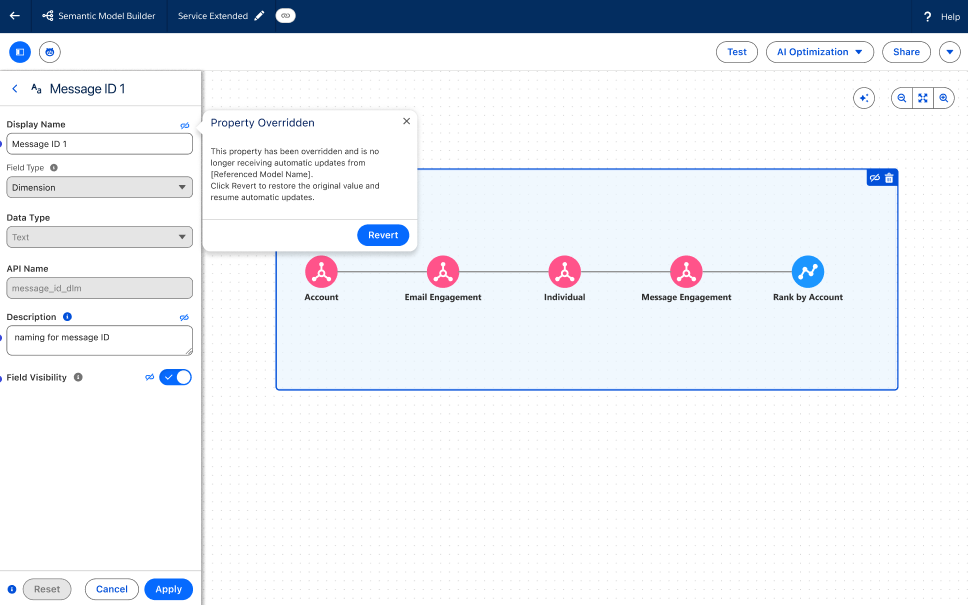
Tableau semantic model builder override features

Tableau ์‹œ๋งจํ‹ฑ: ๊ตฌ์„ฑ ๊ฐ€๋Šฅ์„ฑ ์žฌ์ •์˜

๋ชจ๋ธ์„ ํ™•์žฅํ•  ๋•Œ ๊ธฐ๋ณธ SDM์—์„œ ์ƒ์†๋œ ์‹œ๋งจํ‹ฑ ์ •์˜๋ฅผ ์‚ฌ์šฉ์ž ์ง€์ •ํ•  ์ˆ˜ ์žˆ์Šต๋‹ˆ๋‹ค.

Tableau semantic model builder override features

Tableau ์‹œ๋งจํ‹ฑ: ๊ตฌ์„ฑ ๊ฐ€๋Šฅ์„ฑ ์žฌ์ •์˜

ํ™•์žฅ๋œ ์‹œ๋งจํ‹ฑ ๋ชจ๋ธ์—์„œ ํ‘œ์‹œ ์ด๋ฆ„ ๋ฐ ํ‘œ์‹œ ์œ ํ˜•๊ณผ ๊ฐ™์€ ์†์„ฑ์„ ์ˆ˜์ •ํ•˜์—ฌ ์ƒ์†๋œ ๋น„์ฆˆ๋‹ˆ์Šค ๋…ผ๋ฆฌ๋ฅผ ํŠน์ • ์š”๊ตฌ ์‚ฌํ•ญ์— ๋งž๊ฒŒ ์กฐ์ •ํ•˜์‹ญ์‹œ์˜ค. ์ด๋ฅผ ํ†ตํ•ด OOTB ์ฝ˜ํ…์ธ ๊ฐ€ ์กฐ์ง์˜ ๊ณ ์œ ํ•œ ์š”๊ตฌ ์‚ฌํ•ญ์„ ๋ฐ˜์˜ํ•˜๋Š” ๋™์‹œ์— ์‹ ๋ขฐํ•  ์ˆ˜ ์žˆ๋Š” ๋‹จ์ผ ์›๋ณธ์„ ์œ ์ง€ํ•  ์ˆ˜ ์žˆ์Šต๋‹ˆ๋‹ค.

๊ตฌ์„ฑ ๊ฐ€๋Šฅ์„ฑ ์žฌ์ •์˜ ๊ธฐ๋Šฅ์€ Tableau Next์— ์ •์‹ ์ถœ์‹œ๋˜์—ˆ์Šต๋‹ˆ๋‹ค.

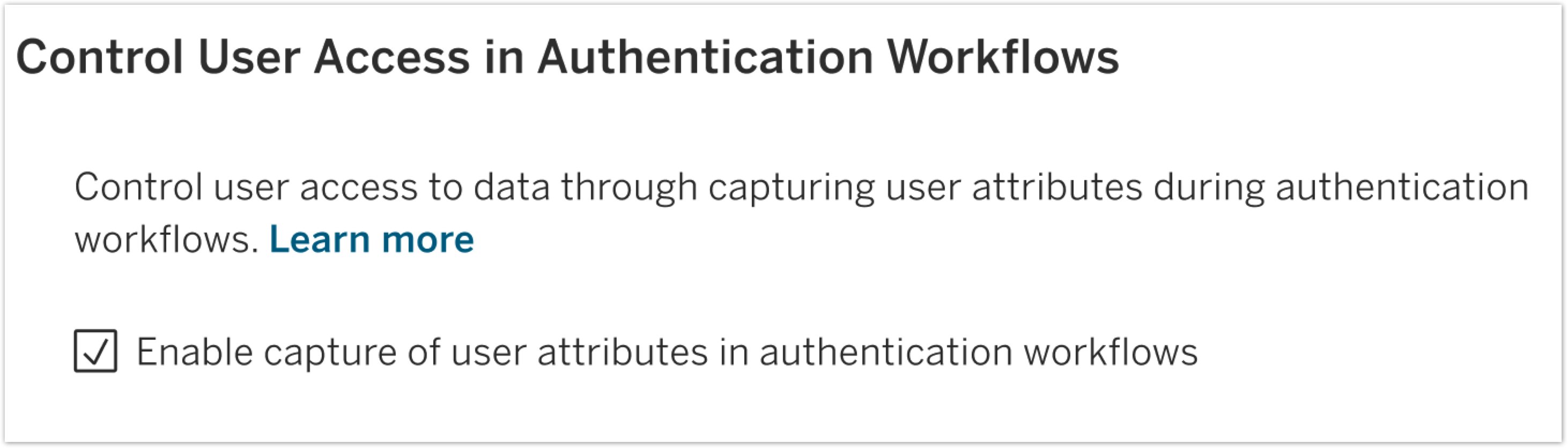
user attribute feature in Tableau Server

SAML ๋ฐ OIDC๋ฅผ ์œ„ํ•œ ์‚ฌ์šฉ์ž ํŠน์„ฑ ํ•จ์ˆ˜

๋™์  ID ํŠน์„ฑ์„ ์‚ฌ์šฉํ•˜์—ฌ ํ–‰ ์ˆ˜์ค€ ๋ฐ์ดํ„ฐ ๋ณด์•ˆ์„ ์ž๋™ํ™”ํ•˜์‹ญ์‹œ์˜ค.

user attribute feature in Tableau Server

SAML ๋ฐ OIDC๋ฅผ ์œ„ํ•œ ์‚ฌ์šฉ์ž ํŠน์„ฑ ํ•จ์ˆ˜

ํ–‰ ์ˆ˜์ค€ ๋ณด์•ˆ์„ ์œ„ํ•ด ID ๊ณต๊ธ‰์ž๋กœ๋ถ€ํ„ฐ ์ง์ ‘ ์ „๋‹ฌ๋˜๋Š” ํŠน์„ฑ์„ ์‚ฌ์šฉํ•˜์—ฌ ๋ฐ์ดํ„ฐ ๋ณด์•ˆ์„ ๊ฐ•ํ™”ํ•˜์‹ญ์‹œ์˜ค. ์ด๋ฅผ ํ†ตํ•ด ๋™์ ์ธ ํŠน์„ฑ ๊ธฐ๋ฐ˜ ์•ก์„ธ์Šค ์ œ์–ด๋ฅผ ๊ตฌํ˜„ํ•˜์—ฌ ์‚ฌ์šฉ์ž๊ฐ€ ์ž์‹ ์˜ ์—ญํ• ๊ณผ ๊ด€๋ จ๋œ ๋ฐ์ดํ„ฐ๋งŒ ๋ณด๋„๋ก ๋ณด์žฅํ•  ์ˆ˜ ์žˆ์Šต๋‹ˆ๋‹ค.

SAML ๋ฐ OIDC๋ฅผ ์œ„ํ•œ ์‚ฌ์šฉ์ž ํŠน์„ฑ ํ•จ์ˆ˜๋Š” Tableau Server์— ์ •์‹ ์ถœ์‹œ๋˜์—ˆ์Šต๋‹ˆ๋‹ค.

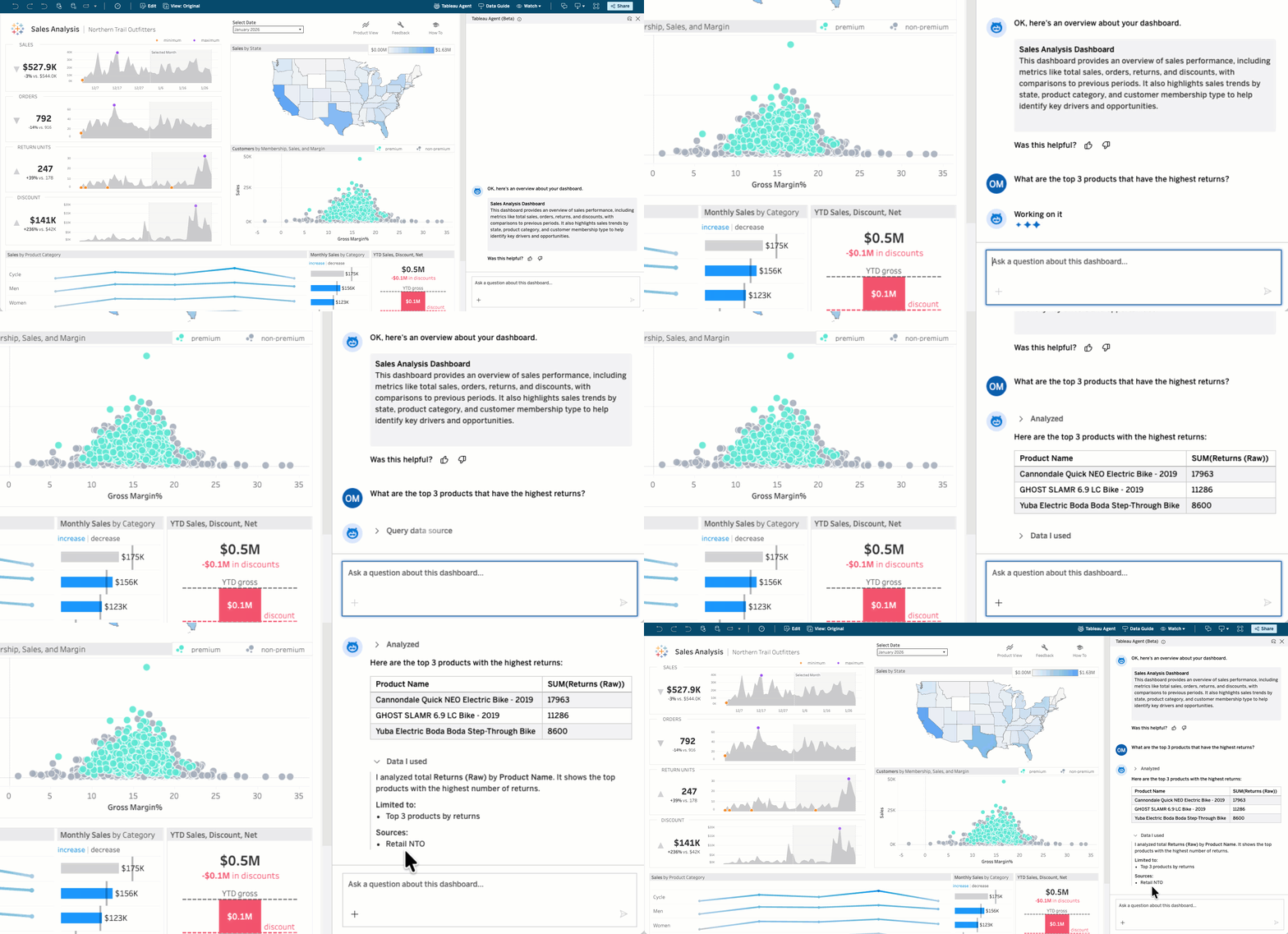
๋Œ€์‹œ๋ณด๋“œ์˜ Tableau Agent: ๋Œ€ํ™”ํ˜• ๋ถ„์„(๋ฒ ํƒ€ ๋ฐ ํŒŒ์ผ๋Ÿฟ)

๋น„์ฆˆ๋‹ˆ์Šค ์‚ฌ์šฉ์ž๊ฐ€ ๋ฐ์ดํ„ฐ ์งˆ๋ฌธ์— ๋Œ€ํ•œ ๋‹ต์„ ์–ป๊ธฐ ์œ„ํ•ด ๋” ์ด์ƒ ๊ธฐ๋‹ค๋ฆด ํ•„์š”๊ฐ€ ์—†์Šต๋‹ˆ๋‹ค. ๋Œ€์‹œ๋ณด๋“œ์˜ Tableau Agent๋ฅผ ์‚ฌ์šฉํ•˜๋ฉด ๋ˆ„๊ตฌ๋‚˜ ์ผ๋ฐ˜์ ์ธ ์–ธ์–ด๋กœ ๋ฐ์ดํ„ฐ์— ๊ด€ํ•œ ์งˆ๋ฌธ์„ ํ•˜๊ณ  ์ฆ‰์‹œ ์‹คํ–‰ ๊ฐ€๋Šฅํ•œ ์ •๋ณด๋ฅผ ์–ป์„ ์ˆ˜ ์žˆ์Šต๋‹ˆ๋‹ค. ์ด ์…€ํ”„ ์„œ๋น„์Šค ๊ธฐ๋Šฅ์„ ํ†ตํ•ด ๋ชจ๋“  ์‚ฌ์šฉ์ž๊ฐ€ ๊ธฐ์ดˆ ๋ฐ์ดํ„ฐ ์›๋ณธ์„ ์ง๊ด€์ ์œผ๋กœ ์ฟผ๋ฆฌํ•˜์—ฌ ๋Œ€์‹œ๋ณด๋“œ์—์„œ ๋” ์‹ฌ์ธต์ ์ธ ์ธ์‚ฌ์ดํŠธ๋ฅผ ์–ป์„ ์ˆ˜ ์žˆ์Šต๋‹ˆ๋‹ค.

๋Œ€์‹œ๋ณด๋“œ์˜ Tableau Agent: ๋Œ€ํ™”ํ˜• ๋ถ„์„ ๊ธฐ๋Šฅ์€ Tableau Cloud์—์„œ ๋ฒ ํƒ€ ๋ฒ„์ „์œผ๋กœ, Tableau Server์—์„œ๋Š” ํŒŒ์ผ๋Ÿฟ ๋ฒ„์ „์œผ๋กœ ์ œ๊ณต๋  ์˜ˆ์ •์ž…๋‹ˆ๋‹ค.

๋Œ€์‹œ๋ณด๋“œ์˜ Tableau Agent: ๋Œ€ํ™”ํ˜• ๋ถ„์„(๋ฒ ํƒ€ ๋ฐ ํŒŒ์ผ๋Ÿฟ)

๋น„์ฆˆ๋‹ˆ์Šค ์‚ฌ์šฉ์ž๊ฐ€ ๋ฐ์ดํ„ฐ ์งˆ๋ฌธ์— ๋Œ€ํ•œ ๋‹ต์„ ์–ป๊ธฐ ์œ„ํ•ด ๋” ์ด์ƒ ๊ธฐ๋‹ค๋ฆด ํ•„์š”๊ฐ€ ์—†์Šต๋‹ˆ๋‹ค. ๋Œ€์‹œ๋ณด๋“œ์˜ Tableau Agent๋ฅผ ์‚ฌ์šฉํ•˜๋ฉด ๋ˆ„๊ตฌ๋‚˜ ์ผ๋ฐ˜์ ์ธ ์–ธ์–ด๋กœ ๋ฐ์ดํ„ฐ์— ๊ด€ํ•œ ์งˆ๋ฌธ์„ ํ•˜๊ณ  ์ฆ‰์‹œ ์‹คํ–‰ ๊ฐ€๋Šฅํ•œ ์ •๋ณด๋ฅผ ์–ป์„ ์ˆ˜ ์žˆ์Šต๋‹ˆ๋‹ค. ์ด ์…€ํ”„ ์„œ๋น„์Šค ๊ธฐ๋Šฅ์„ ํ†ตํ•ด ๋ชจ๋“  ์‚ฌ์šฉ์ž๊ฐ€ ๊ธฐ์ดˆ ๋ฐ์ดํ„ฐ ์›๋ณธ์„ ์ง๊ด€์ ์œผ๋กœ ์ฟผ๋ฆฌํ•˜์—ฌ ๋Œ€์‹œ๋ณด๋“œ์—์„œ ๋” ์‹ฌ์ธต์ ์ธ ์ธ์‚ฌ์ดํŠธ๋ฅผ ์–ป์„ ์ˆ˜ ์žˆ์Šต๋‹ˆ๋‹ค.

๋Œ€์‹œ๋ณด๋“œ์˜ Tableau Agent: ๋Œ€ํ™”ํ˜• ๋ถ„์„ ๊ธฐ๋Šฅ์€ Tableau Cloud์—์„œ ๋ฒ ํƒ€ ๋ฒ„์ „์œผ๋กœ, Tableau Server์—์„œ๋Š” ํŒŒ์ผ๋Ÿฟ ๋ฒ„์ „์œผ๋กœ ์ œ๊ณต๋  ์˜ˆ์ •์ž…๋‹ˆ๋‹ค.

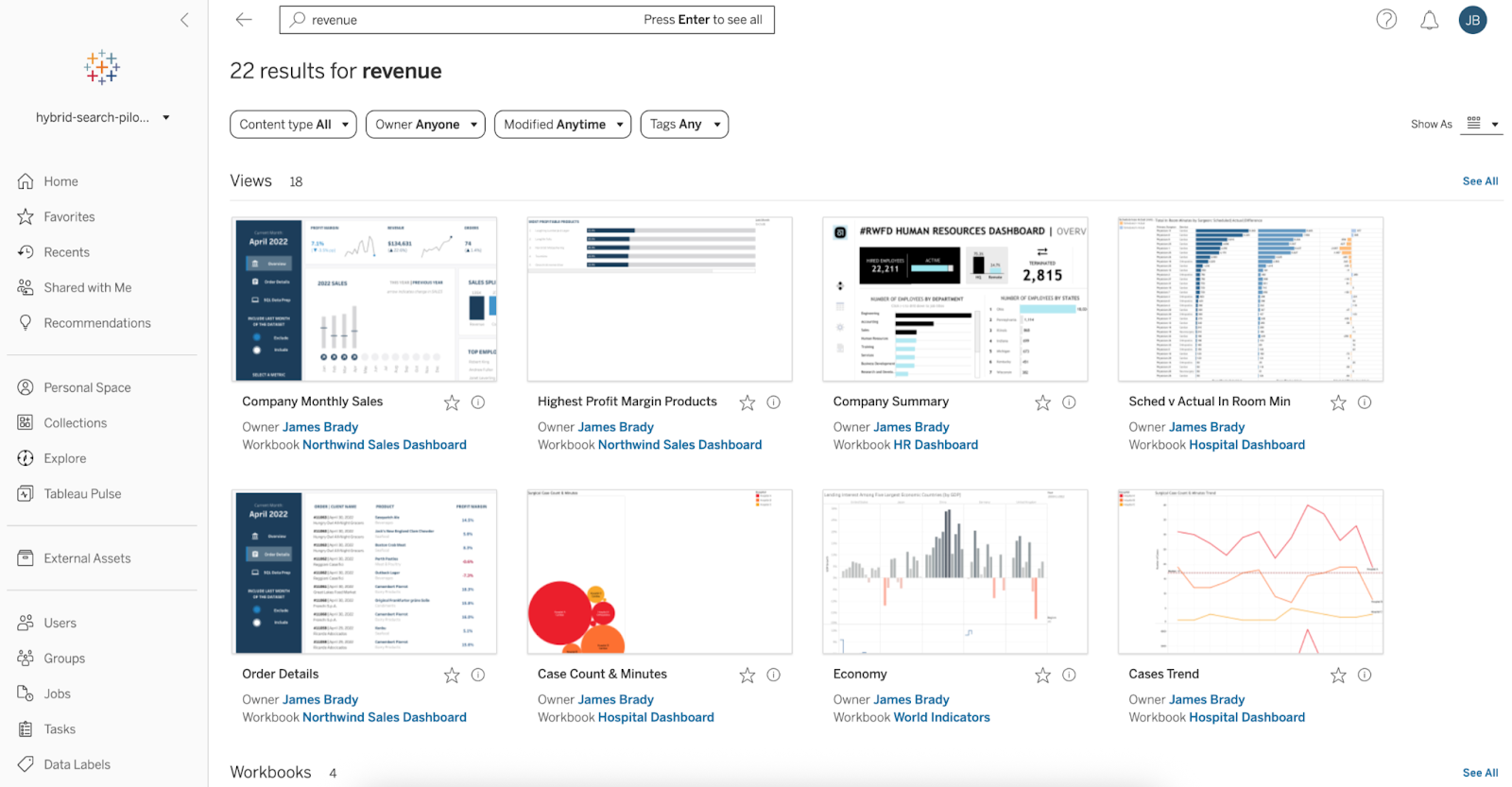
์‹œ๋งจํ‹ฑ ๊ฒ€์ƒ‰(ํŒŒ์ผ๋Ÿฟ)

์ž์—ฐ์–ด๋ฅผ ์‚ฌ์šฉํ•˜์—ฌ ์ ํ•ฉํ•œ Tableau ์ฝ˜ํ…์ธ ๋ฅผ ๋” ๋น ๋ฅด๊ฒŒ ์ฐพ์„ ์ˆ˜ ์žˆ์Šต๋‹ˆ๋‹ค. ์‹œ๋งจํ‹ฑ ๊ฒ€์ƒ‰์„ ์‚ฌ์šฉํ•˜๋ฉด ํ‚ค๋ณด๋“œ๊ฐ€ ์ •ํ™•ํžˆ ์ผ์น˜ํ•  ํ•„์š” ์—†์ด, ์ผ๋ฐ˜์ ์ธ ์–ธ์–ด์™€ ๋น„์ฆˆ๋‹ˆ์Šค ๊ฐœ๋…์„ ์‚ฌ์šฉํ•˜์—ฌ ๊ด€๋ จ ๋Œ€์‹œ๋ณด๋“œ, ๋ฐ์ดํ„ฐ ์›๋ณธ, ํ†ตํ•ฉ ๋ฌธ์„œ๋ฅผ ๊ฒ€์ƒ‰ํ•  ์ˆ˜ ์žˆ์Šต๋‹ˆ๋‹ค. ์ด ์ง๊ด€์ ์ธ ๊ฒ€์ƒ‰ ๊ธฐ๋Šฅ์€ ๊ธฐ์กด ์•„ํ‹ฐํŒฉํŠธ ํƒ์ƒ‰์„ ๊ตฌ๋™ํ•˜์—ฌ ์ค‘๋ณต์„ ์—†์• ์ค๋‹ˆ๋‹ค.

์‹œ๋งจํ‹ฑ ๊ฒ€์ƒ‰ ๊ธฐ๋Šฅ์€ Tableau Cloud์—์„œ ํŒŒ์ผ๋Ÿฟ ๋ฒ„์ „์œผ๋กœ ์ œ๊ณต๋ฉ๋‹ˆ๋‹ค.

์‹œ๋งจํ‹ฑ ๊ฒ€์ƒ‰(ํŒŒ์ผ๋Ÿฟ)

์ž์—ฐ์–ด๋ฅผ ์‚ฌ์šฉํ•˜์—ฌ ์ ํ•ฉํ•œ Tableau ์ฝ˜ํ…์ธ ๋ฅผ ๋” ๋น ๋ฅด๊ฒŒ ์ฐพ์„ ์ˆ˜ ์žˆ์Šต๋‹ˆ๋‹ค. ์‹œ๋งจํ‹ฑ ๊ฒ€์ƒ‰์„ ์‚ฌ์šฉํ•˜๋ฉด ํ‚ค๋ณด๋“œ๊ฐ€ ์ •ํ™•ํžˆ ์ผ์น˜ํ•  ํ•„์š” ์—†์ด, ์ผ๋ฐ˜์ ์ธ ์–ธ์–ด์™€ ๋น„์ฆˆ๋‹ˆ์Šค ๊ฐœ๋…์„ ์‚ฌ์šฉํ•˜์—ฌ ๊ด€๋ จ ๋Œ€์‹œ๋ณด๋“œ, ๋ฐ์ดํ„ฐ ์›๋ณธ, ํ†ตํ•ฉ ๋ฌธ์„œ๋ฅผ ๊ฒ€์ƒ‰ํ•  ์ˆ˜ ์žˆ์Šต๋‹ˆ๋‹ค. ์ด ์ง๊ด€์ ์ธ ๊ฒ€์ƒ‰ ๊ธฐ๋Šฅ์€ ๊ธฐ์กด ์•„ํ‹ฐํŒฉํŠธ ํƒ์ƒ‰์„ ๊ตฌ๋™ํ•˜์—ฌ ์ค‘๋ณต์„ ์—†์• ์ค๋‹ˆ๋‹ค.

์‹œ๋งจํ‹ฑ ๊ฒ€์ƒ‰ ๊ธฐ๋Šฅ์€ Tableau Cloud์—์„œ ํŒŒ์ผ๋Ÿฟ ๋ฒ„์ „์œผ๋กœ ์ œ๊ณต๋ฉ๋‹ˆ๋‹ค.

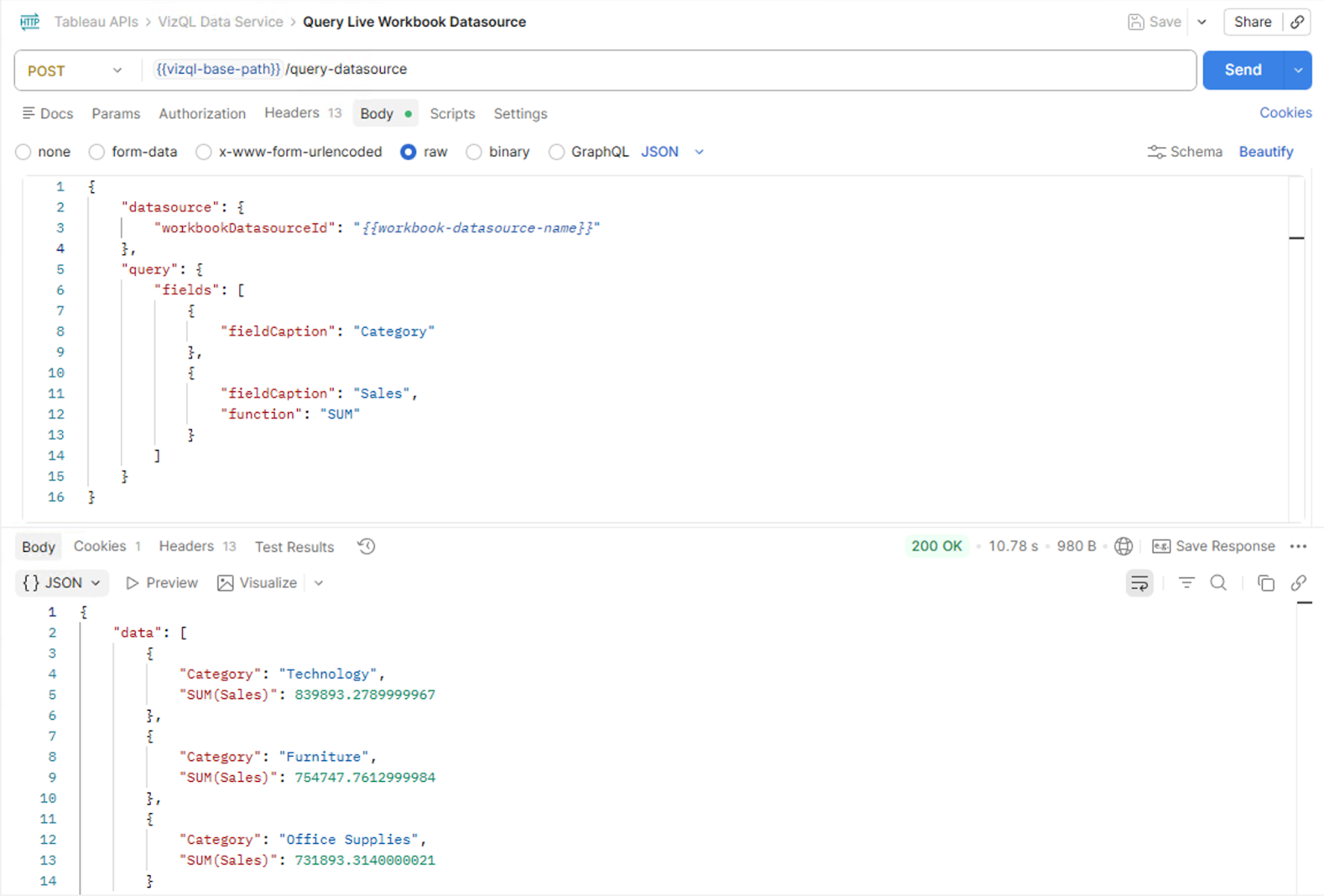
VizQL ๋ฐ์ดํ„ฐ ์„œ๋น„์Šค: ๋ผ์ด๋ธŒ ๋Œ€์‹œ๋ณด๋“œ ์ฟผ๋ฆฌ

๋‚ด์žฅ ์•ฑ์—์„œ ๋ผ์ด๋ธŒ ๋Œ€์‹œ๋ณด๋“œ ๋ฐ์ดํ„ฐ๋ฅผ ์ฟผ๋ฆฌํ•  ์ˆ˜ ์žˆ์Šต๋‹ˆ๋‹ค.

VizQL ๋ฐ์ดํ„ฐ ์„œ๋น„์Šค: ๋ผ์ด๋ธŒ ๋Œ€์‹œ๋ณด๋“œ ์ฟผ๋ฆฌ

๊ฐ•๋ ฅํ•œ ๋‚ด์žฅ๋œ ๋ถ„์„ ๊ฒฝํ—˜์„ ๋” ์‰ฝ๊ฒŒ ๊ตฌ์ถ•ํ•  ์ˆ˜ ์žˆ๊ฒŒ ๋˜์—ˆ์Šต๋‹ˆ๋‹ค. ์ƒˆ๋กœ์šด VizQL ๋ฐ์ดํ„ฐ ์„œ๋น„์Šค ๋ผ์ด๋ธŒ ๋Œ€์‹œ๋ณด๋“œ ์ฟผ๋ฆฌ ๊ธฐ๋Šฅ์„ ์‚ฌ์šฉํ•˜๋ฉด ๋‚ด์žฅ๋œ ์‘์šฉ ํ”„๋กœ๊ทธ๋žจ์—์„œ ๋ฐ”๋กœ Tableau ํ†ตํ•ฉ ๋ฌธ์„œ ์ด๋ฉด์˜ ๋ฐ์ดํ„ฐ ์›๋ณธ(๋‚ด์žฅ๋œ ๋ฐ์ดํ„ฐ ์›๋ณธ ํฌํ•จ)์„ ์ฟผ๋ฆฌํ•  ์ˆ˜ ์žˆ์Šต๋‹ˆ๋‹ค. ์ƒˆ๋กœ์šด Embedding API ๋ฉ”์„œ๋“œ๋Š” ์‚ฌ์šฉ์ž์˜ ํ™œ์„ฑ ๋Œ€์‹œ๋ณด๋“œ ์„ธ์…˜์— ๋Œ€ํ•œ ์‹๋ณ„์ž๋ฅผ ์ œ๊ณตํ•˜๋Š”๋ฐ, ์ด ์‹๋ณ„์ž๋Š” VizQL ๋ฐ์ดํ„ฐ ์„œ๋น„์Šค๋กœ ์ „๋‹ฌ๋˜์–ด ๋ทฐ์–ด๊ฐ€ ๋Œ€์‹œ๋ณด๋“œ์—์„œ ๋ณด๋Š” ๊ฒƒ๊ณผ ์ •ํ™•ํžˆ ์ผ์น˜ํ•˜๋Š” ๋ฐ์ดํ„ฐ๋ฅผ ๋ฐ˜ํ™˜ํ•ฉ๋‹ˆ๋‹ค. ์ด๋ฅผ ํ†ตํ•ด ์‚ฌ์šฉ์ž ์ง€์ • ์—์ด์ „ํŠธ ๊ฒฝํ—˜, AI ๊ธฐ๋ฐ˜ Q&A ์ธํ„ฐํŽ˜์ด์Šค, ๊ทธ๋ฆฌ๊ณ  ์„ธ์…˜ ์ธ์‹ ๋ผ์ด๋ธŒ Tableau ๋ฐ์ดํ„ฐ๋ฅผ ํ™œ์šฉํ•˜๋Š” ๊ธฐํƒ€ ์‹ฌ์ธต ํ†ตํ•ฉ ์‘์šฉ ํ”„๋กœ๊ทธ๋žจ์„ ๊ฐœ๋ฐœํ•  ์ˆ˜ ์žˆ์Šต๋‹ˆ๋‹ค.

VizQL ๋ฐ์ดํ„ฐ ์„œ๋น„์Šค ๋ผ์ด๋ธŒ ๋Œ€์‹œ๋ณด๋“œ ์ฟผ๋ฆฌ๋Š” Tableau Cloud์™€ Tableau Server์— ์ •์‹ ์ถœ์‹œ๋˜์—ˆ์Šต๋‹ˆ๋‹ค.

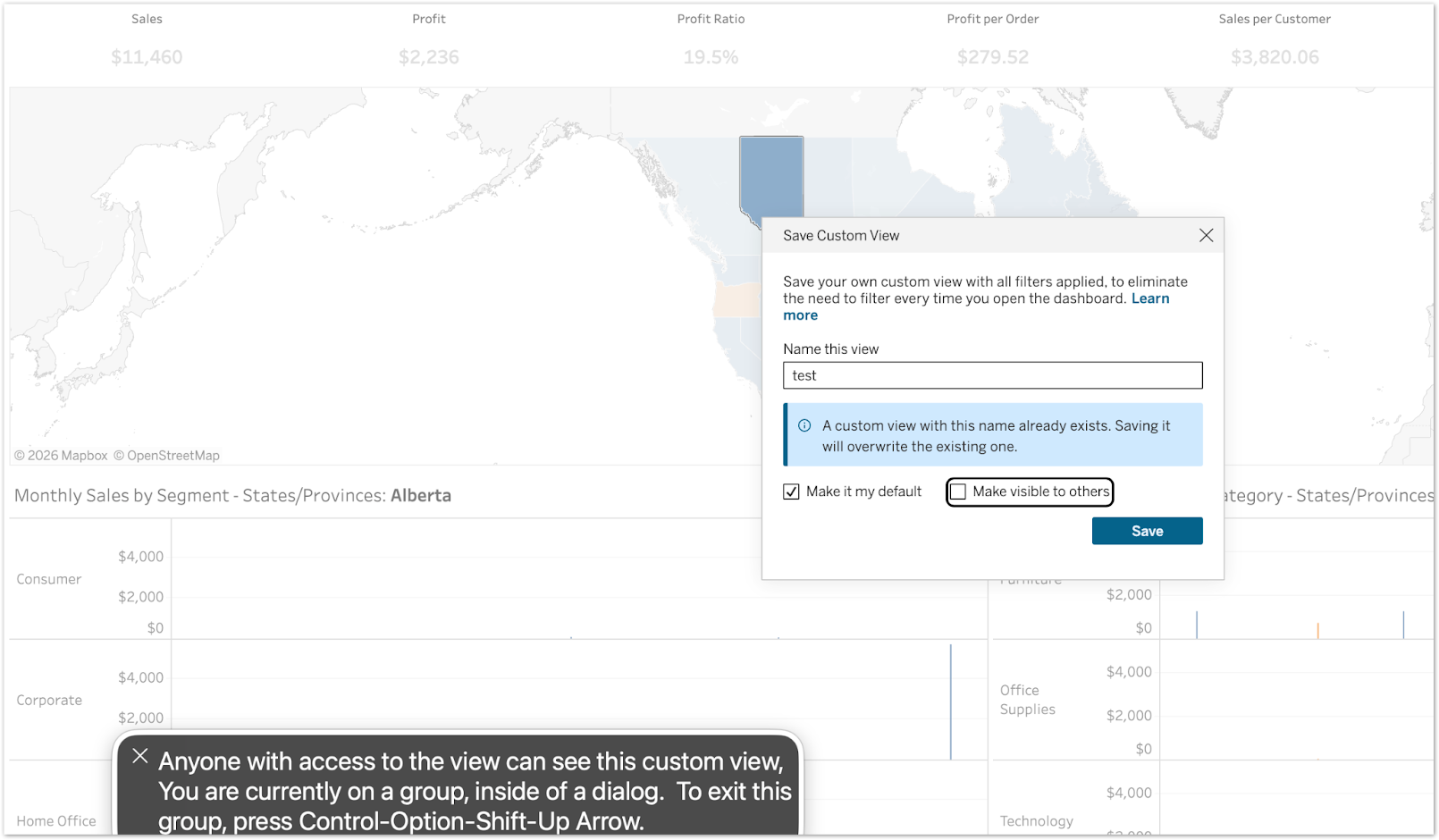
New accessibility feature for Tableau dashboards

์‚ฌ์šฉ์ž ์ง€์ • ๋ทฐ์— ๋Œ€ํ•œ ์ ‘๊ทผ์„ฑ ํ–ฅ์ƒ

์—…๊ทธ๋ ˆ์ด๋“œ๋œ ํ™”๋ฉด ์ฝ๊ธฐ ํ”„๋กœ๊ทธ๋žจ ์ง€์›์œผ๋กœ ์‚ฌ์šฉ์ž ์ง€์ • ๋ทฐ ์„ค์ •์„ ๋…๋ฆฝ์ ์œผ๋กœ ํƒ์ƒ‰ํ•˜๊ณ  ๊ตฌ์„ฑํ•  ์ˆ˜ ์žˆ์Šต๋‹ˆ๋‹ค.

New accessibility feature for Tableau dashboards

์‚ฌ์šฉ์ž ์ง€์ • ๋ทฐ์— ๋Œ€ํ•œ ์ ‘๊ทผ์„ฑ ํ–ฅ์ƒ

์ค‘์š”ํ•œ ๊ตฌ์„ฑ ์˜ต์…˜์— ๋Œ€ํ•ด ํ™”๋ฉด ์ฝ๊ธฐ ํ”„๋กœ๊ทธ๋žจ ์ง€์›์„ ์ œ๊ณตํ•˜์—ฌ ์‹œ๊ฐ ์žฅ์• ๊ฐ€ ์žˆ๋Š” ์‚ฌ์šฉ์ž์—๊ฒŒ ๊ณตํ‰ํ•œ ์‚ฌ์šฉ ํ™˜๊ฒฝ์„ ๋ณด์žฅํ•ฉ๋‹ˆ๋‹ค. ์ด์ œ ํ‚ค๋ณด๋“œ ํฌ์ปค์Šค ๋ชจ๋“œ ์ค‘์— ๊ธฐ๋ณธ ๋ทฐ ๋˜๋Š” ๊ณต์œ  ๋ทฐ ์„ค์ •์— ๋Œ€ํ•œ ์„ค๋ช… ํ…์ŠคํŠธ๊ฐ€ ์•ˆ๋‚ด๋˜์–ด ๊ฐœ์ธ ๋ฐ์ดํ„ฐ๊ฐ€ ์‹ค์ˆ˜๋กœ ๋…ธ์ถœ๋˜๋Š” ๊ฒƒ์„ ๋ฐฉ์ง€ํ•ฉ๋‹ˆ๋‹ค.

์‚ฌ์šฉ์ž ์ง€์ • ๋ทฐ์— ๋Œ€ํ•œ ์ ‘๊ทผ์„ฑ ํ–ฅ์ƒ์€ Tableau Cloud ๋ฐ Server์— ์ •์‹ ์ถœ์‹œ๋˜์—ˆ์Šต๋‹ˆ๋‹ค.

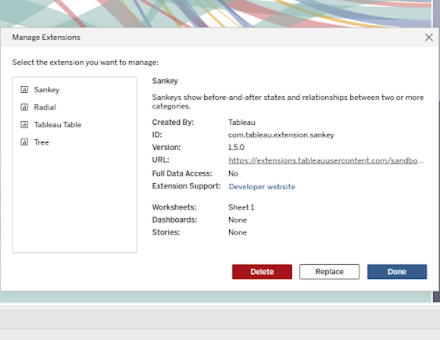
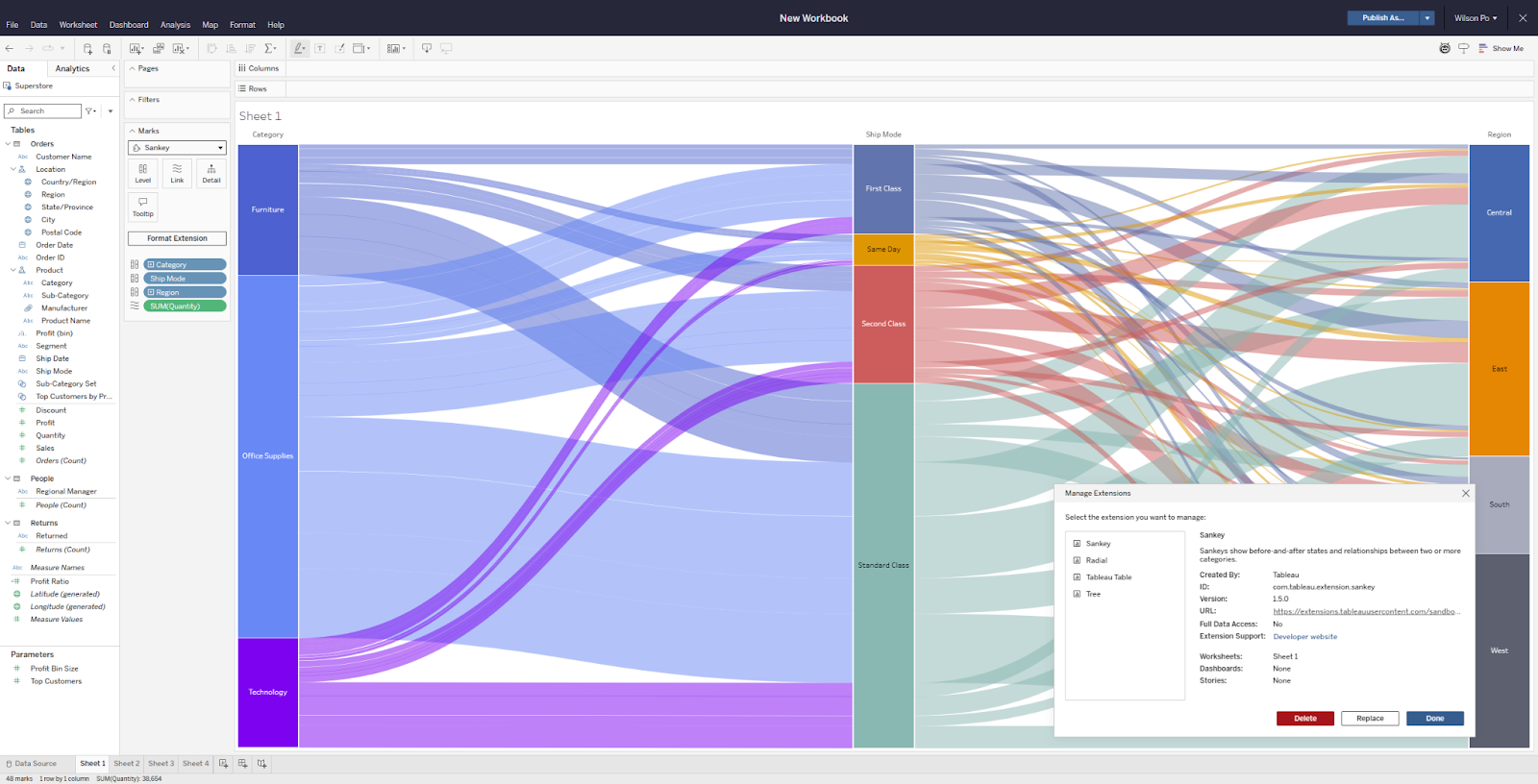
ํ†ตํ•ฉ ๋ฌธ์„œ ํ™•์žฅ ํ”„๋กœ๊ทธ๋žจ ๊ด€๋ฆฌ

ํ™•์žฅ ํ”„๋กœ๊ทธ๋žจ์„ ํ•œ ๊ณณ์—์„œ ๊ฒ€์‚ฌํ•˜๊ณ , ๋ฐ”๊พธ๊ณ , ์ œ๊ฑฐํ•  ์ˆ˜ ์žˆ์Šต๋‹ˆ๋‹ค.

ํ†ตํ•ฉ ๋ฌธ์„œ ํ™•์žฅ ํ”„๋กœ๊ทธ๋žจ ๊ด€๋ฆฌ

ํ†ตํ•ฉ ๋ฌธ์„œ์˜ ๋ณต์žก์„ฑ์ด ์ฆ๊ฐ€ํ•จ์— ๋”ฐ๋ผ ์–ด๋–ค ํ™•์žฅ ํ”„๋กœ๊ทธ๋žจ์ด ์–ด๋””์— ์‚ฌ์šฉ ์ค‘์ธ์ง€ ์ถ”์ ํ•˜๋Š” ์ผ์ด ์‹ค๋กœ ํฐ ๋ฌธ์ œ๊ฐ€ ๋  ์ˆ˜ ์žˆ์Šต๋‹ˆ๋‹ค. ํ†ตํ•ฉ ๋ฌธ์„œ ํ™•์žฅ ํ”„๋กœ๊ทธ๋žจ ๊ด€๋ฆฌ๋Š” ํ†ตํ•ฉ ๋ฌธ์„œ์—์„œ ์‚ฌ์šฉ๋˜๋Š” ๋ชจ๋“  ๋Œ€์‹œ๋ณด๋“œ ๋˜๋Š” ๋น„์ฃผ์–ผ๋ฆฌ์ œ์ด์…˜ ํ™•์žฅ ํ”„๋กœ๊ทธ๋žจ์„ ํ•œ ๊ณณ์—์„œ ๊ฒ€์‚ฌ, ์‚ญ์ œ, ๊ต์ฒดํ•  ์ˆ˜ ์žˆ๋Š” ์ „์šฉ ๋ฉ”๋‰ด๋ฅผ ์ œ๊ณตํ•ฉ๋‹ˆ๋‹ค. Tableau Exchange์—์„œ ์ œ๊ณต๋˜๋Š” ํ™•์žฅ ํ”„๋กœ๊ทธ๋žจ์„ ์‚ฌ์šฉํ•˜๋“ , ๋น„๊ณต๊ฐœ๋กœ ๊ฐœ๋ฐœํ•œ ํ™•์žฅ ํ”„๋กœ๊ทธ๋žจ์„ ์‚ฌ์šฉํ•˜๋“ , ๋ผ์ด์„ ์Šค ๋ฐฉ์‹์˜ ํŒŒํŠธ๋„ˆ ์†”๋ฃจ์…˜์„ ์‚ฌ์šฉํ•˜๋“  ๊ด€๊ณ„์—†์ด, ์ด์ œ ์‹ค์‹œ๊ฐ„์œผ๋กœ ํ™•์žฅ ํ”„๋กœ๊ทธ๋žจ์„ ๋ฐ”๊ฟ€ ์ˆ˜ ์žˆ์Šต๋‹ˆ๋‹ค.

ํ†ตํ•ฉ ๋ฌธ์„œ ํ™•์žฅ ํ”„๋กœ๊ทธ๋žจ ๊ด€๋ฆฌ๋Š” Tableau Desktop, Tableau Cloud, Tableau Server, Tableau Public์— ์ •์‹ ์ถœ์‹œ๋˜์—ˆ์Šต๋‹ˆ๋‹ค.

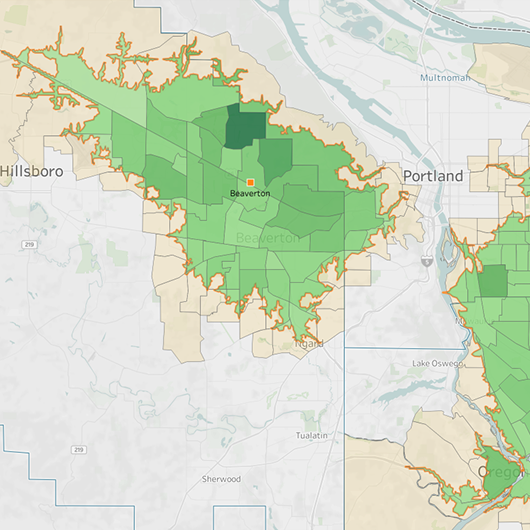
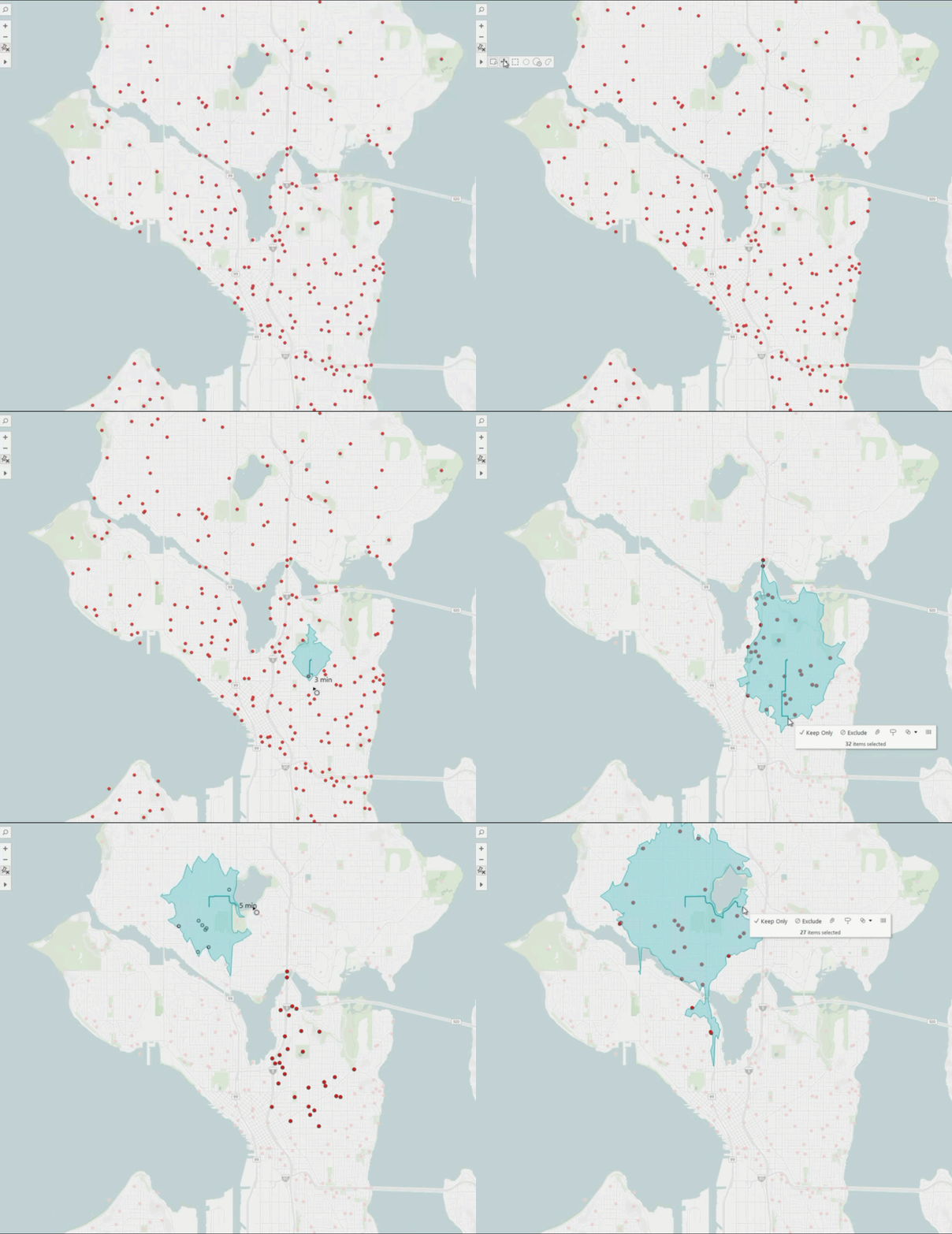
Tableau ๋งต: ์šด์ „ ์‹œ๊ฐ„ ์˜์—ญ

์‹ค์ œ ์ด๋™ ๊ฐ€๋Šฅ ๋ฒ”์œ„๋ฅผ ์ง€๋„์— ๋ฐ”๋กœ ์‹œ๊ฐํ™”ํ•  ์ˆ˜ ์žˆ์Šต๋‹ˆ๋‹ค.

Tableau ๋งต: ์šด์ „ ์‹œ๊ฐ„ ์˜์—ญ

๊ธฐ์กด ์ง€๋„์—์„œ๋Š” ์ง์„ ๊ฑฐ๋ฆฌ๋ฅผ ์ถ”์ •ํ•˜๋ฏ€๋กœ ์ ์šฉ ์ง€์—ญ, ์ ‘๊ทผ์„ฑ, ๋„๋‹ฌ ๋ฒ”์œ„์— ๋Œ€ํ•œ ๋ถ€์ •ํ™•ํ•œ ๊ฐ€์ •์œผ๋กœ ์ด์–ด์งˆ ์ˆ˜ ์žˆ์Šต๋‹ˆ๋‹ค. Tableau ๋งต์˜ ์šด์ „ ์‹œ๊ฐ„ ์˜์—ญ ๊ธฐ๋Šฅ์„ ์‚ฌ์šฉํ•˜๋ฉด ์‹ค์ œ ๋„๋กœ๋ง๊ณผ ๊ตํ†ต ์ƒํ™ฉ์„ ๊ธฐ๋ฐ˜์œผ๋กœ ์ฃผ์–ด์ง„ ์‹œ๊ฐ„ ๋‚ด์— ํ˜„์‹ค์ ์œผ๋กœ ์ด๋™ํ•  ์ˆ˜ ์žˆ๋Š” ๊ฑฐ๋ฆฌ๋ฅผ ๋ฐ˜์˜ํ•˜๋Š” ๋“ฑ์‹œ์„  ๋‹ค๊ฐํ˜•์„ ๋งต์— ์ง์ ‘ ๊ทธ๋ฆด ์ˆ˜ ์žˆ์Šต๋‹ˆ๋‹ค. ๋งต ํˆด๋ฐ”์—์„œ ์šด์ „ ์‹œ๊ฐ„ ๋„๊ตฌ๋ฅผ ์„ ํƒํ•˜๊ณ , ์›ํ•˜๋Š” ์ง€์ ์„ ํด๋ฆญํ•œ ๋‹ค์Œ, ๋ฐ”๊นฅ์ชฝ์œผ๋กœ ๋Œ์–ด ์ ์šฉ ๋Œ€์ƒ ์˜์—ญ์„ ์ƒ์„ฑํ•˜๊ธฐ๋งŒ ํ•˜๋ฉด ๋ฉ๋‹ˆ๋‹ค. ๋งค์žฅ ์œ„์น˜ ์ตœ์ ํ™”, ๋ฐฐ์†ก ๊ตฌ์—ญ ๊ณ„ํš, ๋น„์ƒ ๋Œ€์‘ ๊ด€๋ฆฌ, ์„œ๋น„์Šค ์ง€์—ญ ์„ธ๋ถ€ ์กฐ์ • ๋“ฑ ์–ด๋–ค ๊ฒฝ์šฐ์—์„œ๋“ , ์šด์ „ ์‹œ๊ฐ„ ์˜์—ญ์€ ์‹ค์ œ ์กฐ๊ฑด์„ ๊ธฐ๋ฐ˜์œผ๋กœ ์˜์‚ฌ ๊ฒฐ์ •์„ ๋‚ด๋ฆด ์ˆ˜ ์žˆ๋„๋ก ์ง€์›ํ•ฉ๋‹ˆ๋‹ค.

๋งต: ์šด์ „ ์‹œ๊ฐ„ ์˜์—ญ ๊ธฐ๋Šฅ์€ Tableau Desktop, Tableau Cloud, Tableau Server, Tableau Public์šฉ์œผ๋กœ ์ •์‹ ์ถœ์‹œ๋˜์—ˆ์Šต๋‹ˆ๋‹ค.

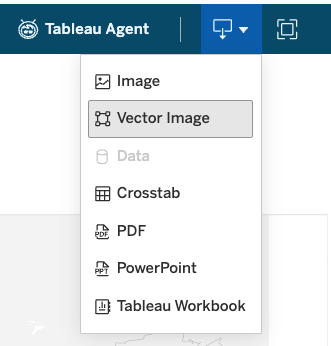
SVG ์ด๋ฏธ์ง€ ๋‹ค์šด๋กœ๋“œ

Tableau์—์„œ ๋” ์„ ๋ช…ํ•˜๊ณ  ํ™•์žฅ ๊ฐ€๋Šฅํ•œ ์ด๋ฏธ์ง€๋ฅผ ๋‚ด๋ณด๋‚ผ ์ˆ˜ ์žˆ์Šต๋‹ˆ๋‹ค.

SVG ์ด๋ฏธ์ง€ ๋‹ค์šด๋กœ๋“œ

Tableau ๋Œ€์‹œ๋ณด๋“œ์™€ ๋น„์ฃผ์–ผ๋ฆฌ์ œ์ด์…˜์„ Tableau ๋ฐ–์œผ๋กœ ๊ณต์œ ํ•  ๋•Œ๋Š” ์ด๋ฏธ์ง€ ํ’ˆ์งˆ์ด ์ค‘์š”ํ•ฉ๋‹ˆ๋‹ค. ์ด์ œ SVG ์ด๋ฏธ์ง€ ๋‹ค์šด๋กœ๋“œ ๊ธฐ๋Šฅ์œผ๋กœ ๋Œ€์‹œ๋ณด๋“œ์™€ ๋น„์ฃผ์–ผ๋ฆฌ์ œ์ด์…˜์„ ํ™•์žฅ ๊ฐ€๋Šฅํ•œ ๋ฒกํ„ฐ ๊ทธ๋ž˜ํ”ฝ์œผ๋กœ ๋‚ด๋ณด๋‚ผ ์ˆ˜ ์žˆ์œผ๋ฏ€๋กœ, PNG ํ˜•์‹์œผ๋กœ ๋‚ด๋ณด๋‚ผ ๋•Œ ๋‚˜ํƒ€๋‚  ์ˆ˜ ์žˆ๋Š” ์ด๋ฏธ์ง€๊ฐ€ ํ๋ฆฟํ•ด์ง€๋Š” ํ˜„์ƒ ์—†์ด ์–ด๋–ค ํฌ๊ธฐ๋กœ๋„ ์‹œ๊ฐ ์ž๋ฃŒ๊ฐ€ ์„ ๋ช…ํ•˜๊ณ  ๊นจ๋—ํ•˜๊ฒŒ ์œ ์ง€๋ฉ๋‹ˆ๋‹ค. SVG ํŒŒ์ผ์€ REST API, ์›น ๋ณด๊ธฐ์˜ ๋ฒกํ„ฐ ์ด๋ฏธ์ง€ ์˜ต์…˜ ๋˜๋Š” ๋Œ€์‹œ๋ณด๋“œ ๋‹ค์šด๋กœ๋“œ ๋ฒ„ํŠผ์„ ํ†ตํ•ด ์ด์šฉํ•  ์ˆ˜ ์žˆ์Šต๋‹ˆ๋‹ค. ํ”„๋ ˆ์  ํ…Œ์ด์…˜, ๋ณด๊ณ ์„œ ๋˜๋Š” ๊ธฐํƒ€ ์ฝ˜ํ…์ธ  ๋“ฑ ์–ด๋А ๊ณณ์— ์‹œ๊ฐ ์ž๋ฃŒ๋ฅผ ์‚ฝ์ž…ํ•˜๋“  ๊ด€๊ณ„์—†์ด, ์ด์ œ Tableau ๋ถ„์„ ๊ฒฐ๊ณผ๊ฐ€ ์ •ํ™•ํžˆ ์˜๋„ํ•œ ๋Œ€๋กœ ํ‘œ์‹œ๋ฉ๋‹ˆ๋‹ค.

SVG ์ด๋ฏธ์ง€ ๋‹ค์šด๋กœ๋“œ๋Š” Tableau Desktop, Tableau Cloud, Tableau Server, Tableau Public์šฉ์œผ๋กœ ์ •์‹ ์ถœ์‹œ๋˜์—ˆ์Šต๋‹ˆ๋‹ค.

image

Tableau Bridge: Tableau Cloud์˜ ์•Œ๋ฆผ

Tableau Cloud ๋‚ด์—์„œ ๋ฐ”๋กœ ์ „๋‹ฌ๋˜๋Š” Tableau Bridge ์ž‘์—… ์‹คํŒจ ์•Œ๋ฆผ์„ ํ†ตํ•ด ๋ฐ์ดํ„ฐ์˜ ์ตœ์‹  ์ƒํƒœ๋ฅผ ์™„๋ฒฝํ•˜๊ฒŒ ํŒŒ์•…ํ•˜์‹ญ์‹œ์˜ค. ์‚ฌ์ดํŠธ ๊ด€๋ฆฌ์ž์™€ ๋ฐ์ดํ„ฐ ์†Œ์œ ์ž๋Š” ์ด๋Ÿฌํ•œ ์ž๋™ ์•Œ๋ฆผ ๊ธฐ๋Šฅ ๋•๋ถ„์— ์—ฐ๊ฒฐ ๋ฌธ์ œ๋ฅผ ๋” ๋น ๋ฅด๊ฒŒ ํ•ด๊ฒฐํ•˜๊ณ  ๋ฐ์ดํ„ฐ ํŒŒ์ดํ”„๋ผ์ธ์„ ์ตœ์‹  ์ƒํƒœ๋กœ ์œ ์ง€ํ•  ์ˆ˜ ์žˆ์Šต๋‹ˆ๋‹ค.

Tableau Bridge: ์•Œ๋ฆผ ๊ธฐ๋Šฅ์ด Tableau Cloud์— ์ •์‹ ์ถœ์‹œ๋˜์—ˆ์Šต๋‹ˆ๋‹ค.

Tableau Bridge: Tableau Cloud์˜ ์•Œ๋ฆผ

Tableau Cloud ๋‚ด์—์„œ ๋ฐ”๋กœ ์ „๋‹ฌ๋˜๋Š” Tableau Bridge ์ž‘์—… ์‹คํŒจ ์•Œ๋ฆผ์„ ํ†ตํ•ด ๋ฐ์ดํ„ฐ์˜ ์ตœ์‹  ์ƒํƒœ๋ฅผ ์™„๋ฒฝํ•˜๊ฒŒ ํŒŒ์•…ํ•˜์‹ญ์‹œ์˜ค. ์‚ฌ์ดํŠธ ๊ด€๋ฆฌ์ž์™€ ๋ฐ์ดํ„ฐ ์†Œ์œ ์ž๋Š” ์ด๋Ÿฌํ•œ ์ž๋™ ์•Œ๋ฆผ ๊ธฐ๋Šฅ ๋•๋ถ„์— ์—ฐ๊ฒฐ ๋ฌธ์ œ๋ฅผ ๋” ๋น ๋ฅด๊ฒŒ ํ•ด๊ฒฐํ•˜๊ณ  ๋ฐ์ดํ„ฐ ํŒŒ์ดํ”„๋ผ์ธ์„ ์ตœ์‹  ์ƒํƒœ๋กœ ์œ ์ง€ํ•  ์ˆ˜ ์žˆ์Šต๋‹ˆ๋‹ค.

Tableau Bridge: ์•Œ๋ฆผ ๊ธฐ๋Šฅ์ด Tableau Cloud์— ์ •์‹ ์ถœ์‹œ๋˜์—ˆ์Šต๋‹ˆ๋‹ค.

Tableau Bridge

Tableau Bridge: ์›น ์ž‘์„ฑ์˜ ๋ฐ์ดํ„ฐ ์›๋ณธ ํŽธ์ง‘

์˜จํ”„๋ ˆ๋ฏธ์Šค ๋ฐ์ดํ„ฐ๋ฅผ ์‚ฌ์šฉํ•˜๋Š” ํฌ๋ฆฌ์—์ดํ„ฐ๊ฐ€ ๋” ์ด์ƒ Tableau Bridge ๋ฐ์ดํ„ฐ ์›๋ณธ์„ ๋งŒ๋“ค๊ฑฐ๋‚˜ ์—…๋ฐ์ดํŠธํ•˜๋ ค๊ณ  Tableau Desktop์œผ๋กœ ์ „ํ™˜ํ•  ํ•„์š”๊ฐ€ ์—†์Šต๋‹ˆ๋‹ค. ์ด๋ฒˆ ์—…๋ฐ์ดํŠธ๋ฅผ ํ†ตํ•ด ํฌ๋ฆฌ์—์ดํ„ฐ๋Š” ์ง€์ • ์ปค๋„ฅํ„ฐ๋ฅผ ์‚ฌ์šฉํ•˜๋Š” ๊ฒŒ์‹œ๋œ Bridge ๋ฐ์ดํ„ฐ ์›๋ณธ์„ Tableau Cloud์—์„œ ์ง์ ‘ ๋งŒ๋“ค๊ณ  ํŽธ์ง‘ํ•˜๋ฉฐ ์ „์ฒด ์›Œํฌํ”Œ๋กœ๋ฅผ ํ•œ ๊ณณ์—์„œ ๊ด€๋ฆฌํ•  ์ˆ˜ ์žˆ์Šต๋‹ˆ๋‹ค.

Tableau Bridge: ์›น ์ž‘์„ฑ์˜ ๋ฐ์ดํ„ฐ ์›๋ณธ ํŽธ์ง‘์€ Tableau Cloud์— ์ •์‹ ์ถœ์‹œ๋˜์—ˆ์Šต๋‹ˆ๋‹ค.

Tableau Bridge: ์›น ์ž‘์„ฑ์˜ ๋ฐ์ดํ„ฐ ์›๋ณธ ํŽธ์ง‘

์˜จํ”„๋ ˆ๋ฏธ์Šค ๋ฐ์ดํ„ฐ๋ฅผ ์‚ฌ์šฉํ•˜๋Š” ํฌ๋ฆฌ์—์ดํ„ฐ๊ฐ€ ๋” ์ด์ƒ Tableau Bridge ๋ฐ์ดํ„ฐ ์›๋ณธ์„ ๋งŒ๋“ค๊ฑฐ๋‚˜ ์—…๋ฐ์ดํŠธํ•˜๋ ค๊ณ  Tableau Desktop์œผ๋กœ ์ „ํ™˜ํ•  ํ•„์š”๊ฐ€ ์—†์Šต๋‹ˆ๋‹ค. ์ด๋ฒˆ ์—…๋ฐ์ดํŠธ๋ฅผ ํ†ตํ•ด ํฌ๋ฆฌ์—์ดํ„ฐ๋Š” ์ง€์ • ์ปค๋„ฅํ„ฐ๋ฅผ ์‚ฌ์šฉํ•˜๋Š” ๊ฒŒ์‹œ๋œ Bridge ๋ฐ์ดํ„ฐ ์›๋ณธ์„ Tableau Cloud์—์„œ ์ง์ ‘ ๋งŒ๋“ค๊ณ  ํŽธ์ง‘ํ•˜๋ฉฐ ์ „์ฒด ์›Œํฌํ”Œ๋กœ๋ฅผ ํ•œ ๊ณณ์—์„œ ๊ด€๋ฆฌํ•  ์ˆ˜ ์žˆ์Šต๋‹ˆ๋‹ค.

Tableau Bridge: ์›น ์ž‘์„ฑ์˜ ๋ฐ์ดํ„ฐ ์›๋ณธ ํŽธ์ง‘์€ Tableau Cloud์— ์ •์‹ ์ถœ์‹œ๋˜์—ˆ์Šต๋‹ˆ๋‹ค.

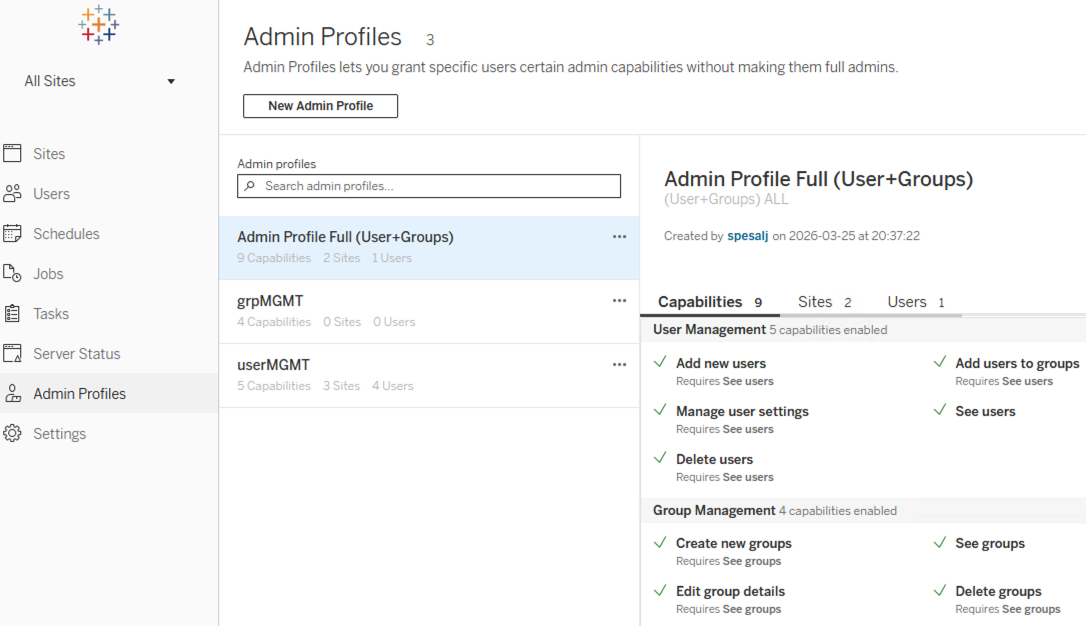
New admin profile in Tableau Server settings

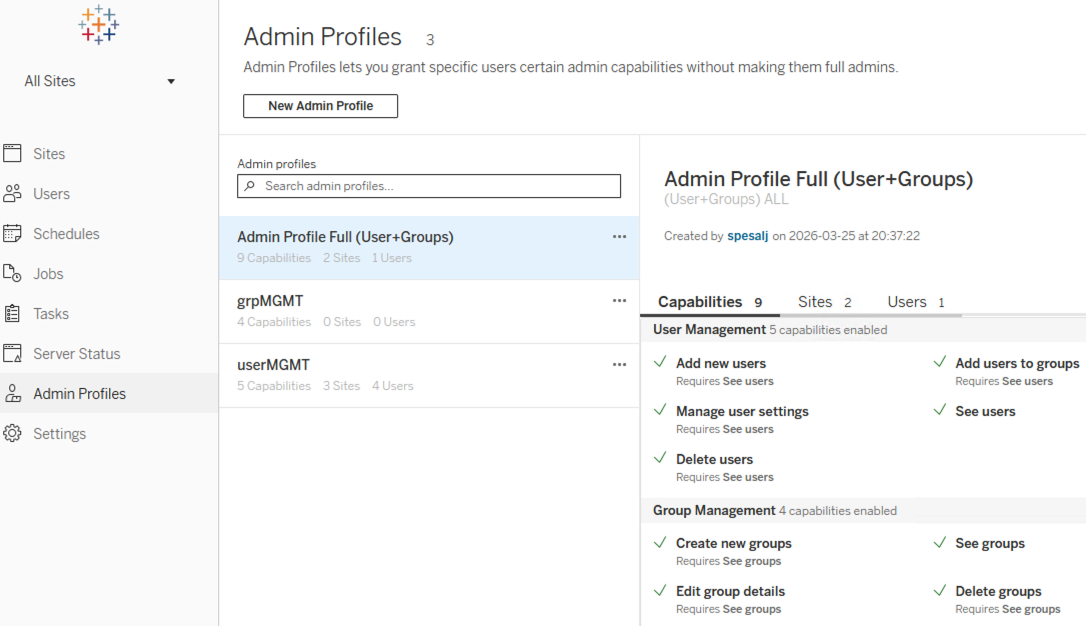
Tableau Server ๊ด€๋ฆฌ์ž ํ”„๋กœํ•„

์‚ฌ์šฉ์ž ์ง€์ • ์‚ฌ์šฉ ๊ถŒํ•œ ์ œํ•œ ํ”„๋กœํ•„์„ ์‚ฌ์šฉํ•˜์—ฌ ๊ด€๋ฆฌ ์ž‘์—…์„ ์œ„์ž„ํ•  ์ˆ˜ ์žˆ์Šต๋‹ˆ๋‹ค.

Admin profile feature in Tableau Server settings

Tableau Server ๊ด€๋ฆฌ์ž ํ”„๋กœํ•„

ํŠน์ • ์‚ฌ์šฉ์ž ๋ฐ ๊ทธ๋ฃน ๊ด€๋ฆฌ ๊ธฐ๋Šฅ์„ IT ๋ถ€์„œ ๋˜๋Š” ์ง€์—ญ ์ฑ…์ž„์ž์ฒ˜๋Ÿผ ๊ด€๋ฆฌ์ž๊ฐ€ ์•„๋‹Œ ์—ญํ• ์— ์œ„์ž„ํ•˜์‹ญ์‹œ์˜ค. ์ด ์‚ฌ์šฉ์ž ์ง€์ • ํ”„๋กœํ•„ ๊ด€๋ฆฌ ๊ธฐ๋Šฅ์œผ๋กœ ์„ธ๋ถ€์ ์ธ ์ œ์–ด์™€ ๋ณด์•ˆ์„ ์œ ์ง€ํ•˜๋ฉด์„œ ์ „์ฒด ์‚ฌ์ดํŠธ ๊ด€๋ฆฌ์ž์˜ ํ•„์š”์„ฑ์„ ์ค„์ผ ์ˆ˜ ์žˆ์Šต๋‹ˆ๋‹ค.

Tableau Server ๊ด€๋ฆฌ์ž ํ”„๋กœํ•„์€ Tableau Server์— ์ •์‹ ์ถœ์‹œ๋˜์—ˆ์Šต๋‹ˆ๋‹ค.

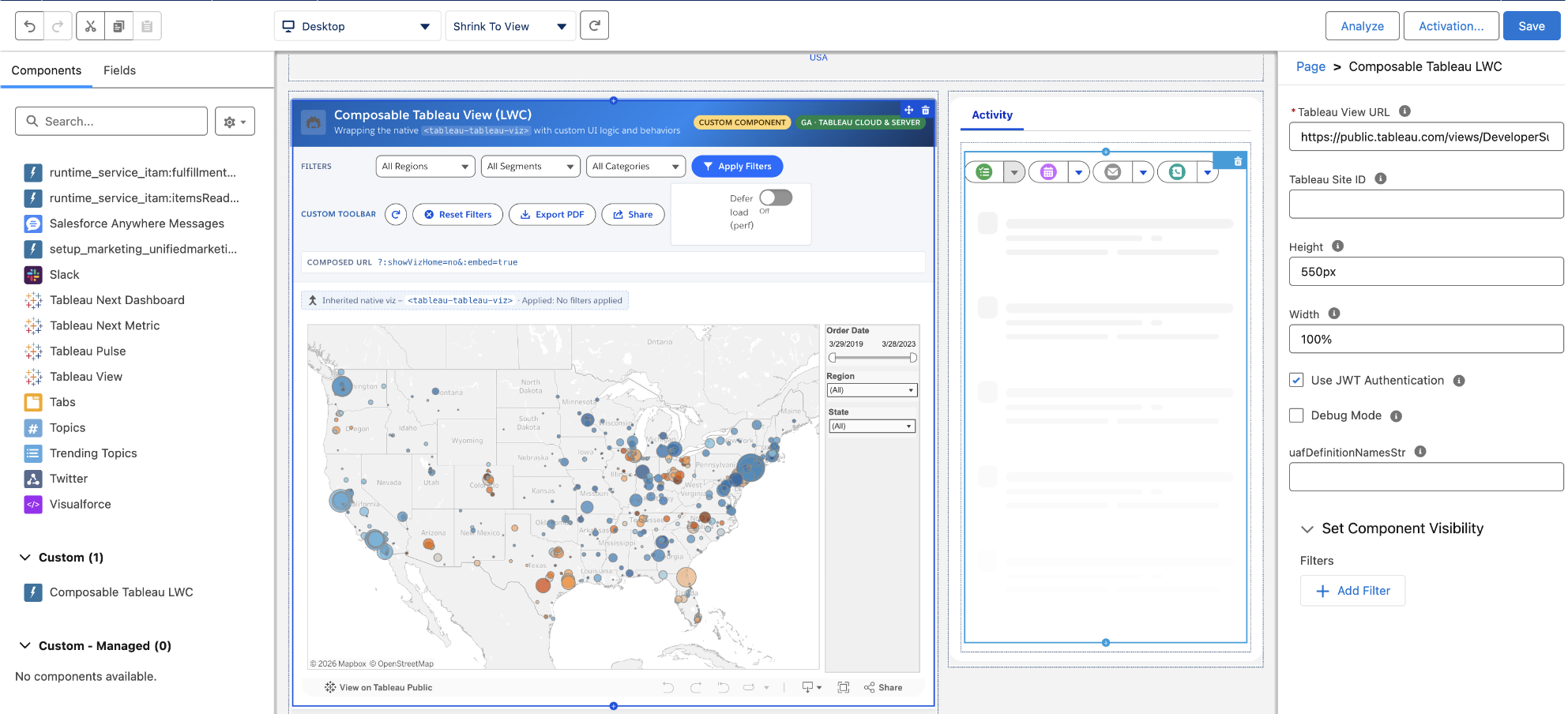
๊ตฌ์„ฑํ˜• Tableau ๋ทฐ ๋ฐ Tableau Pulse ๋ฉ”ํŠธ๋ฆญ(LWC)

๊ธฐ๋ณธ ๊ตฌ์„ฑ ์š”์†Œ๋ฅผ ์ž์ฒด UI ๋…ผ๋ฆฌ์™€ ๋™์ž‘์œผ๋กœ ์ค„ ๋ฐ”๊ฟˆํ•˜์—ฌ Tableau ๋Œ€์‹œ๋ณด๋“œ์™€ Pulse ๋ฉ”ํŠธ๋ฆญ์ด Salesforce์— ๋‚ด์žฅ๋˜๋Š” ๋ฐฉ์‹์„ ์‚ฌ์šฉ์ž ์ง€์ •ํ•  ์ˆ˜ ์žˆ์Šต๋‹ˆ๋‹ค. ๊ตฌ์„ฑํ˜• Tableau ๋ทฐ์™€ Tableau Pulse ๋ฉ”ํŠธ๋ฆญ - Lightning ์›น ๊ตฌ์„ฑ ์š”์†Œ(LWC)๋ฅผ ์‚ฌ์šฉํ•˜๋ฉด ๊ฐœ๋ฐœ์ž๋Š” ์›ํ™œํ•œ ํ†ตํ•ฉ์„ ์ƒ์†ํ•˜๋ฉด์„œ ํ”„๋กœ๊ทธ๋ž˜๋ฐ ๋ฐฉ์‹์œผ๋กœ ํ•„ํ„ฐ๋ฅผ ์„ค์ •ํ•˜๊ณ , ์‚ฌ์šฉ์ž ์ง€์ • ํˆด๋ฐ”๋ฅผ ์ถ”๊ฐ€ํ•˜๊ณ , ์„ฑ๋Šฅ์„ ๋ฏธ์„ธ ์กฐ์ •ํ•  ์ˆ˜ ์žˆ์Šต๋‹ˆ๋‹ค.

๊ตฌ์„ฑํ˜• Tableau ๋ทฐ ๋ฐ Tableau Pulse ๋ฉ”ํŠธ๋ฆญ(LWC)์€ Tableau Cloud ๋ฐ Server์— ์ •์‹ ์ถœ์‹œ๋˜์—ˆ์Šต๋‹ˆ๋‹ค.

๊ตฌ์„ฑํ˜• Tableau ๋ทฐ ๋ฐ Tableau Pulse ๋ฉ”ํŠธ๋ฆญ(LWC)

๊ธฐ๋ณธ ๊ตฌ์„ฑ ์š”์†Œ๋ฅผ ์ž์ฒด UI ๋…ผ๋ฆฌ์™€ ๋™์ž‘์œผ๋กœ ์ค„ ๋ฐ”๊ฟˆํ•˜์—ฌ Tableau ๋Œ€์‹œ๋ณด๋“œ์™€ Pulse ๋ฉ”ํŠธ๋ฆญ์ด Salesforce์— ๋‚ด์žฅ๋˜๋Š” ๋ฐฉ์‹์„ ์‚ฌ์šฉ์ž ์ง€์ •ํ•  ์ˆ˜ ์žˆ์Šต๋‹ˆ๋‹ค. ๊ตฌ์„ฑํ˜• Tableau ๋ทฐ์™€ Tableau Pulse ๋ฉ”ํŠธ๋ฆญ - Lightning ์›น ๊ตฌ์„ฑ ์š”์†Œ(LWC)๋ฅผ ์‚ฌ์šฉํ•˜๋ฉด ๊ฐœ๋ฐœ์ž๋Š” ์›ํ™œํ•œ ํ†ตํ•ฉ์„ ์ƒ์†ํ•˜๋ฉด์„œ ํ”„๋กœ๊ทธ๋ž˜๋ฐ ๋ฐฉ์‹์œผ๋กœ ํ•„ํ„ฐ๋ฅผ ์„ค์ •ํ•˜๊ณ , ์‚ฌ์šฉ์ž ์ง€์ • ํˆด๋ฐ”๋ฅผ ์ถ”๊ฐ€ํ•˜๊ณ , ์„ฑ๋Šฅ์„ ๋ฏธ์„ธ ์กฐ์ •ํ•  ์ˆ˜ ์žˆ์Šต๋‹ˆ๋‹ค.

๊ตฌ์„ฑํ˜• Tableau ๋ทฐ ๋ฐ Tableau Pulse ๋ฉ”ํŠธ๋ฆญ(LWC)์€ Tableau Cloud ๋ฐ Server์— ์ •์‹ ์ถœ์‹œ๋˜์—ˆ์Šต๋‹ˆ๋‹ค.

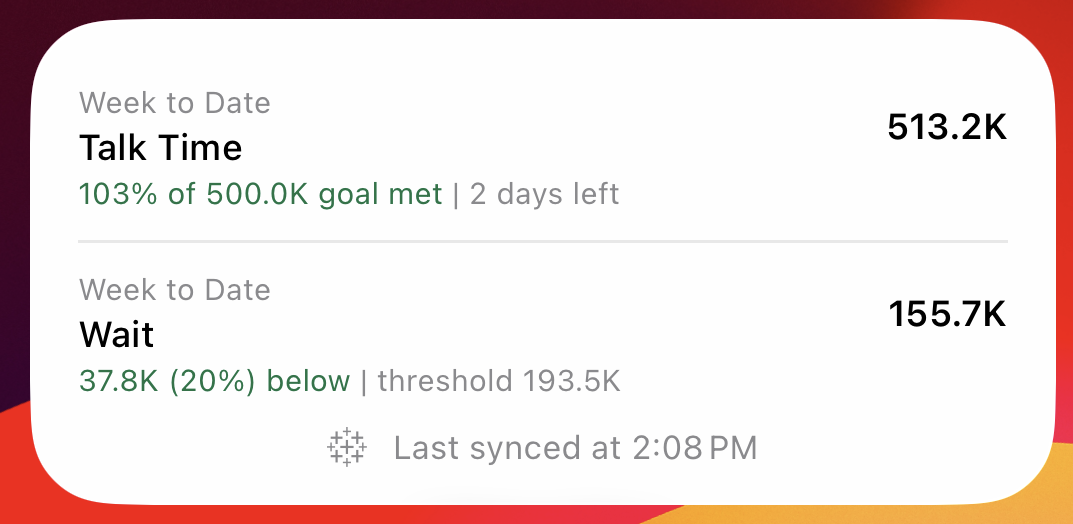
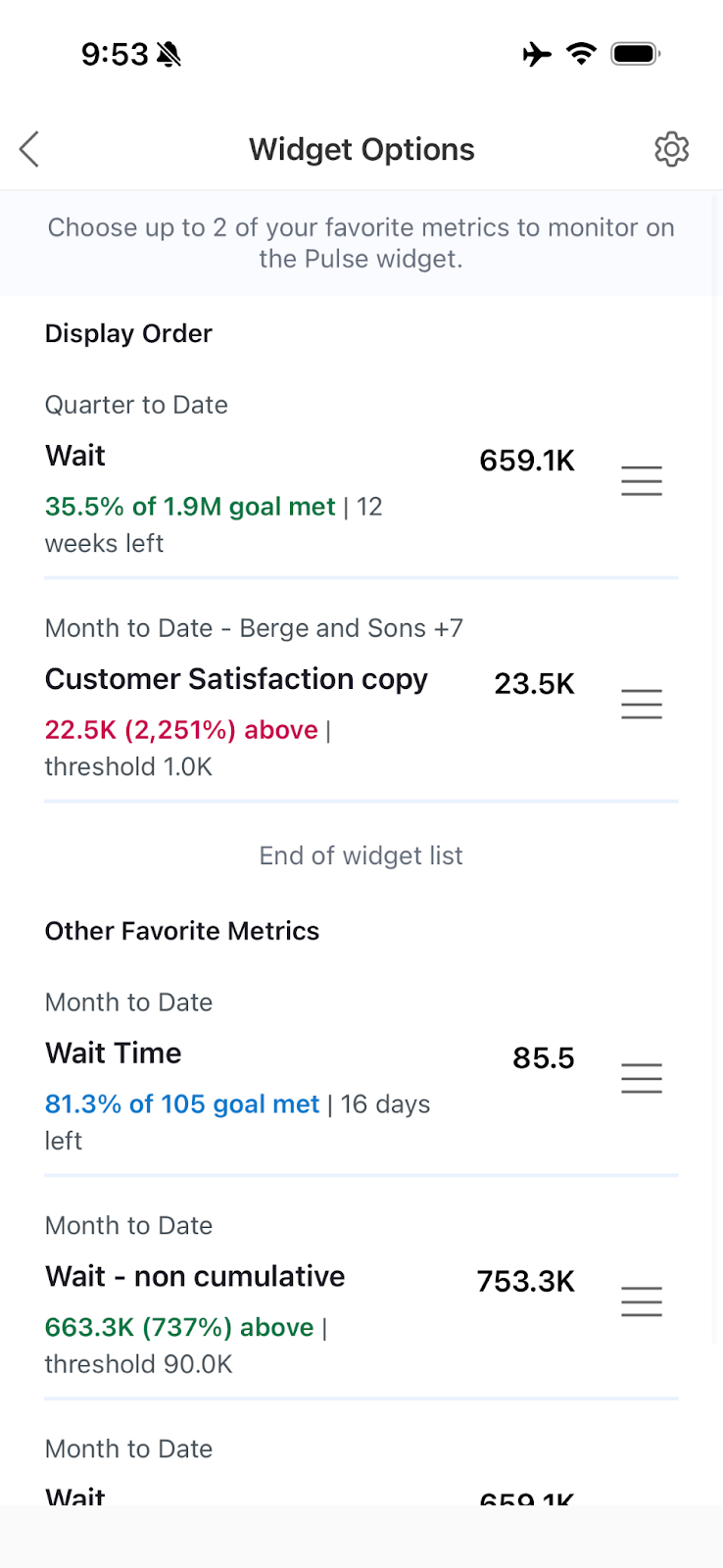
Tableau Pulse: ๋ฉ”ํŠธ๋ฆญ์šฉ ๋ชจ๋ฐ”์ผ ์œ„์ ฏ

๋ชจ๋ฐ”์ผ ํ™ˆ ํ™”๋ฉด์— ๋ฐ”๋กœ, ๊ฐ€์žฅ ์ค‘์š”ํ•œ ๋ฐ์ดํ„ฐ์™€ ์ธ์‚ฌ์ดํŠธ๊ฐ€ ํ•ญ์ƒ ๋ณด์ด๊ฒŒ ํ•˜์‹ญ์‹œ์˜ค. Tableau Pulse ๋ฉ”ํŠธ๋ฆญ์šฉ ๋ชจ๋ฐ”์ผ ์œ„์ ฏ์„ ์‚ฌ์šฉํ•˜๋ฉด ์šฐ์„ ์ˆœ์œ„๊ฐ€ ๋†’์€ ๋ฉ”ํŠธ๋ฆญ์ด ๊ฐ€์žฅ ๋ˆˆ์— ์ž˜ ๋„๋Š” ๊ณณ์— ํ‘œ์‹œ๋˜๋„๋ก ์‚ฌ์šฉ์ž ์ง€์ •ํ•  ์ˆ˜ ์žˆ์–ด, Tableau ์•ฑ์„ ๋จผ์ € ์—ด์ง€ ์•Š๊ณ ๋„ ์ตœ์‹  ์ •๋ณด๋ฅผ ํŒŒ์•…ํ•˜๊ณ  ์‹ ์†ํ•˜๊ฒŒ ์กฐ์น˜๋ฅผ ์ทจํ•˜๋Š” ๋ฐ ๋„์›€์ด ๋ฉ๋‹ˆ๋‹ค.

Tableau Pulse: ๋ฉ”ํŠธ๋ฆญ์šฉ ๋ชจ๋ฐ”์ผ ์œ„์ ฏ์€ Tableau Cloud์— ์ •์‹ ์ถœ์‹œ๋˜์—ˆ์Šต๋‹ˆ๋‹ค.

Tableau Pulse: ๋ฉ”ํŠธ๋ฆญ์šฉ ๋ชจ๋ฐ”์ผ ์œ„์ ฏ

๋ชจ๋ฐ”์ผ ํ™ˆ ํ™”๋ฉด์— ๋ฐ”๋กœ, ๊ฐ€์žฅ ์ค‘์š”ํ•œ ๋ฐ์ดํ„ฐ์™€ ์ธ์‚ฌ์ดํŠธ๊ฐ€ ํ•ญ์ƒ ๋ณด์ด๊ฒŒ ํ•˜์‹ญ์‹œ์˜ค. Tableau Pulse ๋ฉ”ํŠธ๋ฆญ์šฉ ๋ชจ๋ฐ”์ผ ์œ„์ ฏ์„ ์‚ฌ์šฉํ•˜๋ฉด ์šฐ์„ ์ˆœ์œ„๊ฐ€ ๋†’์€ ๋ฉ”ํŠธ๋ฆญ์ด ๊ฐ€์žฅ ๋ˆˆ์— ์ž˜ ๋„๋Š” ๊ณณ์— ํ‘œ์‹œ๋˜๋„๋ก ์‚ฌ์šฉ์ž ์ง€์ •ํ•  ์ˆ˜ ์žˆ์–ด, Tableau ์•ฑ์„ ๋จผ์ € ์—ด์ง€ ์•Š๊ณ ๋„ ์ตœ์‹  ์ •๋ณด๋ฅผ ํŒŒ์•…ํ•˜๊ณ  ์‹ ์†ํ•˜๊ฒŒ ์กฐ์น˜๋ฅผ ์ทจํ•˜๋Š” ๋ฐ ๋„์›€์ด ๋ฉ๋‹ˆ๋‹ค.

Tableau Pulse: ๋ฉ”ํŠธ๋ฆญ์šฉ ๋ชจ๋ฐ”์ผ ์œ„์ ฏ์€ Tableau Cloud์— ์ •์‹ ์ถœ์‹œ๋˜์—ˆ์Šต๋‹ˆ๋‹ค.

๊ตฌ์„ฑํ˜• ๋ฐ์ดํ„ฐ ์›๋ณธ

์ธ์ฆ๋œ ๋ฐ์ดํ„ฐ๋ฅผ ๋‹ค์‹œ ๋งŒ๋“ค์ง€ ๋ง๊ณ  ์ƒˆ๋กœ์šด ์ปจํ…์ŠคํŠธ๋กœ ํ™•์žฅํ•˜์‹ญ์‹œ์˜ค.

๊ตฌ์„ฑํ˜• ๋ฐ์ดํ„ฐ ์›๋ณธ

์ƒˆ ์‚ฌ์šฉ ์‚ฌ๋ก€๋งˆ๋‹ค ๋ฐ์ดํ„ฐ ์›๋ณธ์„ ์ฒ˜์Œ๋ถ€ํ„ฐ ๋‹ค์‹œ ์ž‘์„ฑํ•˜๋ฉด ํŒ€์˜ ์—…๋ฌด ์ง„ํ–‰ ์†๋„๊ฐ€ ๋А๋ ค์ง€๊ณ  ์กฐ์ง ์ „์ฒด์—์„œ ์ผ๊ด€์„ฑ์ด ์ €ํ•˜๋ฉ๋‹ˆ๋‹ค. ๊ตฌ์„ฑํ˜• ๋ฐ์ดํ„ฐ ์›๋ณธ์„ ์‚ฌ์šฉํ•˜๋ฉด ๊ธฐ์กด Tableau์— ๊ฒŒ์‹œ๋œ ๋ฐ์ดํ„ฐ ์›๋ณธ์„ ๋‹จ์ผ ํ†ตํ•ฉ ๋ชจ๋ธ๋กœ ๊ฒฐํ•ฉํ•˜๊ณ , ์‚ฌ์šฉ ์‚ฌ๋ก€์— ํ•„์š”ํ•œ ๋น„์ฆˆ๋‹ˆ์Šค ๋…ผ๋ฆฌ์™€ ์ปจํ…์ŠคํŠธ๋กœ ํ™•์žฅํ•˜๊ณ , ํ†ตํ•ฉ ๋ฌธ์„œ, Tableau Pulse ๋ฉ”ํŠธ๋ฆญ, API ์ „๋ฐ˜์— ์žฌ์‚ฌ์šฉํ•˜๋„๋ก ๊ฒŒ์‹œํ•  ์ˆ˜ ์žˆ์Šต๋‹ˆ๋‹ค. ์—…์ŠคํŠธ๋ฆผ์˜ ๊ฒŒ์‹œ๋œ ๋ฐ์ดํ„ฐ ์›๋ณธ์ด ๋ณ€๊ฒฝ๋˜๋ฉด ๊ตฌ์„ฑ๋œ ๋ฐ์ดํ„ฐ ์›๋ณธ์ด ์ƒˆ๋กœ ๊ณ ์นจ ์‹œ ์ž๋™์œผ๋กœ ์ด๋ฅผ ๋ฐ˜์˜ํ•ฉ๋‹ˆ๋‹ค.

๊ตฌ์„ฑํ˜• ๋ฐ์ดํ„ฐ ์›๋ณธ์€ Tableau Cloud, Tableau Server, Tableau Desktop์—์„œ 6์›”๊ณผ 7์›”์— ๊ฑธ์ณ ์ˆœ์ฐจ์ ์œผ๋กœ ์ถœ์‹œ๋  ์˜ˆ์ •์ž…๋‹ˆ๋‹ค.

Create an SDM in Tableau Next with plain language

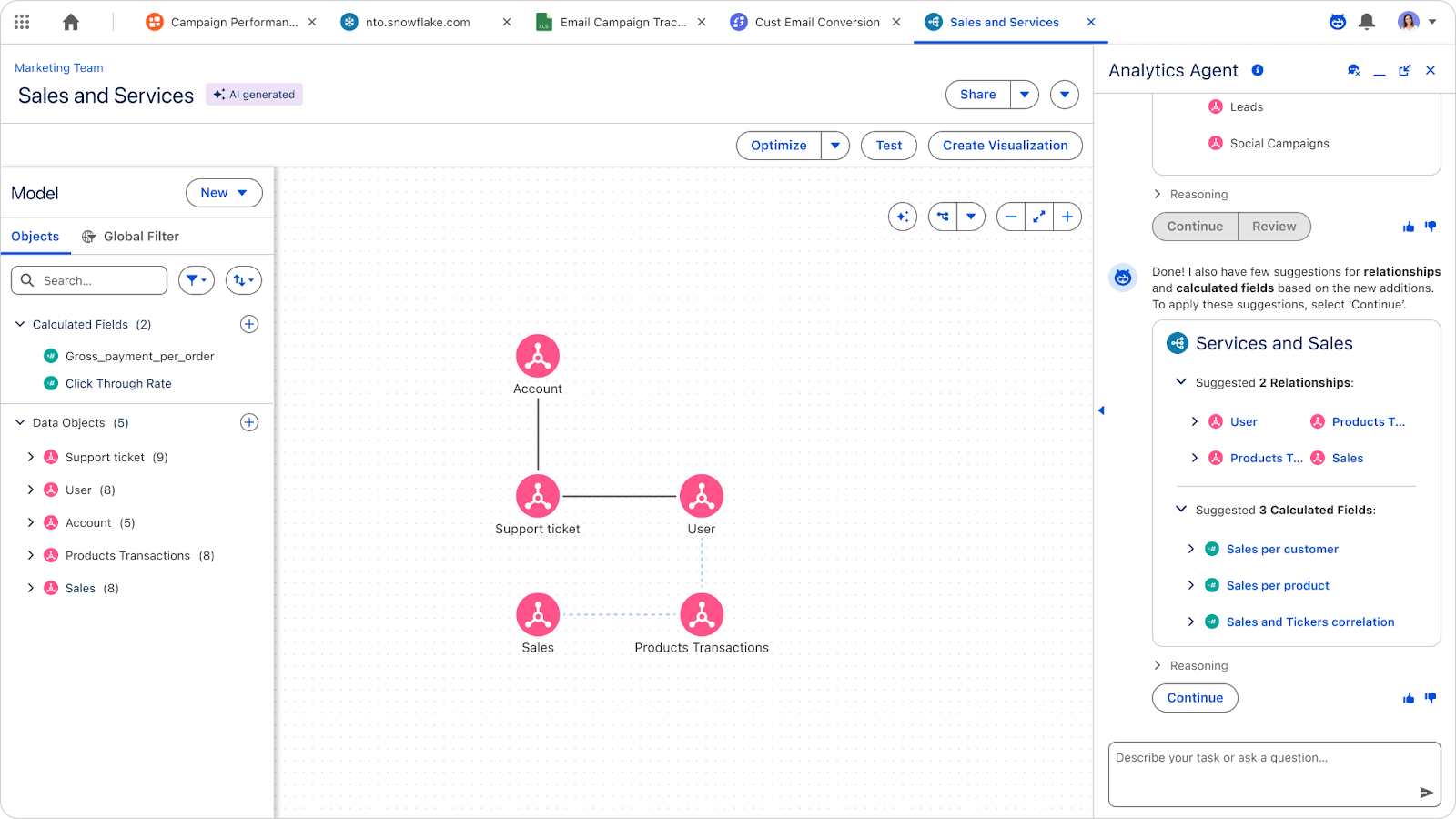
Tableau Next: ์ž๋™ ์‹œ๋งจํ‹ฑ ๋ชจ๋ธ ์ƒ์„ฑ(๋ฒ ํƒ€)

AI๋ฅผ ์‚ฌ์šฉํ•˜์—ฌ ์‹œ๋งจํ‹ฑ ๋ชจ๋ธ๊ณผ ๊ด€๊ณ„๋ฅผ ์ž๋™์œผ๋กœ ์ƒ์„ฑํ•  ์ˆ˜ ์žˆ์Šต๋‹ˆ๋‹ค.

Create an SDM in Tableau Next with plain language

Tableau Next: ์ž๋™ ์‹œ๋งจํ‹ฑ ๋ชจ๋ธ ์ƒ์„ฑ(๋ฒ ํƒ€)

AI๋ฅผ ์‚ฌ์šฉํ•˜์—ฌ ์ผ๋ฐ˜์ ์ธ ์–ธ์–ด์—์„œ ์‹œ๋งจํ‹ฑ ๋ชจ๋ธ, ๊ด€๊ณ„, ๊ณ„์‚ฐ๋œ ํ•„๋“œ๋ฅผ ์ž๋™์œผ๋กœ ์ƒ์„ฑํ•จ์œผ๋กœ์จ ์ธ์‚ฌ์ดํŠธ ๋„์ถœ ์‹œ๊ฐ„์„ ๋‹จ์ถ•ํ•˜์‹ญ์‹œ์˜ค. ์ด ๊ธฐ๋Šฅ์€ ์‹ ๊ทœ ์‚ฌ์šฉ์ž์—๊ฒŒ ๊ธฐ์ˆ ์  ์žฅ๋ฒฝ์„ ๋‚ฎ์ถฐ์ฃผ๊ณ  ๋ฐ์ดํ„ฐ ์ „๋ฌธ๊ฐ€๊ฐ€ ๋ณต์žกํ•œ ๋ชจ๋ธ๋ง ์ž‘์—…์„ ์‹œ์ž‘ํ•˜๋Š” ๋ฐ ํฐ ํž˜์ด ๋ฉ๋‹ˆ๋‹ค.

์ž๋™ ์‹œ๋งจํ‹ฑ ๋ชจ๋ธ ์ƒ์„ฑ์€ Tableau Next์— ๋ฒ ํƒ€ ๋ฒ„์ „์œผ๋กœ ์ œ๊ณต๋ฉ๋‹ˆ๋‹ค.

Tableau Next: Q&A ๋ณด์ •(๋ฒ ํƒ€)

์—์ด์ „ํŠธ ๋‹ต๋ณ€ ์œ ํšจ์„ฑ ๊ฒ€์‚ฌ ๋ฐ ์ตœ์ ํ™”

Tableau Next: Q&A ๋ณด์ •(๋ฒ ํƒ€)

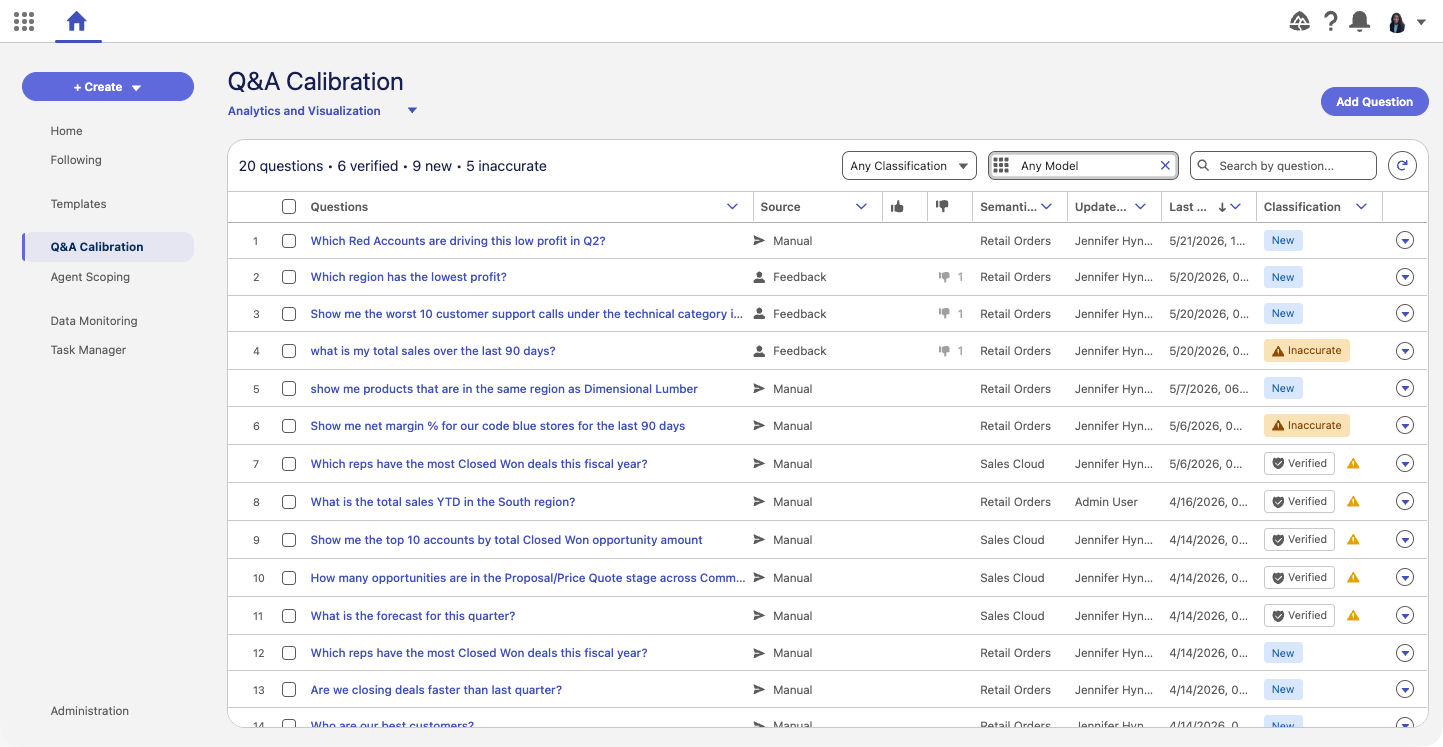
๋ฐ์ดํ„ฐ SME๊ฐ€ AI๊ฐ€ ์ƒ์„ฑํ•œ ๋‹ต๋ณ€์˜ ์œ ํšจ์„ฑ์„ ์ฒด๊ณ„์ ์œผ๋กœ ๊ฒ€์‚ฌํ•˜๊ณ  ์ตœ์ ํ™”ํ•˜๋„๋ก ์ง€์›ํ•˜์—ฌ ์กฐ์ง์˜ ๊ณ ์œ ํ•œ ํ™˜๊ฒฝ ์„ค์ •์— ๋ถ€ํ•ฉํ•˜๋„๋ก ๋ณด์žฅํ•ฉ๋‹ˆ๋‹ค. ์ด ๋„๊ตฌ๋กœ ์ผ๊ด„ ํšŒ๊ท€ ํ…Œ์ŠคํŠธ ๋ฐ ์งˆ๋ฌธ ์ƒ์„ฑ์ด ๊ฐ€๋Šฅํ•ด์ ธ ๋ฐ์ดํ„ฐ ๋ชจ๋ธ์ด ๋ฐœ์ „ํ•จ์— ๋”ฐ๋ผ ๋†’์€ ์ •ํ™•๋„์™€ ์ผ๊ด€์„ฑ์„ ์œ ์ง€ํ•  ์ˆ˜ ์žˆ์Šต๋‹ˆ๋‹ค.

Q&A ๋ณด์ •์€ Tableau Next์— ๋ฒ ํƒ€ ๋ฒ„์ „์œผ๋กœ ์ œ๊ณต๋ฉ๋‹ˆ๋‹ค.

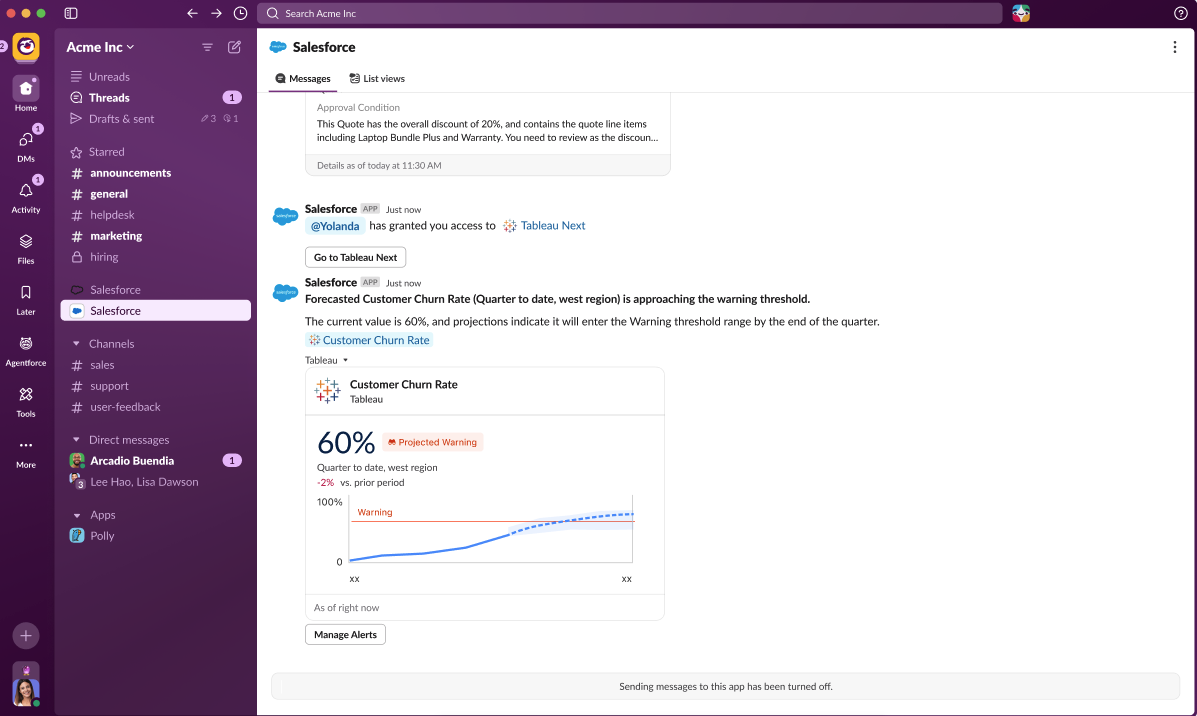
Tableau Next: ์ž„๊ณ„๊ฐ’ ๊ทผ์ ‘๋ฅ  ์ธ์‚ฌ์ดํŠธ(๋ฒ ํƒ€)

์ค‘์š”ํ•œ ํ•œ๋„์™€ ์—ฐ๊ด€๋œ ๋ฉ”ํŠธ๋ฆญ์„ ๋ชจ๋‹ˆํ„ฐ๋งํ•  ๋•Œ, ์ž„๊ณ„๊ฐ’์„ ์ด๋ฏธ ๋„˜์–ด์„  ๊ฒƒ์„ ์•„๋Š” ๊ฒƒ์œผ๋กœ๋Š” ์ถฉ๋ถ„ํ•˜์ง€ ์•Š์Šต๋‹ˆ๋‹ค. ์ž„๊ณ„๊ฐ’ ๊ทผ์ ‘๋ฅ  ์ธ์‚ฌ์ดํŠธ(Pace to Threshold Insights) ๊ธฐ๋Šฅ์„ ์‚ฌ์šฉํ•˜๋ฉด ์„ ํƒํ•œ ์‹œ๊ฐ„ ๋ฒ”์œ„ ๋‚ด์—์„œ ๋ฉ”ํŠธ๋ฆญ์ด ์„ค์ •๋œ ์ž„๊ณ„๊ฐ’์— ๋„๋‹ฌํ•˜๊ฑฐ๋‚˜ ์ดˆ๊ณผํ•  ๊ฒƒ์œผ๋กœ ์˜ˆ์ƒ๋˜๋Š”์ง€ ์—ฌ๋ถ€์™€ ๊ทธ ์˜ˆ์ƒ ์‹œ์ ์„ ํ™•์ธํ•  ์ˆ˜ ์žˆ์Šต๋‹ˆ๋‹ค. ์ž„๊ณ„๊ฐ’์ด ๊ตฌ์„ฑ๋ผ ์žˆ๊ณ  ์˜ˆ์ธก ๊ธฐ๋Šฅ์„ ํ™œ์„ฑํ™”ํ•ด ๋†“์œผ๋ฉด ์ด๋Ÿฌํ•œ ์ธ์‚ฌ์ดํŠธ๊ฐ€ ๋ฉ”ํŠธ๋ฆญ ์นด๋“œ์™€ ์„ธ๋ถ€ ์ •๋ณด ํŽ˜์ด์ง€์— ์ž๋™์œผ๋กœ ํ‘œ์‹œ๋ฉ๋‹ˆ๋‹ค. ์†Œ๋น„ ํ•œ๋„, ์˜ˆ์‚ฐ ์ƒํ•œ์„ , ์„œ๋น„์Šค ์ˆ˜์ค€ ๋ชฉํ‘œ ๋“ฑ ๋ฌด์—‡์„ ์ถ”์ ํ•˜๋“  ๊ด€๊ณ„์—†์ด, ์ž„๊ณ„๊ฐ’ ๊ทผ์ ‘๋ฅ  ์ธ์‚ฌ์ดํŠธ ๊ธฐ๋Šฅ์€, ์ •์ ์ธ ์ž„๊ณ„๊ฐ’์„ ์„ ์ œ์ ์ธ ์‹ ํ˜ธ๋กœ ๋ฐ”๊พธ์–ด ํ•œ๋„๋ฅผ ์ดˆ๊ณผํ•˜๊ธฐ ์ „์— ์ ์ ˆํ•œ ์กฐ์น˜๋ฅผ ์ทจํ•˜๋„๋ก ์ง€์›ํ•ฉ๋‹ˆ๋‹ค.

Tableau Next: ์ž„๊ณ„๊ฐ’ ๊ทผ์ ‘๋ฅ  ์ธ์‚ฌ์ดํŠธ(๋ฒ ํƒ€)

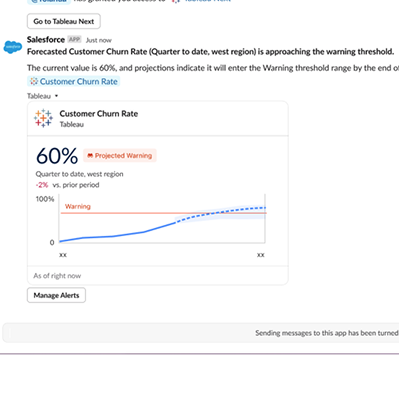
์ค‘์š”ํ•œ ํ•œ๋„์™€ ์—ฐ๊ด€๋œ ๋ฉ”ํŠธ๋ฆญ์„ ๋ชจ๋‹ˆํ„ฐ๋งํ•  ๋•Œ, ์ž„๊ณ„๊ฐ’์„ ์ด๋ฏธ ๋„˜์–ด์„  ๊ฒƒ์„ ์•„๋Š” ๊ฒƒ์œผ๋กœ๋Š” ์ถฉ๋ถ„ํ•˜์ง€ ์•Š์Šต๋‹ˆ๋‹ค. ์ž„๊ณ„๊ฐ’ ๊ทผ์ ‘๋ฅ  ์ธ์‚ฌ์ดํŠธ(Pace to Threshold Insights) ๊ธฐ๋Šฅ์„ ์‚ฌ์šฉํ•˜๋ฉด ์„ ํƒํ•œ ์‹œ๊ฐ„ ๋ฒ”์œ„ ๋‚ด์—์„œ ๋ฉ”ํŠธ๋ฆญ์ด ์„ค์ •๋œ ์ž„๊ณ„๊ฐ’์— ๋„๋‹ฌํ•˜๊ฑฐ๋‚˜ ์ดˆ๊ณผํ•  ๊ฒƒ์œผ๋กœ ์˜ˆ์ƒ๋˜๋Š”์ง€ ์—ฌ๋ถ€์™€ ๊ทธ ์˜ˆ์ƒ ์‹œ์ ์„ ํ™•์ธํ•  ์ˆ˜ ์žˆ์Šต๋‹ˆ๋‹ค. ์ž„๊ณ„๊ฐ’์ด ๊ตฌ์„ฑ๋ผ ์žˆ๊ณ  ์˜ˆ์ธก ๊ธฐ๋Šฅ์„ ํ™œ์„ฑํ™”ํ•ด ๋†“์œผ๋ฉด ์ด๋Ÿฌํ•œ ์ธ์‚ฌ์ดํŠธ๊ฐ€ ๋ฉ”ํŠธ๋ฆญ ์นด๋“œ์™€ ์„ธ๋ถ€ ์ •๋ณด ํŽ˜์ด์ง€์— ์ž๋™์œผ๋กœ ํ‘œ์‹œ๋ฉ๋‹ˆ๋‹ค. ์†Œ๋น„ ํ•œ๋„, ์˜ˆ์‚ฐ ์ƒํ•œ์„ , ์„œ๋น„์Šค ์ˆ˜์ค€ ๋ชฉํ‘œ ๋“ฑ ๋ฌด์—‡์„ ์ถ”์ ํ•˜๋“  ๊ด€๊ณ„์—†์ด, ์ž„๊ณ„๊ฐ’ ๊ทผ์ ‘๋ฅ  ์ธ์‚ฌ์ดํŠธ ๊ธฐ๋Šฅ์€, ์ •์ ์ธ ์ž„๊ณ„๊ฐ’์„ ์„ ์ œ์ ์ธ ์‹ ํ˜ธ๋กœ ๋ฐ”๊พธ์–ด ํ•œ๋„๋ฅผ ์ดˆ๊ณผํ•˜๊ธฐ ์ „์— ์ ์ ˆํ•œ ์กฐ์น˜๋ฅผ ์ทจํ•˜๋„๋ก ์ง€์›ํ•ฉ๋‹ˆ๋‹ค.

์ž„๊ณ„๊ฐ’ ๊ทผ์ ‘๋ฅ  ์ธ์‚ฌ์ดํŠธ๋Š” Tableau Next์— ๋ฒ ํƒ€ ๋ฒ„์ „์œผ๋กœ ์ œ๊ณต๋ฉ๋‹ˆ๋‹ค.

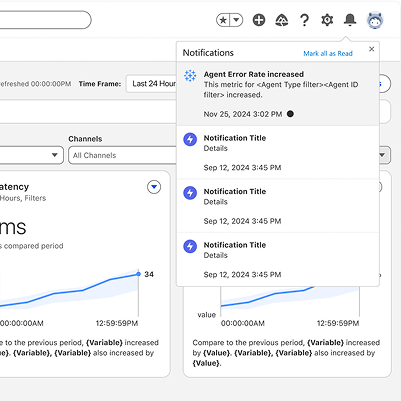
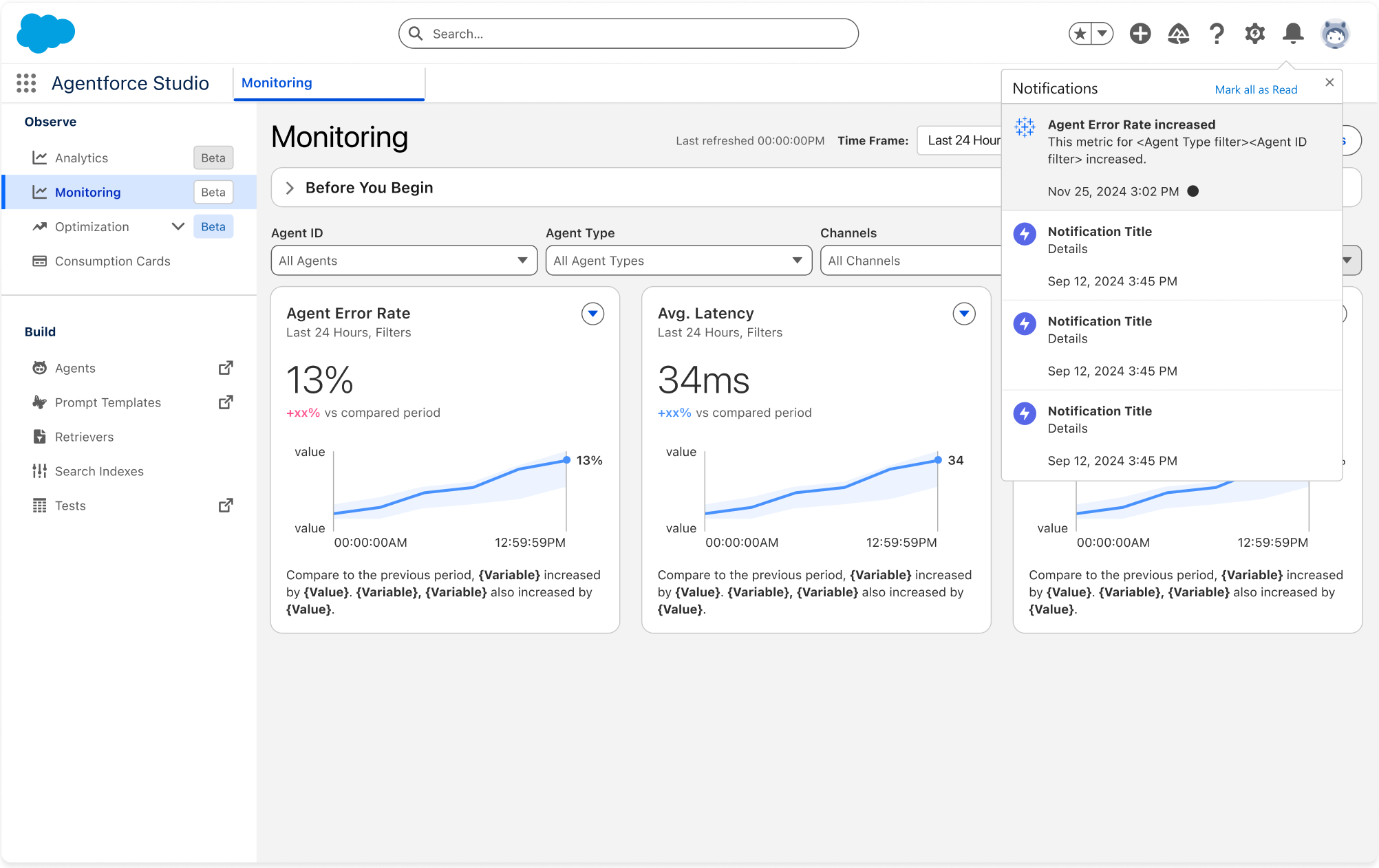
Tableau Next: Agentforce ์ƒํƒœ ๋ชจ๋‹ˆํ„ฐ๋ง ์•Œ๋ฆผ

AI ์—์ด์ „ํŠธ ๋ฌธ์ œ๊ฐ€ ๋น„์ฆˆ๋‹ˆ์Šค์— ์˜ํ–ฅ์„ ๋ฏธ์น˜๊ธฐ ์ „์— ํ•œ๋ฐœ ์•ž์„œ ๋Œ€์‘ํ•˜์‹ญ์‹œ์˜ค.

Tableau Next: Agentforce ์ƒํƒœ ๋ชจ๋‹ˆํ„ฐ๋ง ์•Œ๋ฆผ

๋ฐฐํฌ๋œ AI ์—์ด์ „ํŠธ๋ฅผ ๊ด€๋ฆฌํ•˜๋Š” ์ค‘์ด๋ผ๋ฉด, ๋ฌธ์ œ ๋ฐœ์ƒ ์‹œ ๊ฑฐ์˜ ์‹ค์‹œ๊ฐ„์œผ๋กœ ๋ฌธ์ œ๋ฅผ ์•Œ์•„์ฐจ๋ฆฌ๋Š” ๊ฒƒ์ด ๋งค์šฐ ์ค‘์š”ํ•ฉ๋‹ˆ๋‹ค. Agentforce ์ƒํƒœ ๋ชจ๋‹ˆํ„ฐ๋ง์˜ ๋น„ ์—์ด์ „ํŠธ ๋ฐ์ดํ„ฐ ์•Œ๋ฆผ์„ ์‚ฌ์šฉํ•˜๋ฉด ์ƒํƒœ ๋ชจ๋‹ˆํ„ฐ๋ง ๋Œ€์‹œ๋ณด๋“œ์—์„œ ๋ฐ”๋กœ, ์—์ด์ „ํŠธ ์˜ค๋ฅ˜์œจ๊ณผ ๊ฐ™์€ ์ฃผ์š” ์‹ ํ˜ธ๋ฅผ ์ถ”์ ํ•˜๋Š” ์„ ์ œ์  ์•Œ๋ฆผ์„ ์ƒ์„ฑํ•  ์ˆ˜ ์žˆ์Šต๋‹ˆ๋‹ค. ์กฐ๊ฑด์ด ์ถฉ์กฑ๋˜๋ฉด ๋ช‡ ๋ถ„ ๋‚ด์— ์•Œ๋ฆผ์„ ๋ฐ›๊ฒŒ ๋˜๋ฏ€๋กœ ๋ฌธ์ œ๊ฐ€ ๋” ์ปค์ง€๊ธฐ ์ „์— ์กฐ์น˜๋ฅผ ์ทจํ•  ์ˆ˜ ์žˆ์Šต๋‹ˆ๋‹ค.

Agentforce ์ƒํƒœ ๋ชจ๋‹ˆํ„ฐ๋ง ์•Œ๋ฆผ์€ Tableau Next์— ์ •์‹ ์ถœ์‹œ๋˜์—ˆ์Šต๋‹ˆ๋‹ค.

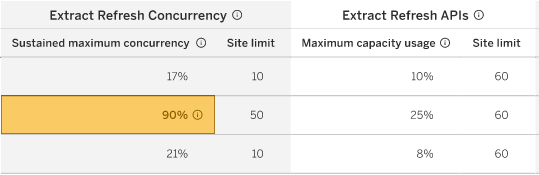
ํด๋ผ์šฐ๋“œ ์šฉ๋Ÿ‰ ๊ด€๋ฆฌ

Tableau Cloud ์šฉ๋Ÿ‰ ์ œํ•œ์„ ์—ฌ๋Ÿฌ ์‚ฌ์ดํŠธ์— ๊ฑธ์ณ ์œ ์—ฐํ•˜๊ฒŒ ํ†ต์ œํ•˜๊ณ  ๊ด€๋ฆฌํ•  ์ˆ˜ ์žˆ์Šต๋‹ˆ๋‹ค.

Adjust capacity limits in cloud settings

ํด๋ผ์šฐ๋“œ ์šฉ๋Ÿ‰ ๊ด€๋ฆฌ

์ถ”์ถœ ์ƒˆ๋กœ ๊ณ ์นจ ๋™์‹œ์„ฑ ๋ฐ ๊ฒŒ์‹œ API์™€ ๊ฐ™์€ ์šฉ๋Ÿ‰ ์ œํ•œ์„ ํ™•์ธํ•˜๊ณ  ํˆฌ๋ช…ํ•˜๊ฒŒ ๊ด€๋ฆฌํ•  ์ˆ˜ ์žˆ๋„๋ก, Tableau Cloud ๊ด€๋ฆฌ์ž๋ฅผ ์œ„ํ•œ ์œ ์—ฐํ•œ ์šฉ๋Ÿ‰ ๊ฑฐ๋ฒ„๋„Œ์Šค ๊ธฐ๋Šฅ์„ ์ œ๊ณตํ•ฉ๋‹ˆ๋‹ค. ๊ด€๋ฆฌ์ž๋Š” ์‚ฌ์ดํŠธ ๊ฐ„์— ์šฉ๋Ÿ‰ ์ œํ•œ์„ ์ „ํ™˜ํ•˜์—ฌ ํ”„๋กœ๋•์…˜ ํ™˜๊ฒฝ์— ํ•œ๋„๊ฐ€ ๋” ๋Š˜์–ด๋‚˜๋„๋ก ๋ณด์žฅํ•˜์—ฌ ์œ ์—ฐํ•œ ์ œํ’ˆ ์‚ฌ์šฉ์„ ์ด‰์ง„ํ•  ์ˆ˜ ์žˆ์Šต๋‹ˆ๋‹ค.

ํด๋ผ์šฐ๋“œ ์šฉ๋Ÿ‰ ๊ด€๋ฆฌ๋Š” Tableau Cloud์— ์ •์‹ ์ถœ์‹œ๋˜์—ˆ์Šต๋‹ˆ๋‹ค.

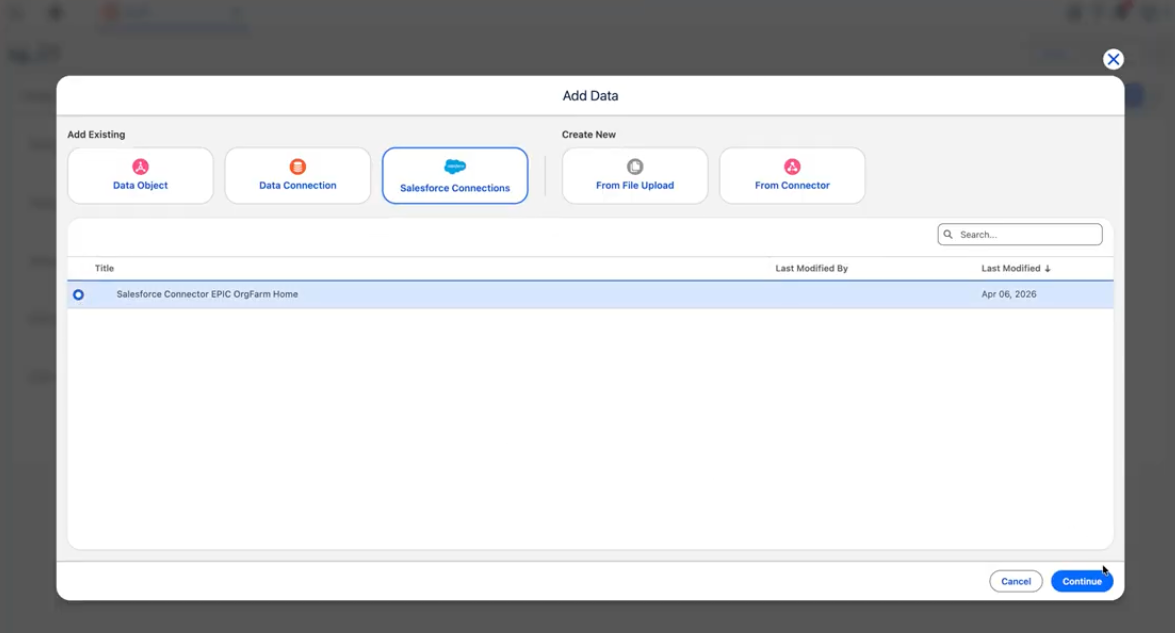
Tableau Next: Salesforce ์ปค๋„ฅํ„ฐ(๋ฒ ํƒ€)

Tableau Next์—์„œ Salesforce ๋ฐ์ดํ„ฐ ์ปค๋„ฅํ„ฐ์— ๊ธฐ๋ณธ์ ์œผ๋กœ ์•ก์„ธ์Šคํ•  ์ˆ˜ ์žˆ์Šต๋‹ˆ๋‹ค.

Tableau Next: Salesforce ์ปค๋„ฅํ„ฐ(๋ฒ ํƒ€)

Tableau ๋‚ด์—์„œ ๋ฐ”๋กœ Salesforce ํ‘œ์ค€ ๋ฐ ์‚ฌ์šฉ์ž ์ง€์ • ๊ฐœ์ฒด๋ฅผ ์ฐพ์•„๋ณด๊ณ  ์—ฐ๊ฒฐํ•˜์—ฌ ๋ฐ์ดํ„ฐ ์ˆ˜์ง‘์„ ๊ฐ„์†Œํ™”ํ•˜์‹ญ์‹œ์˜ค. ์ด ๊ธฐ๋ณธ ํ†ตํ•ฉ ๊ธฐ๋Šฅ์„ ํ†ตํ•ด ํ”Œ๋žซํผ์—์„œ ๋‚˜๊ฐ€์ง€ ์•Š๊ณ ๋„ ๋ถ„์„์— ๋Œ€ํ•œ ๊ธฐ๋ณธ ํ‚ค์™€ ๋ฒ”์ฃผ๋ฅผ ์‹ ์†ํ•˜๊ฒŒ ์„ค์ •ํ•  ์ˆ˜ ์žˆ์Šต๋‹ˆ๋‹ค.

Salesforce ์ปค๋„ฅํ„ฐ๋Š” Tableau Next์— ๋ฒ ํƒ€ ๋ฒ„์ „์œผ๋กœ ์ œ๊ณต๋ฉ๋‹ˆ๋‹ค.

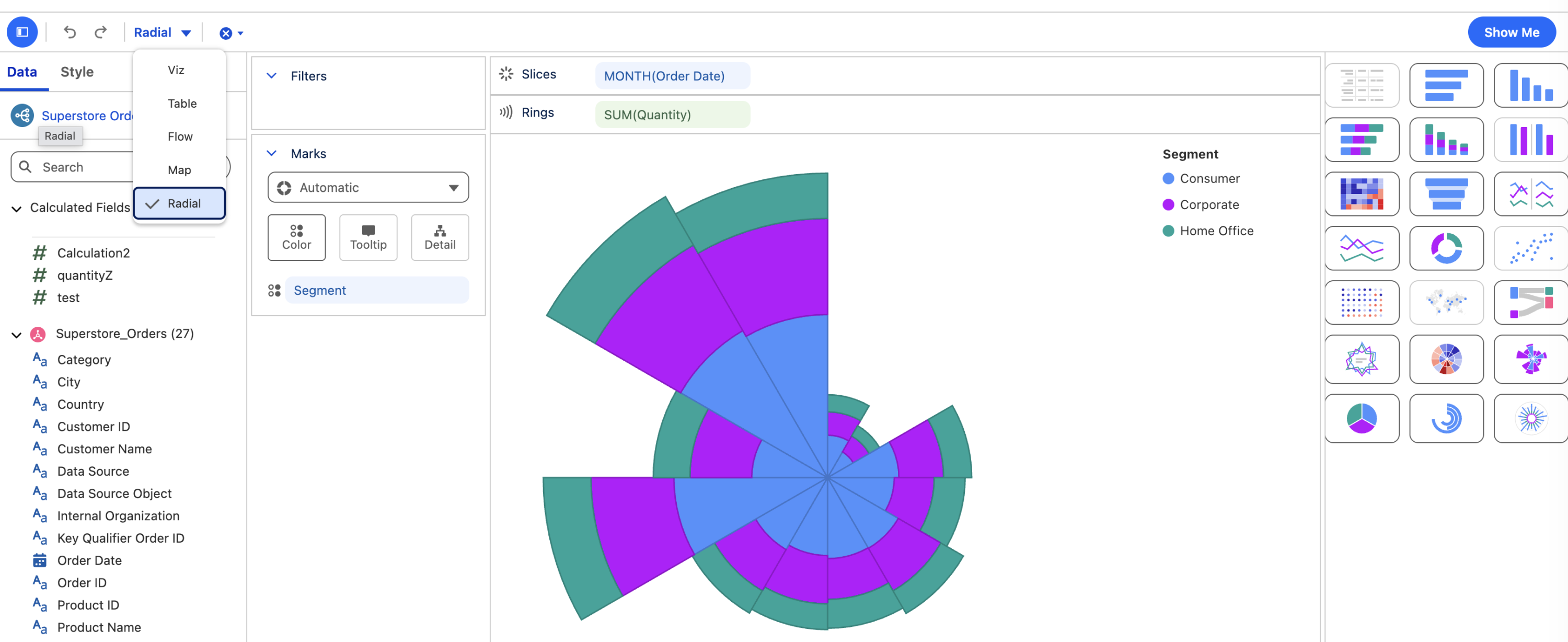
Tableau Next: ๋ฐฉ์‚ฌํ˜• ๋ ˆ์ด์•„์›ƒ

์ˆœํ™˜ ๋ฐ ๊ณ„์ ˆ์  ๋ฐ์ดํ„ฐ์™€ ์ „์ฒด ๋Œ€๋น„ ๋ถ€๋ถ„ ๋ฐ์ดํ„ฐ๋ฅผ 6๊ฐ€์ง€ ์ƒˆ๋กœ์šด ์ฐจํŠธ ์œ ํ˜•์œผ๋กœ ์‹œ๊ฐํ™”ํ•  ์ˆ˜ ์žˆ์Šต๋‹ˆ๋‹ค.

Tableau Next: ๋ฐฉ์‚ฌํ˜• ๋ ˆ์ด์•„์›ƒ

๋ฐฉ์‚ฌํ˜• ๋ ˆ์ด์•„์›ƒ์„ ํ†ตํ•ด, ๋ฐฉ์‚ฌํ˜• ํžˆํŠธ ๋งต, ๋ง‰๋Œ€ ์ฐจํŠธ, ๋ผ์ธ ์ฐจํŠธ, Nightingale ์ฐจํŠธ๋ฅผ ํฌํ•จํ•œ 6๊ฐ€์ง€ ์ƒˆ๋กœ์šด ์ฐจํŠธ ์œ ํ˜•์— ๊ฑธ์ณ ๋ฐ์ดํ„ฐ๋ฅผ ๋ฐฉ์‚ฌํ˜•์œผ๋กœ ๋ฐฐ์น˜ํ•จ์œผ๋กœ์จ ๋ผ์ธ ์ฐจํŠธ์—์„œ ๋†“์น˜๋Š” ํŒจํ„ด์„ ์ฐพ์•„๋‚ด์‹ญ์‹œ์˜ค. ๋ถ„์„๊ฐ€๋Š” ๊ฐ„๊ฒฐํ•˜๊ณ  ์‹œ๊ฐ์ ์œผ๋กœ ๋งค๋ ฅ์ ์ธ ์ด๋Ÿฌํ•œ ์„œ์‹์„ ํ†ตํ•ด ์ถ”์„ธ์™€ ๋น„์œจ์„ ๋” ์ง๊ด€์ ์ธ ๋ฐฉ์‹์œผ๋กœ ์ „๋‹ฌํ•  ์ˆ˜ ์žˆ์Šต๋‹ˆ๋‹ค.

๋ฐฉ์‚ฌํ˜• ๋ ˆ์ด์•„์›ƒ์€ Tableau Next์— ์ •์‹ ์ถœ์‹œ๋˜์—ˆ์Šต๋‹ˆ๋‹ค.

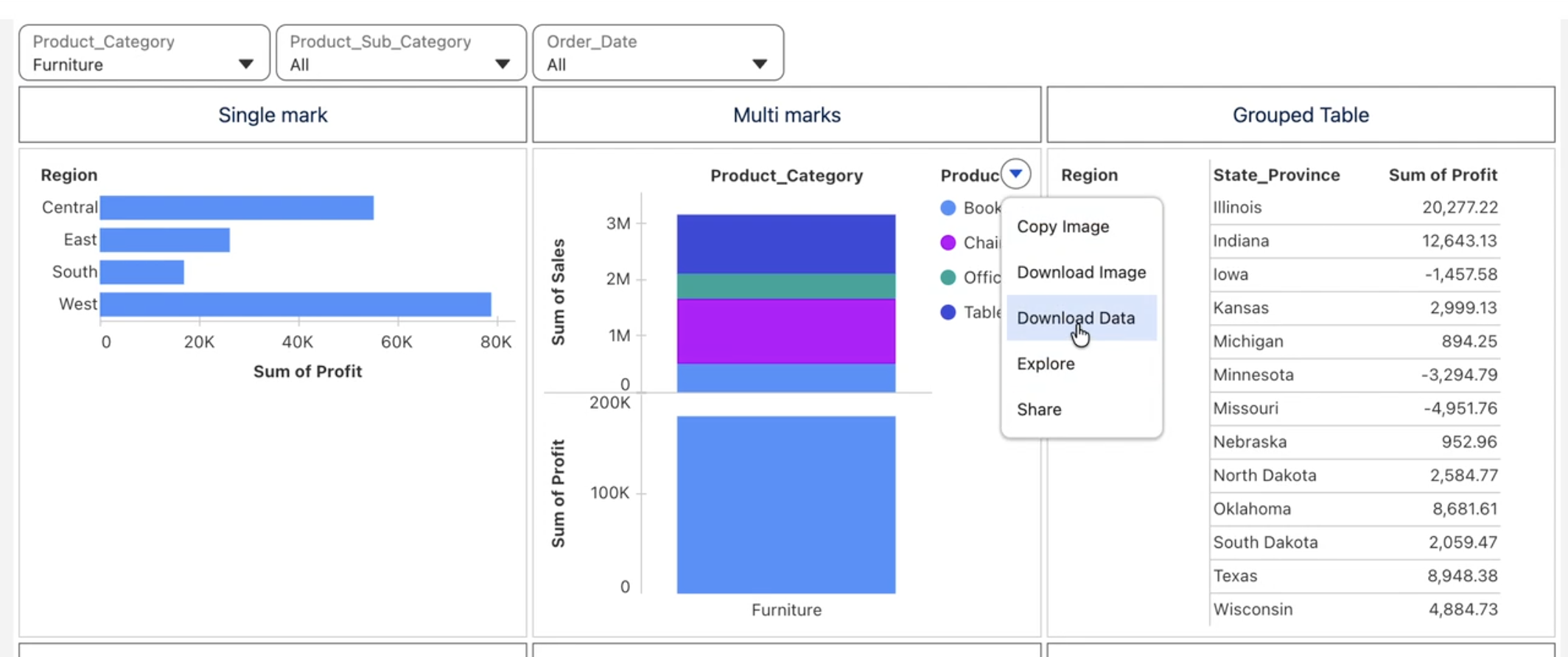
Tableau Next: ํ–ฅ์ƒ๋œ ๋ฐ์ดํ„ฐ ํƒ์ƒ‰

์ง‘๊ณ„๋œ ๋น„์ฃผ์–ผ๋ฆฌ์ œ์ด์…˜ ๋ฐ์ดํ„ฐ๋ฅผ CSV ํŒŒ์ผ๋กœ ๋‹ค์šด๋กœ๋“œํ•˜๊ณ , ์†Œ๊ณ„๋ฅผ ํฌํ•จํ•˜์—ฌ ํ…Œ์ด๋ธ”์„ ๊ทธ๋ฃนํ™”ํ•˜๊ณ , ํ…์ŠคํŠธ ์œ„์ ฏ์— ๋ฉ”ํŠธ๋ฆญ์„ ํฌํ•จํ•  ์ˆ˜ ์žˆ์Šต๋‹ˆ๋‹ค.

Tableau Next: ํ–ฅ์ƒ๋œ ๋ฐ์ดํ„ฐ ํƒ์ƒ‰

์ถ”๊ฐ€ ๋ถ„์„์„ ์œ„ํ•ด ๋น„์ฃผ์–ผ๋ฆฌ์ œ์ด์…˜ ๋ฐ์ดํ„ฐ๋ฅผ ์ฆ‰์‹œ ๋‚ด๋ณด๋‚ด๊ฑฐ๋‚˜ CSV๋กœ ๋‹ค์šด๋กœ๋“œ ๊ธฐ๋Šฅ์œผ๋กœ ๊ณต์œ ํ•˜์‹ญ์‹œ์˜ค. ์†Œ๊ณ„๋ฅผ ํฌํ•จํ•˜์—ฌ ๊ทธ๋ฃนํ™”๋œ ํ…Œ์ด๋ธ”์—์„œ ํ™•์žฅ ๋ฐ ์ถ•์†Œ ๊ฐ€๋Šฅํ•œ ํ–‰์„ ์‚ฌ์šฉํ•˜์—ฌ ๋Œ€๋žต์ ์ธ ์š”์•ฝ๊ณผ ์„ธ๋ถ€ ์ˆ˜์ค€ ์ •๋ณด ๊ฐ„์— ์†์‰ฝ๊ฒŒ ์ „ํ™˜ํ•  ์ˆ˜ ์žˆ์Šต๋‹ˆ๋‹ค. ๋Œ€์‹œ๋ณด๋“œ์˜ ํ…์ŠคํŠธ ์œ„์ ฏ์— ๋ฉ”ํŠธ๋ฆญ ํฌํ•จ ๊ธฐ๋Šฅ์„ ์‚ฌ์šฉํ•˜์—ฌ ์ž๋™ ์—…๋ฐ์ดํŠธ๋˜๋Š” ๋ผ์ด๋ธŒ ๋ฉ”ํŠธ๋ฆญ ๊ฐ’์„ ์„ค๋ช… ํ…์ŠคํŠธ์— ์ง์ ‘ ๋‚ด์žฅํ•จ์œผ๋กœ์จ ์„œ์ˆ ๊ณผ ์ˆซ์ž๋ฅผ ๋™๊ธฐํ™”๋œ ์ƒํƒœ๋กœ ์œ ์ง€ํ•˜์‹ญ์‹œ์˜ค.

CSV ํŒŒ์ผ๋กœ ๋‹ค์šด๋กœ๋“œ, ์†Œ๊ณ„๋ฅผ ํฌํ•จํ•˜์—ฌ ๊ทธ๋ฃนํ™”๋œ ํ…Œ์ด๋ธ”, ๋Œ€์‹œ๋ณด๋“œ์˜ ํ…์ŠคํŠธ ์œ„์ ฏ์— ๋ฉ”ํŠธ๋ฆญ ํฌํ•จ์€ Tableau Next์— ์ •์‹ ์ถœ์‹œ๋˜์—ˆ์Šต๋‹ˆ๋‹ค.

Tableau Next: ๋™์ž‘ - ํ•„ํ„ฐ, ๋งค๊ฐœ ๋ณ€์ˆ˜ ๋ฐ ๋‹ค์ค‘ ์„ ํƒ

์‚ฌ์šฉ์ž๊ฐ€ ์ธ์‚ฌ์ดํŠธ๋ฅผ ํ•„ํ„ฐ๋งํ•˜๊ณ  ํƒ์ƒ‰ํ•˜๊ณ  ๊ทธ์— ๋”ฐ๋ผ ์ ์ ˆํ•œ ์กฐ์น˜๋ฅผ ์ทจํ•˜๋Š” ๋ฐฉ์‹์„ ์ •ํ™•ํ•˜๊ณ  ์œ ์—ฐํ•˜๊ฒŒ ์ œ์–ดํ•  ์ˆ˜ ์žˆ๋„๋ก ์ง€์›ํ•˜์‹ญ์‹œ์˜ค.

Tableau Next: ๋™์ž‘ - ํ•„ํ„ฐ, ๋งค๊ฐœ ๋ณ€์ˆ˜ ๋ฐ ๋‹ค์ค‘ ์„ ํƒ

ํ•„ํ„ฐ ๋™์ž‘์„ ์‚ฌ์šฉํ•˜์—ฌ ํ•œ ์ „์—ญ ์„ ํƒ ๋„๊ตฌ์—์„œ ์—ฌ๋Ÿฌ ๋ฐ์ดํ„ฐ ๋ชจ๋ธ์„ ์ œ์–ดํ•˜๊ณ , ๋งค๊ฐœ ๋ณ€์ˆ˜ ๋™์ž‘์„ ์‚ฌ์šฉํ•˜์—ฌ ์‹œ๊ฐ์  ์ƒํ˜ธ ์ž‘์šฉ์—์„œ ๋งค๊ฐœ ๋ณ€์ˆ˜ ๋ณ€๊ฒฝ์„ ํŠธ๋ฆฌ๊ฑฐํ•˜๊ณ , ๋‹ค์ค‘ ์„ ํƒ์„ ํ†ตํ•ด ์—ฌ๋Ÿฌ ๋ฐ์ดํ„ฐ ์š”์†Œ๋ฅผ ํ•œ ๋ฒˆ์— ์ฒ˜๋ฆฌํ•˜์—ฌ ์›Œํฌํ”Œ๋กœ๋ฅผ ๊ฐ„์†Œํ™”ํ•˜๊ณ  ๋ฐ˜๋ณต์ ์ธ ํด๋ฆญ์„ ์—†์• ์‹ญ์‹œ์˜ค. ๋Œ€์ƒ ๋งค๊ฐœ ๋ณ€์ˆ˜๋ฅผ ์‚ฌ์šฉํ•˜๋ฉด ๋ฒ”์œ„ ๋งค๊ฐœ ๋ณ€์ˆ˜๊ฐ€ ๊ด€๋ จ ๋น„์ฃผ์–ผ๋ฆฌ์ œ์ด์…˜์—๋งŒ ์—…๋ฐ์ดํŠธ๋˜์–ด ์ธ์‚ฌ์ดํŠธ๋ฅผ ๋น ๋ฅด๊ณ  ์ง‘์ค‘์ ์œผ๋กœ ์–ป์„ ์ˆ˜ ์žˆ์Šต๋‹ˆ๋‹ค.

ํ•„ํ„ฐ, ๋งค๊ฐœ ๋ณ€์ˆ˜, ๋‹ค์ค‘ ์„ ํƒ ๋™์ž‘์€ Tableau Next์— ์ •์‹ ์ถœ์‹œ๋˜์—ˆ์Šต๋‹ˆ๋‹ค.

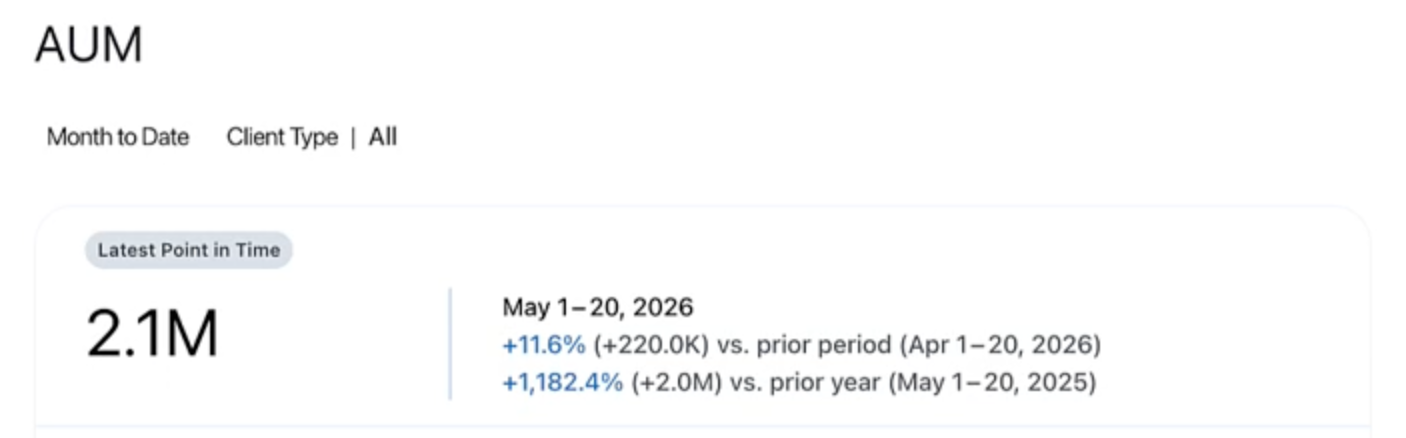
Tableau Pulse: ํŠน์ • ์‹œ์  ๋ฉ”ํŠธ๋ฆญ

์žฌ๊ณ  ์ˆ˜์ค€์ด๋‚˜ ์ธ์›์ˆ˜์™€ ๊ฐ™์€ ์Šค๋ƒ…์ƒท ๋ฉ”ํŠธ๋ฆญ์ด ํ•ด๋‹น ๊ธฐ๊ฐ„์˜ ๋งˆ์ง€๋ง‰ ๋‚  ๊ธฐ์ค€ ๊ฐ’์„ ๋ฐ˜์˜ํ•˜๋„๋ก ํ•˜์‹ญ์‹œ์˜ค. ์ด์ œ ๋ถ„์„๊ฐ€๋Š” ๊ณ ๊ธ‰ ํŽธ์ง‘๊ธฐ์—์„œ ๊ณ„์‚ฐ์‹์„ ์ž‘์„ฑํ•˜๋Š” ๋Œ€์‹  Pulse ๋ฉ”ํŠธ๋ฆญ์„ ํ•ด๋‹น ๊ธฐ๊ฐ„์— ๊ฑธ์นœ ์ง‘๊ณ„๊ฐ€ ์•„๋‹ˆ๋ผ 'ํŠน์ • ์‹œ์ '์˜ ๊ฐ’์œผ๋กœ ์ •์˜ํ•  ์ˆ˜ ์žˆ์Šต๋‹ˆ๋‹ค. ํŒ€์—์„œ๋Š” Tableau Pulse: ํŠน์ • ์‹œ์  ๋ฉ”ํŠธ๋ฆญ์„ ์‚ฌ์šฉํ•˜์—ฌ ๋น„์ฆˆ๋‹ˆ์Šค ์šด์˜์— ๋ถ€ํ•ฉํ•˜๋Š” ๋ณด๊ณ ๋ฅผ ํ†ตํ•ด ์„ฑ๊ณผ๋ฅผ ์‹ ๋ขฐ๋„ ์žˆ๊ฒŒ ์ถ”์ ํ•  ์ˆ˜ ์žˆ์Šต๋‹ˆ๋‹ค.

Tableau Pulse: ํŠน์ • ์‹œ์  ๋ฉ”ํŠธ๋ฆญ์€ Tableau Cloud์— ์ •์‹ ์ถœ์‹œ๋˜์—ˆ์Šต๋‹ˆ๋‹ค.

Tableau Pulse: ํŠน์ • ์‹œ์  ๋ฉ”ํŠธ๋ฆญ

์žฌ๊ณ  ์ˆ˜์ค€์ด๋‚˜ ์ธ์›์ˆ˜์™€ ๊ฐ™์€ ์Šค๋ƒ…์ƒท ๋ฉ”ํŠธ๋ฆญ์ด ํ•ด๋‹น ๊ธฐ๊ฐ„์˜ ๋งˆ์ง€๋ง‰ ๋‚  ๊ธฐ์ค€ ๊ฐ’์„ ๋ฐ˜์˜ํ•˜๋„๋ก ํ•˜์‹ญ์‹œ์˜ค. ์ด์ œ ๋ถ„์„๊ฐ€๋Š” ๊ณ ๊ธ‰ ํŽธ์ง‘๊ธฐ์—์„œ ๊ณ„์‚ฐ์‹์„ ์ž‘์„ฑํ•˜๋Š” ๋Œ€์‹  Pulse ๋ฉ”ํŠธ๋ฆญ์„ ํ•ด๋‹น ๊ธฐ๊ฐ„์— ๊ฑธ์นœ ์ง‘๊ณ„๊ฐ€ ์•„๋‹ˆ๋ผ 'ํŠน์ • ์‹œ์ '์˜ ๊ฐ’์œผ๋กœ ์ •์˜ํ•  ์ˆ˜ ์žˆ์Šต๋‹ˆ๋‹ค. ํŒ€์—์„œ๋Š” Tableau Pulse: ํŠน์ • ์‹œ์  ๋ฉ”ํŠธ๋ฆญ์„ ์‚ฌ์šฉํ•˜์—ฌ ๋น„์ฆˆ๋‹ˆ์Šค ์šด์˜์— ๋ถ€ํ•ฉํ•˜๋Š” ๋ณด๊ณ ๋ฅผ ํ†ตํ•ด ์„ฑ๊ณผ๋ฅผ ์‹ ๋ขฐ๋„ ์žˆ๊ฒŒ ์ถ”์ ํ•  ์ˆ˜ ์žˆ์Šต๋‹ˆ๋‹ค.

Tableau Pulse: ํŠน์ • ์‹œ์  ๋ฉ”ํŠธ๋ฆญ์€ Tableau Cloud์— ์ •์‹ ์ถœ์‹œ๋˜์—ˆ์Šต๋‹ˆ๋‹ค.

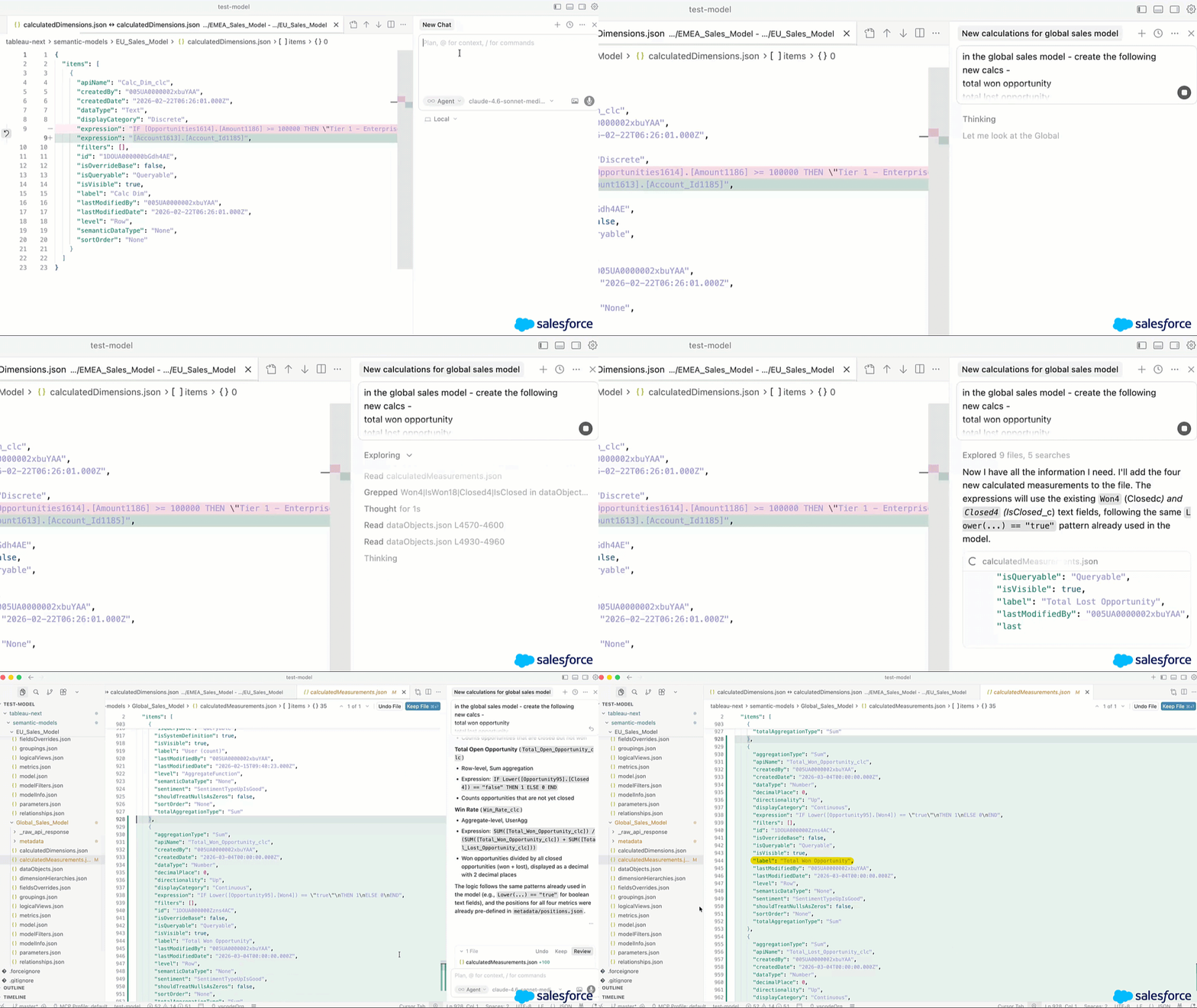
Tableau Next: Tableau ์‹œ๋งจํ‹ฑ DX ํ™•์žฅ ํ”„๋กœ๊ทธ๋žจ

ํ”„๋กœ๊ทธ๋ž˜๋ฐ ๋ฐฉ์‹์œผ๋กœ ์‹œ๋งจํ‹ฑ ๋ฐ์ดํ„ฐ ๋ชจ๋ธ์„ ์ฝ”๋“œ๋กœ ๊ด€๋ฆฌํ•˜๊ณ  ๋ฒ„์ „์„ ์ง€์ •ํ•  ์ˆ˜ ์žˆ์Šต๋‹ˆ๋‹ค.

Tableau Next: Tableau ์‹œ๋งจํ‹ฑ DX ํ™•์žฅ ํ”„๋กœ๊ทธ๋žจ

์ด๋ฏธ ์‚ฌ์šฉ ์ค‘์ธ ๊ฐœ๋ฐœ์ž ๋„๊ตฌ์—์„œ ๋ฐ”๋กœ Tableau ์‹œ๋งจํ‹ฑ ๋ชจ๋ธ์„ ์ฝ”๋“œ๋กœ ํŽธ์ง‘ํ•˜๊ณ  ๋ฐฐํฌํ•  ์ˆ˜ ์žˆ์Šต๋‹ˆ๋‹ค. VS Code, Cursor ๋˜๋Š” Agentforce Vibes์—์„œ ์ง์ ‘ ์‹œ๋งจํ‹ฑ ๋ชจ๋ธ์„ ์ƒ์„ฑ, ํŽธ์ง‘ ๋ฐ ์ผ๊ด„ ๊ด€๋ฆฌํ•˜์‹ญ์‹œ์˜ค. ํŒ€์€ Git ํ†ตํ•ฉ ๋ฐ CI/CD ์ง€์›์„ ํ†ตํ•ด ๋น„์ฆˆ๋‹ˆ์Šค ๋…ผ๋ฆฌ๋ฅผ ๋ฒ„์ „ ๊ด€๋ฆฌํ•˜๊ณ  ํ˜‘์—…ํ•˜๋ฉฐ Tableau ์‹œ๋งจํ‹ฑ ์ „๋ฐ˜์— ๊ฑธ์ณ ๋ณ€๊ฒฝ ์‚ฌํ•ญ์„ ์ผ๊ด€๋˜๊ฒŒ ๋ฐฐํฌํ•  ์ˆ˜ ์žˆ์Šต๋‹ˆ๋‹ค.

Tableau ์‹œ๋งจํ‹ฑ DX ํ™•์žฅ ํ”„๋กœ๊ทธ๋žจ์€ Tableau Next์— ์ •์‹ ์ถœ์‹œ๋˜์—ˆ์Šต๋‹ˆ๋‹ค.

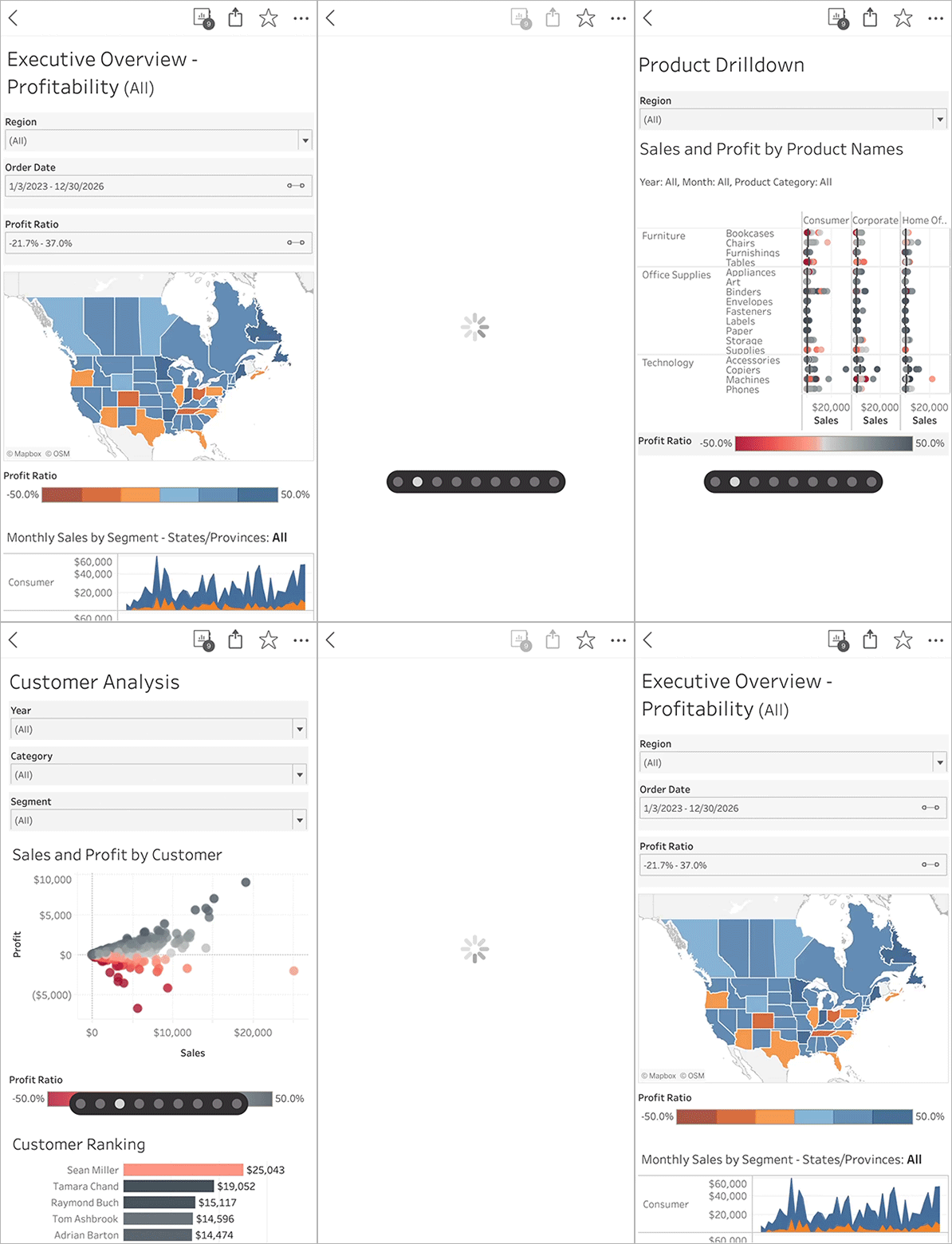
Tableau Mobile: ์‹œํŠธ ๊ฐ„ ์‚ด์ง ๋ฐ€๊ธฐ

Tableau Mobile ์•ฑ ๋‚ด์—์„œ ์—ฌ๋Ÿฌ ์‹œํŠธ๋กœ ๋œ ํ†ตํ•ฉ ๋ฌธ์„œ๋ฅผ ์›ํ™œํ•˜๊ฒŒ ํƒ์ƒ‰ํ•  ์ˆ˜ ์žˆ์Šต๋‹ˆ๋‹ค. ๋“œ๋กญ๋‹ค์šด ๋ฉ”๋‰ด๋ฅผ ์‚ฌ์šฉํ•˜์—ฌ ํŠน์ • ์‹œํŠธ๋ฅผ ์—ฌ๋Š” ๊ฒƒ ์™ธ์—๋„, ์‚ฌ์šฉ์ž๋Š” ์„ธ ์†๊ฐ€๋ฝ์œผ๋กœ ์™ผ์ชฝ ๋˜๋Š” ์˜ค๋ฅธ์ชฝ์œผ๋กœ ์‚ด์ง ๋ฐ€์–ด ์ธ์ ‘ํ•œ ์‹œํŠธ ๊ฐ„์— ์ด๋™ํ•  ์ˆ˜ ์žˆ์Šต๋‹ˆ๋‹ค. ๋ชจ๋ฐ”์ผ์—์„œ ์‹œํŠธ ๊ฐ„์— ๊ฐ„ํŽธํ•˜๊ฒŒ ์ด๋™ํ•˜๋Š” ๊ธฐ๋Šฅ์„ ์‚ฌ์šฉํ•˜์—ฌ ํŒ€์€ ์–ด๋–ค ๋น„์ฆˆ๋‹ˆ์Šค ์ƒํ™ฉ์—์„œ๋„ ํ•„์š”ํ•œ ๋ฐ์ดํ„ฐ๋ฅผ ์†์‰ฝ๊ฒŒ ๊ฒ€ํ† ํ•˜์—ฌ ์ž์‹  ์žˆ๋Š” ์˜์‚ฌ ๊ฒฐ์ •์„ ๋‚ด๋ฆด ์ˆ˜ ์žˆ์Šต๋‹ˆ๋‹ค.

Tableau Mobile: ์‹œํŠธ ๊ฐ„ ์‚ด์ง ๋ฐ€๊ธฐ๋กœ ์ด๋™์€ Tableau Cloud ๋ฐ Server์— ์ •์‹ ์ถœ์‹œ๋˜์—ˆ์Šต๋‹ˆ๋‹ค.

Tableau Mobile: ์‹œํŠธ ๊ฐ„ ์‚ด์ง ๋ฐ€๊ธฐ

Tableau Mobile ์•ฑ ๋‚ด์—์„œ ์—ฌ๋Ÿฌ ์‹œํŠธ๋กœ ๋œ ํ†ตํ•ฉ ๋ฌธ์„œ๋ฅผ ์›ํ™œํ•˜๊ฒŒ ํƒ์ƒ‰ํ•  ์ˆ˜ ์žˆ์Šต๋‹ˆ๋‹ค. ๋“œ๋กญ๋‹ค์šด ๋ฉ”๋‰ด๋ฅผ ์‚ฌ์šฉํ•˜์—ฌ ํŠน์ • ์‹œํŠธ๋ฅผ ์—ฌ๋Š” ๊ฒƒ ์™ธ์—๋„, ์‚ฌ์šฉ์ž๋Š” ์„ธ ์†๊ฐ€๋ฝ์œผ๋กœ ์™ผ์ชฝ ๋˜๋Š” ์˜ค๋ฅธ์ชฝ์œผ๋กœ ์‚ด์ง ๋ฐ€์–ด ์ธ์ ‘ํ•œ ์‹œํŠธ ๊ฐ„์— ์ด๋™ํ•  ์ˆ˜ ์žˆ์Šต๋‹ˆ๋‹ค. ๋ชจ๋ฐ”์ผ์—์„œ ์‹œํŠธ ๊ฐ„์— ๊ฐ„ํŽธํ•˜๊ฒŒ ์ด๋™ํ•˜๋Š” ๊ธฐ๋Šฅ์„ ์‚ฌ์šฉํ•˜์—ฌ ํŒ€์€ ์–ด๋–ค ๋น„์ฆˆ๋‹ˆ์Šค ์ƒํ™ฉ์—์„œ๋„ ํ•„์š”ํ•œ ๋ฐ์ดํ„ฐ๋ฅผ ์†์‰ฝ๊ฒŒ ๊ฒ€ํ† ํ•˜์—ฌ ์ž์‹  ์žˆ๋Š” ์˜์‚ฌ ๊ฒฐ์ •์„ ๋‚ด๋ฆด ์ˆ˜ ์žˆ์Šต๋‹ˆ๋‹ค.

Tableau Mobile: ์‹œํŠธ ๊ฐ„ ์‚ด์ง ๋ฐ€๊ธฐ๋กœ ์ด๋™์€ Tableau Cloud ๋ฐ Server์— ์ •์‹ ์ถœ์‹œ๋˜์—ˆ์Šต๋‹ˆ๋‹ค.

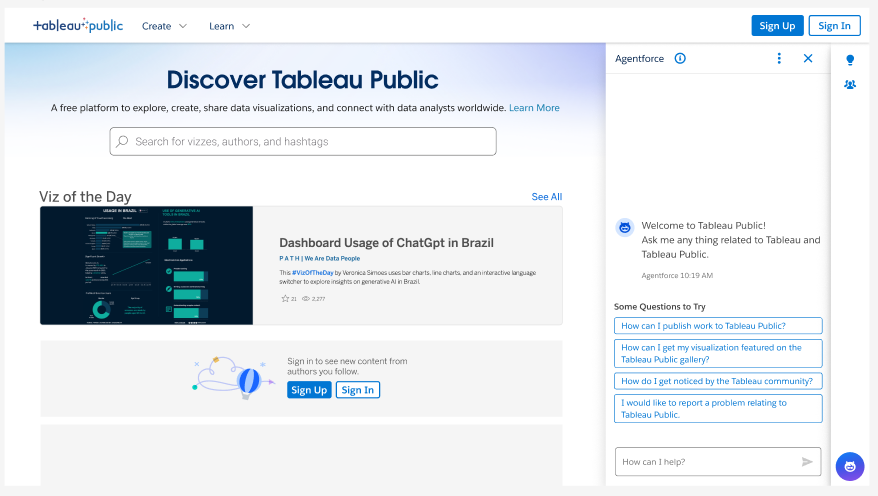
Tableau Public์˜ ์ง€์› ์—์ด์ „ํŠธ

์ฆ‰๊ฐ์ ์ธ ๋‹ต๋ณ€๊ณผ ๊ธฐ๋Šฅ ์ง€์›์„ ์ œ๊ณตํ•˜๋Š” ๋Œ€ํ™”ํ˜• ๋น„์„œ๋ฅผ ์‚ฌ์šฉํ•ด Tableau Public์„ ํƒ์ƒ‰ํ•ด ๋ณด์‹ญ์‹œ์˜ค.

Tableau Public์˜ ์ง€์› ์—์ด์ „ํŠธ

์›ํ•˜๋Š” ๋‹ต๋ณ€์„ ์ฐพ๊ณ  ์ƒˆ๋กœ์šด ๊ธฐ๋Šฅ์„ ๋” ๋น ๋ฅด๊ฒŒ ์ตํž ์ˆ˜ ์žˆ๋„๋ก ๊ณ ์•ˆ๋œ ์ง€๋Šฅ์ ์ธ ๋Œ€ํ™”ํ˜• ๊ฐ€์ด๋“œ๋กœ Tableau Public ์—ฌ์ •์ด ๋” ๋นจ๋ผ์ง‘๋‹ˆ๋‹ค. ์ฒ˜์Œ์œผ๋กœ ๋น„์ฃผ์–ผ๋ฆฌ์ œ์ด์…˜์˜ ์„ธ๊ณ„๋ฅผ ํƒ์ƒ‰ํ•˜๋Š” ์ดˆ๋ณด์ž์ด๋“  ์ปค๋ฎค๋‹ˆํ‹ฐ ๋ชจ๋ฒ” ์‚ฌ๋ก€๋ฅผ ์ฐพ๋Š” ์ „๋ฌธ๊ฐ€์ด๋“  ๊ด€๊ณ„์—†์ด, Tableau Public ์ง€์› ์—์ด์ „ํŠธ๊ฐ€ ์ฆ‰๊ฐ์ ์ธ ๊ฐœ์ธ ๋งž์ถคํ˜• ๊ต์œก์„ ์ œ๊ณตํ•ฉ๋‹ˆ๋‹ค.

Tableau Public์˜ ์ง€์› ์—์ด์ „ํŠธ๋Š” Tableau Public์— ์ •์‹ ์ถœ์‹œ๋˜์—ˆ์Šต๋‹ˆ๋‹ค.

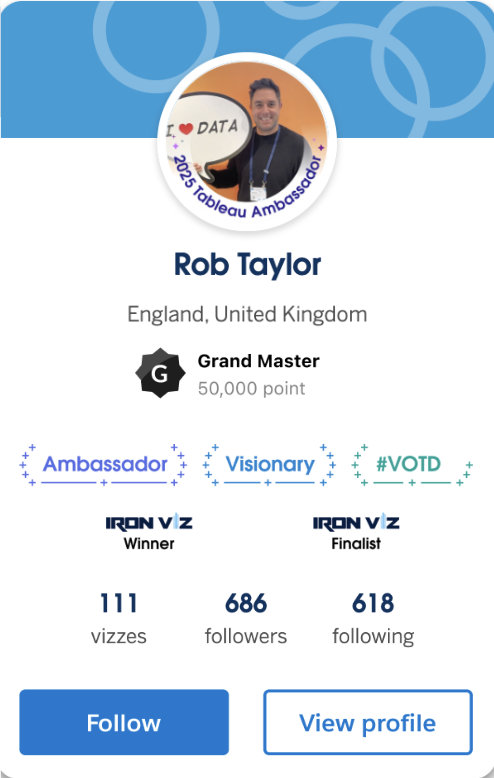
Tableau Public Badges on Author Card

Tableau Public์˜ ์„ฑ๊ณผ์™€ ๋ฐฐ์ง€

Tableau Public์—์„œ ๋ฐฐ์ง€๋กœ ์„ฑ๊ณผ๋ฅผ ๋ณด์—ฌ์ฃผ์‹ญ์‹œ์˜ค.

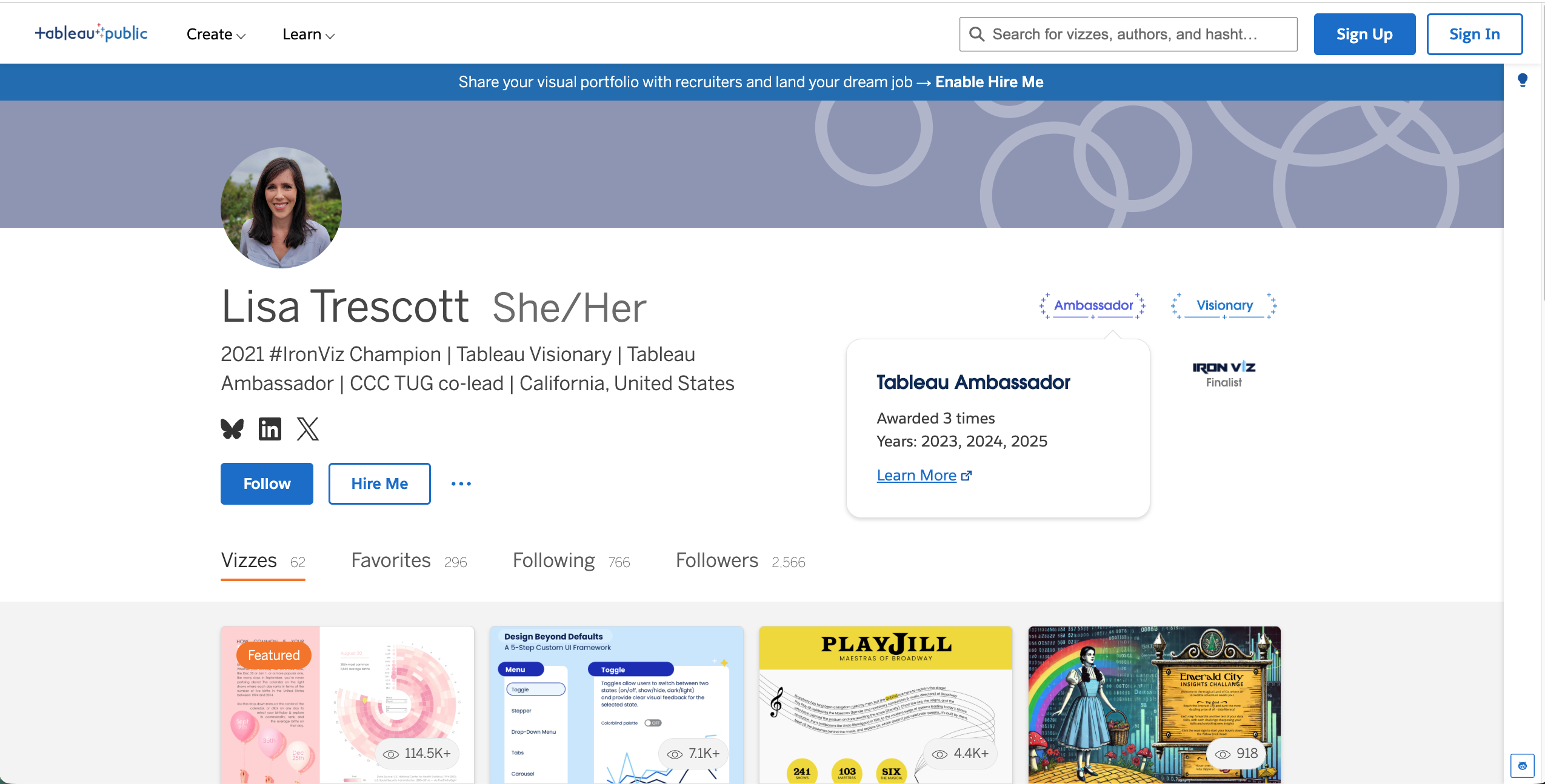
Lisa Trescott Badges on Tableau Public

Tableau Public์˜ ์„ฑ๊ณผ์™€ ๋ฐฐ์ง€

๊ณต์‹ ํ”Œ๋žซํผ ๋ฐฐ์ง€๋กœ ์ค‘์š”ํ•œ ๋‹จ๊ณ„์˜ ๋‹ฌ์„ฑ์„ ๊ธฐ๋…ํ•˜๊ณ  ์ „๋ฌธ์„ฑ์„ ๊ฐ•์กฐํ•˜์‹ญ์‹œ์˜ค. Tableau Public์˜ ๋ฐฐ์ง€๋Š” ๋ฐ์ดํ„ฐ ๊ธฐ์ˆ ์„ ๋ฐฐ์šฐ๊ณ , ๊ฒฝ๋ ฅ์„ ๊ฐœ๋ฐœํ•˜๊ณ , ์ปค๋ฎค๋‹ˆํ‹ฐ์™€ ์†Œํ†ตํ•˜๋Š” ๋ฐ ์ „๋…ํ•œ ๋ฐ”์— ๋Œ€ํ•œ ๋ณด์ƒ์ž…๋‹ˆ๋‹ค. ์ด ๋ฐฐ์ง€๋Š” ์˜ค๋Š˜์˜ ๋น„์ฃผ์–ผ๋ฆฌ์ œ์ด์…˜ ์„ ์ • ๋“ฑ, ์ž ์žฌ์  ๊ณ ์šฉ์ฃผ์™€ DataFam์—๊ฒŒ ๋‚ด ์„ฑ๊ณผ๋ฅผ ๋ณด์—ฌ์ค„ ์ˆ˜ ์žˆ๋Š” ๊ถŒ์œ„ ์žˆ๊ณ  ์‹ ๋ขฐํ•  ์ˆ˜ ์žˆ๋Š” ๋ฐฉ๋ฒ•์ด ๋ฉ๋‹ˆ๋‹ค.

Tableau Next: ์•ˆ๋‚ด๊ฐ€ ์žˆ๋Š” ์„ค์ •

์ผ์ƒ์ ์ธ ๋ฐฐํฌ ์ž‘์—…์„ ์ž๋™ํ™”ํ•˜์—ฌ ๊ตฌ์„ฑ ๋ฐ ๊ฐ€์น˜ ์‹คํ˜„ ์‹œ๊ฐ„์„ ๋‹จ์ถ•ํ•˜์‹ญ์‹œ์˜ค.

Tableau Next: ์•ˆ๋‚ด๊ฐ€ ์žˆ๋Š” ์„ค์ •

์ƒˆ๋กœ์šด ์•ˆ๋‚ด๊ฐ€ ์žˆ๋Š” ์„ค์ •์œผ๋กœ ๋” ๋น ๋ฅด๊ฒŒ ๊ตฌํ˜„ํ•  ์ˆ˜ ์žˆ์Šต๋‹ˆ๋‹ค. ๊ด€๋ฆฌ์ž๋Š” ๋ฉ”ํƒ€๋ฐ์ดํ„ฐ ์„ค์น˜, ํ‘œ์ค€ ๋ณด์•ˆ ์ •์ฑ… ์„ค์ •, ์ฃผ์š” AI ๊ธฐ๋Šฅ ํ™œ์„ฑํ™”๋ฅผ ๋ชจ๋‘ ๊ฐ„์†Œํ™”๋˜๊ณ  ์ž๋™ํ™”๋œ ์„ค์น˜ ํ”„๋กœ์„ธ์Šค๋ฅผ ํ†ตํ•ด ์ˆ˜ํ–‰ํ•  ์ˆ˜ ์žˆ์Šต๋‹ˆ๋‹ค. ํŒ€์—์„œ๋Š” ์•ˆ๋‚ด๊ฐ€ ์žˆ๋Š” ์„ค์ •์„ ํ†ตํ•ด ๋” ๋น ๋ฅด๊ฒŒ ๊ฐ€์น˜๋ฅผ ์ฐฝ์ถœํ•จ์œผ๋กœ์จ ์ค‘์š”ํ•œ ์ผ, ์ฆ‰ ๋ฐ์ดํ„ฐ๋ฅผ ์˜์‚ฌ ๊ฒฐ์ •์œผ๋กœ ์ „ํ™˜ํ•˜๋Š” ์ผ์— ์ง‘์ค‘ํ•  ์ˆ˜ ์žˆ์Šต๋‹ˆ๋‹ค.

์•ˆ๋‚ด๊ฐ€ ์žˆ๋Š” ์„ค์ •์€ Tableau Next์— ์ •์‹์œผ๋กœ ์ถœ์‹œ๋˜์—ˆ์Šต๋‹ˆ๋‹ค.

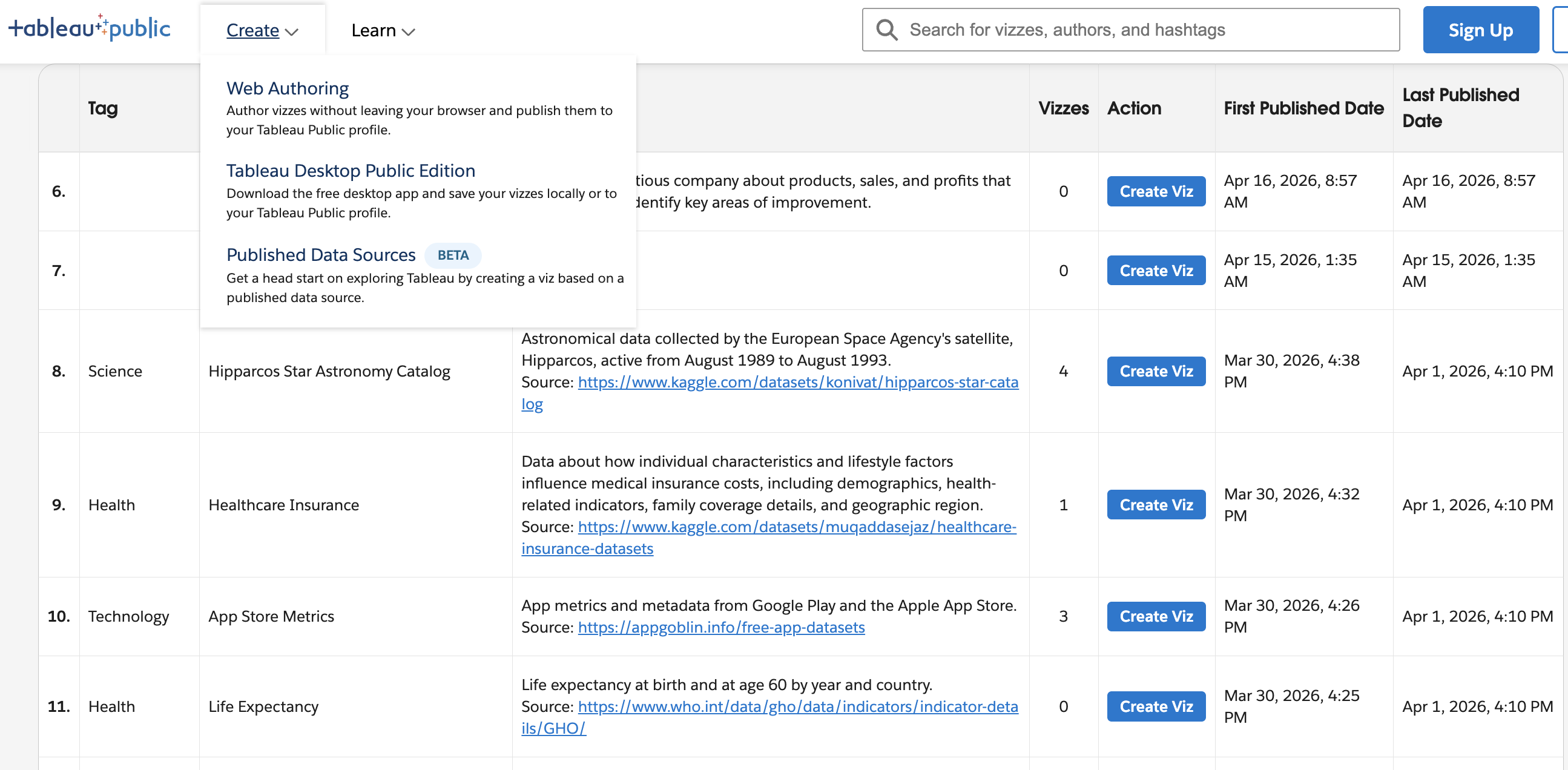
Tableau-owned Published Data Sources on Tableau Public

Discover and reuse data sources within Tableau Public.

Tableau-owned Published Data Sources on Tableau Public

Tableau-owned Published Data Sources on Tableau Public

Discover and connect to data faster with a centralized library of reusable data sources spanning a variety of topics. Published Data Sources reduce manual data imports and gives everyone a faster, more consistent path to exploring data.

The first phase of Published Data Sources is generally available in Tableau Public.

Tableau ์ถœ์‹œ ๋ฒ„์ „์— ๋Œ€ํ•ด ์ž์„ธํžˆ ์•Œ์•„๋ณด๊ธฐ