
Minnesota Pollution Control Agency Clears View of Data
The Minnesota Pollution Control Agency (MPCA) protects Minnesota’s natural environment through monitoring, clean-up, regulation enforcement, policy development and education. The MPCA strives to meet the highest levels of transparency and accountability; to that end the agency has established a data analysis unit to respond to ad hoc information requests. The team chose Tableau to help them answer questions faster and more completely, and to further adoption of a data-driven culture within the MPCA.

Highly Interesting and Highly Public
Minnesota has robust legislation regarding open records, so all state agencies are held to high standards regarding transparency and governmental accountability.
The MPCA Data Analysis team was established to respond to research questions and data requests from both internal clients—such as other staff members and agency leadership—and from external clients including policymakers and concerned citizens.
“By law, we have high standards for data accessibility—it is a priority to provide the information unless we are required by law to keep it private,” says Leslie Goldsmith, data analysis supervisor at Minnesota Pollution Control Agency (MPCA).
She points out that MPCA data is both highly interesting and highly public, making a focus for both citizens and politicians alike.
“If you can't provide an answer, people may become concerned that you’re hiding something. Or they worry that you are not competent. That creates unnecessary noise in the discussion,” she explains.
When requests come from politicians, the team must ensure that it is being clear and transparent about the data on which its analysis is based.
“If you've provided an answer for a particular hearing, for example, you want to be able to reproduce that answer,” Goldsmith explains.
“Typically when a concerned citizen asks a question, they just want an answer. But our policymakers not only want an answer, they want to see the data so they can have their staff verify it.”
Data in a Box
The Data Analysis team is also focused on helping the agency further its efforts to be a data-driven organization.
“We would run into situations where you'd get a different answer out of a question each time, based on who was answering the question,” says Goldsmith. Part of the team’s mission was to help establish consistent and truthful answers.
“We help people differentiate between data that was truly missing and data that exists—but they just don’t know how to get at it,” says Goldsmith. “Or people will bring us their box of data and say, ‘Can you make something interesting out of this?’”
That “box of data” typically comprises two different types of data: field data (in some cases, literally so) about environmental conditions and stressors, and organizational data such as performance metrics, counts of works in progress, and data about milestone events.
The data is also stored across a number of data sources, including Oracle, Microsoft SQL Server, Esri Database, Access, and Excel and PostgreSQL. “Data is stored everywhere in the agency. It's not as central as one might hope,” says Goldsmith.
Some questions come up routinely, such as the number and monetary value of actions the MPCA has taken against industries.
“We seem to get that question every month,” she says. “And each time the requester asks for it a slightly different way than the way it was asked the month before. If you have to constantly pull the data through an Access query or you need to hit the database—it's redundant with previous work and it takes time.”
“In Excel, You Had to Get out the Big Hammer”
After accessing the data, the team still needs to put it in a useable format.
“Many people don't like spreadsheets—they get lost in all the numbers. We wanted to take all of these different kinds of data and make some decent pictures from them. And if you tried to do that in Excel, you had to get out the big hammer and your format blew up and seven people wanted it 18 different ways!” says Goldsmith with a laugh. “That makes it really hard to be productive.”
She estimates that the process of making presentable graphs using data from Excel and Access took about two hours for each report. And those two hours would be spent each time the report was refreshed—some daily, others weekly or monthly.
In 2007, Goldsmith went looking for a better tool and ran across a mention of Tableau.
As a longtime proponent of visual analysis, Goldsmith remembered reading about Tableau back when it was still a research project at Stanford.
Intrigued, Goldsmith arranged for a few trials of Tableau Desktop 4.
“I used it in the trial and was doing something useful with it 20 minutes out of the box,” says Goldsmith. “We have never looked back.”
The team has been using Tableau for nearly five years, starting with Tableau Desktop 4 and quickly moving to Tableau Server 4 and then upgrading with each new release. The MPCA team is now using Tableau Server 8.
The MPCA has 18 analysts authoring visualizations in Tableau Desktop and publishing them agency-wide through Tableau Server. All 900 agency employees can access and interact with visualizations published to Server. The agency uses Active Directory to control access to dashboards and visualizations.
“We Tend to Say ‘Yes’ with Tableau”
Goldsmith believes that Tableau helps the MPCA meet its goals for governmental transparency and accountability.
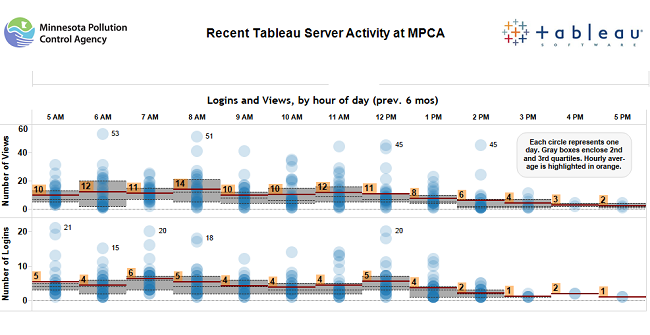
“We have 2,600 workbooks created over the last five years, and many of them have been answers to those one-off questions,” says Goldsmith. “When someone contacts us and asks us to do something, we try to say ‘yes.’ And we tend to say ‘yes’ with Tableau.”
For example, her team built an automatically updated workbook around enforcement efforts. This allows the agency to respond rapidly and consistently to questions from the public, the press or politicians.
“This workbook shows how many enforcement actions we've taken, the value of those actions, and the environmental benefit of those enforcement actions. So it makes it really easy to respond to questions,” she says.
She also appreciates that Tableau enables her to share not just the analysis, but also the data behind it.
“The packaged workbook is a great way to bundle together the static picture—the table and the data behind the visualization—at a particular point in time, so you do have reproducibility and good data lineage,” she says.
Tableau’s ability to produce speedy analysis plus underlying data also helps to allay fears and suspicions that occur when answers are incomplete or take too long to produce.
We save about a half-hour to an hour for each question. We don't have to spend that time, that tedious horribleness that comes with other tools.
“Dive, Play, Explore—Really Fast”
The team is using Tableau as an important tool to forward a data-driven culture within the agency.
“A lot of these questions that we can answer with Tableau—otherwise they would be considered impenetrable and unanswerable. ‘Gee, if only we could answer that but c'est la vie; we can't,’” she says.
Goldsmith considers Tableau’s flexibility in connecting to various data sources to be particularly helpful.
“When people brought us that box of data, Tableau is a great tool for that kind of flexibility,” says Goldsmith. “You can dive into the data and play with it and explore it really fast.”
The team also uses Tableau to help educate agency groups about the importance of quality data.
“When you talk to people and you show them a table or spreadsheet, it doesn't always click. But if you visualize it—it’s so much more impactful,” says Goldsmith. “When managers see a timeline starting at 1392 because someone made a data entry error, they get it.”
Goldsmith is confident that using Tableau has improved her team’s productivity. She estimates that it would take two hours simply to pull the data and determine the answer—formatting the response would take another hour or two.
“We save about a half-hour to an hour for each question,” she says. “We don't have to spend that time, that tedious horribleness that comes with other tools.”
“A couple of hours in Tableau, and the response is prepped, ready for consumption. And it's connected to the data so I never have to do it again,” she says. “We can produce stuff that can be used over and over,” she says. “It’s particularly helpful in high-demand areas.”
She continues, “In terms of ROI, I estimate that it takes about 40 hours of saved labor to start getting actual, measurable return on the cost of a Tableau Desktop license. Anybody who uses Tableau much—they are probably going to be in pure return after a couple of months.”
"Without Tableau, we would be working a whole lot harder to accomplish a whole lot less.”