Insights Wherever You Work: Meet the Tableau App for Microsoft 365




Empowering teams to make data-driven decisions quickly and collaboratively is no longer a nice-to-have, it's a requirement for success. Yet, most organizations hit the same wall: disconnected workflows.
How much time is wasted sorting through Tableau dashboards and tables, taking a screenshot and/or exporting the data, then pasting or importing it into a separate app? Meeting postponed? Scope expanded? Start that process all over again. Once the report or analysis has been shared, the insights instantly become outdated, effectively turning important assets into archives.
Insights should meet you where and how you work, not the other way around.
At Tableau, our goal is to bring insights to life wherever you work, from Salesforce CRM and Slack to your everyday productivity tools.
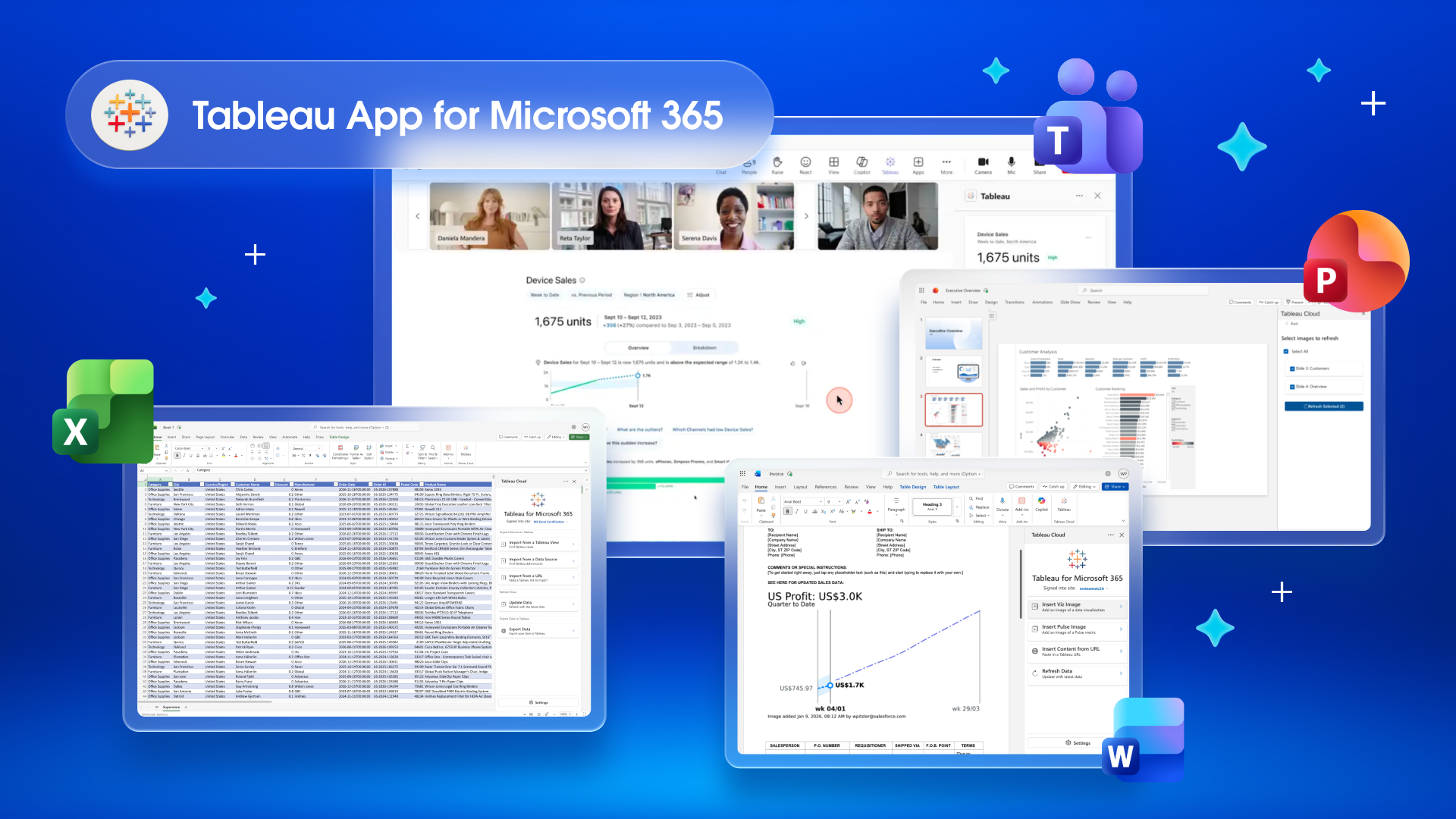
This is why we introduced the Tableau App for Microsoft 365, which enables you to bring your trusted analytics into PowerPoint slides, Word documents, and Teams chats, channels, and meetings. We’ve since introduced the Tableau App in Microsoft Excel, allowing users to seamlessly integrate their business data into their spreadsheets.
By deploying trusted data and analytics within the applications used to build insights and align on decisions, Tableau enables organizations to take smarter action without breaking the flow of work.
“Solving our customers' most complex data challenges requires an open and agnostic view of our customers' application stack. This expansion into Microsoft 365 is a result of our commitment...ensuring that we continue to deliver impactful solutions for our joint customers.”
— Nicolas Brisoux, Senior Director of Product, Tableau
Tableau App in Microsoft Excel
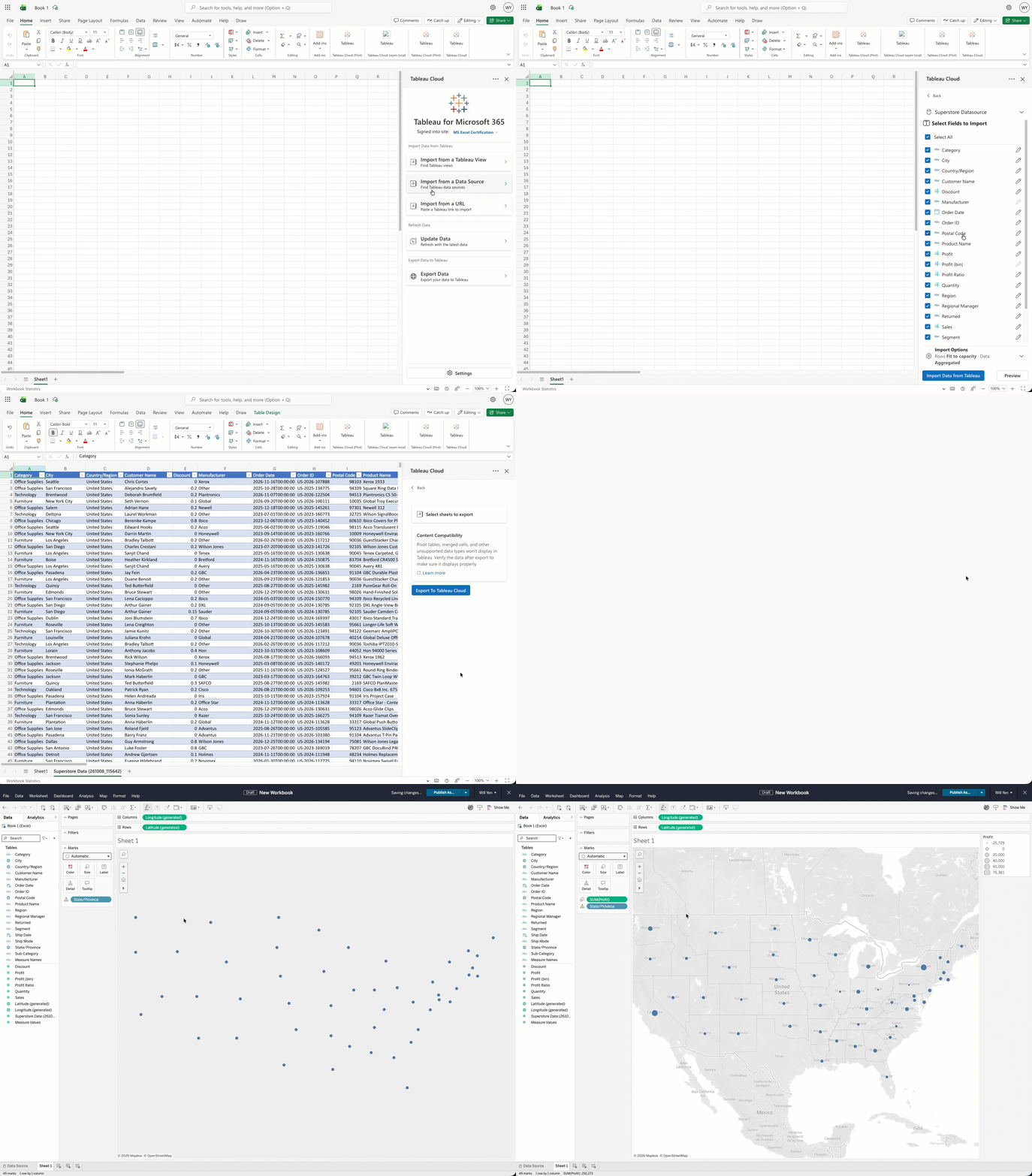
For organizations that use Tableau for analytics and Microsoft 365 for collaboration, the Tableau App in Microsoft Excel closes the gap between your trusted data and the analysis that sits on top of it. Skip the download, copy-paste, and reformat routine. Instead, connect directly to any Tableau view or Published Data Source, query the exact data needed, and pull it directly into your spreadsheet for analysis. As the numbers change, you can refresh the import in an instant so every linked report and model stays current.
- Import what matters: The built-in Query Builder lets you choose the fields, filters, and aggregations from any Published Data Source, so you only query the data you need.
- Fresh data on tap: Refresh all or select data on demand with a single click, so you can spend more time building the insights and less time pulling the same data.
- Full-circle workflow: Bring Tableau data into Excel for analysis and modeling, then send it back to Tableau Cloud to explore and visualize it in more depth.
Tableau App in Microsoft Word and PowerPoint
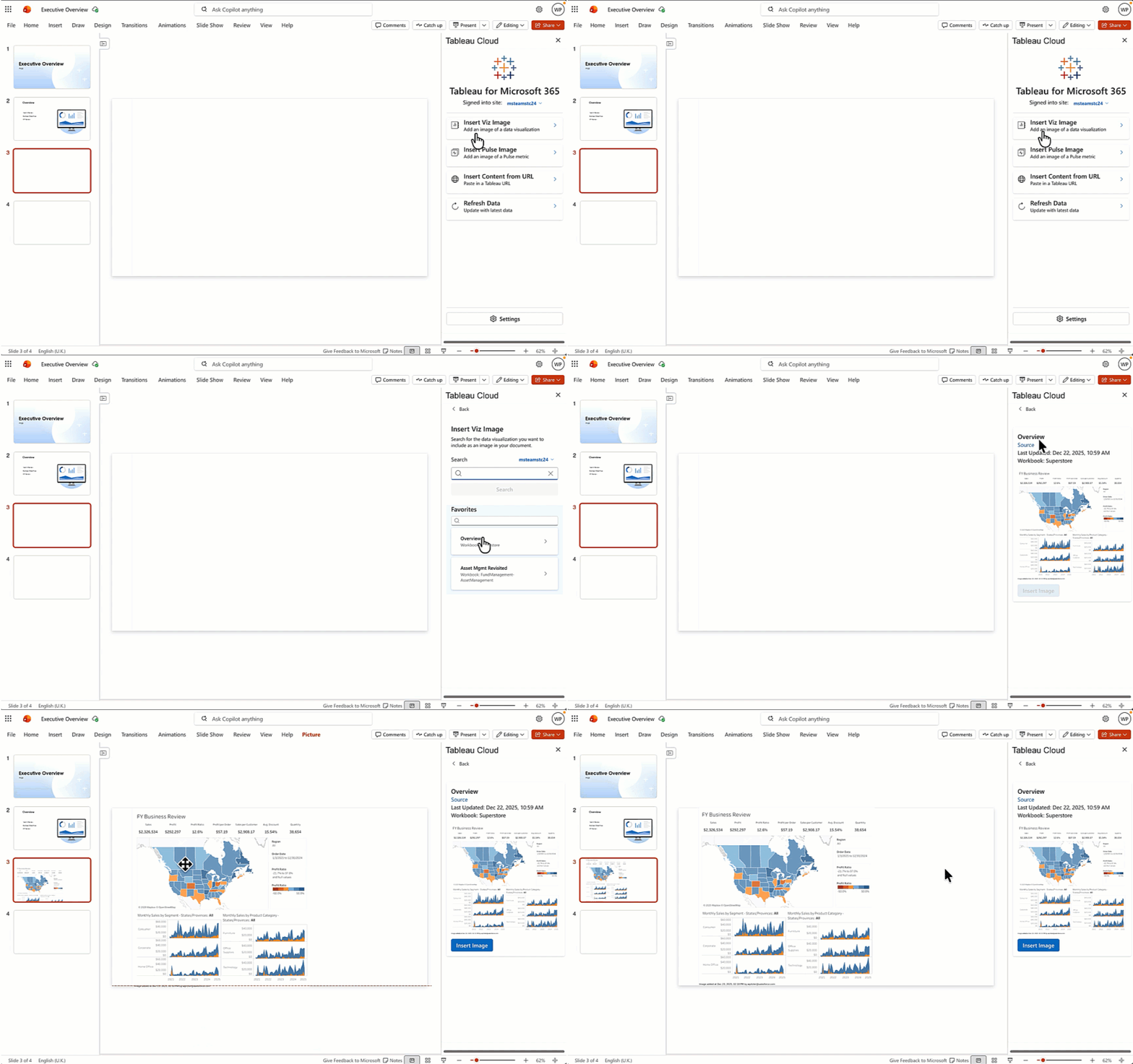
Over in Microsoft Word and PowerPoint, users can insert trusted insights directly into their documents. Instead of the error-prone, manual process of recreating unique dashboard views, capturing numerous screenshots, then pasting them into a lengthy report, users can validate their point of view by weaving Tableau content directly into their narrative. This ensures that key assets—from executive briefings to weekly business reviews—stay backed by governed, relevant information.
- Stay in the flow: Securely browse content across Tableau Cloud or Server sites and embed a screenshot of the dashboard and/or Pulse metric directly onto the page or slide without leaving the app.
- Keep assets up-to-date: Your audience always sees the latest data, not a stale snapshot. Once the screenshots are embedded, refresh them with a single click.
Tableau App in Microsoft Teams
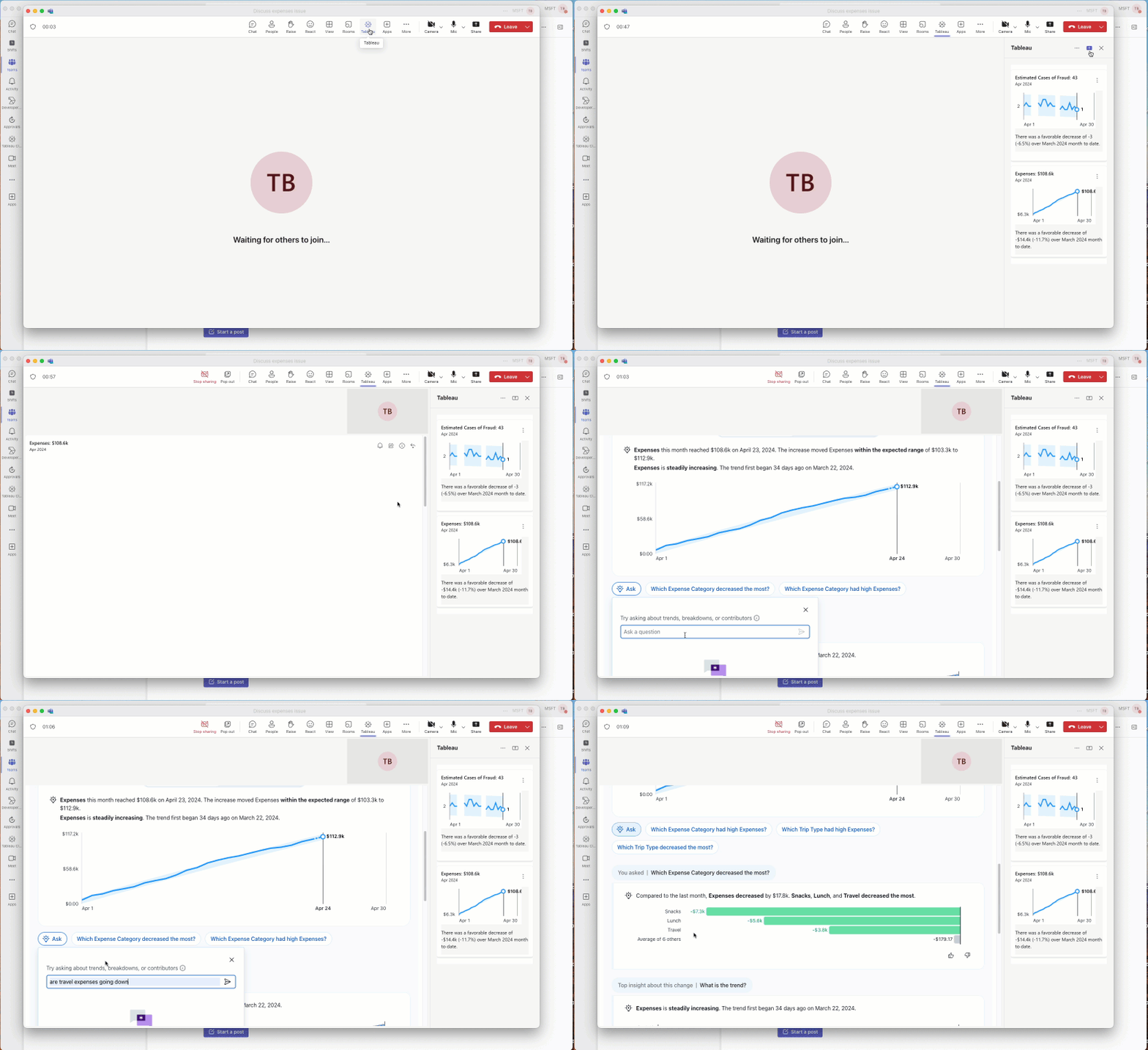
In addition, customers can use the Microsoft Teams integration, which is designed to foster data-driven collaboration directly in the flow of work. The Tableau app in Teams provides access to dashboards and metrics directly within the integrated Tableau app, in both channel tabs and direct messages, and during meetings. By placing trusted insights within reach while collaborating, data becomes central to the conversation and teams can align faster.
- Stay on top of your business: Explore your dashboards and Pulse Metrics directly within Teams to seamlessly stay on top of your business.
- Establish a single source of truth: Keep everyone informed by pinning Tableau content in channels, direct messages, and meetings.
- Accelerate decision making: Enhance collaboration by browsing Tableau content within meetings and presenting relevant insights in real time.
Three core benefits of the Tableau App for Microsoft 365:
1. Governed and secure access: The app inherits your existing Tableau Cloud and/or Tableau Server permission model, streamlining access management. Admins can be confident that content is secure, while users can trust that the data is accurate.
2. Productivity and efficiency boosts: By eliminating context switching, the app drives efficiency for the entire organization. It frees data professionals from the cycle of manual updates and ad hoc requests, while empowering business users to obtain insights directly in their workflows.
3. Trusted data analysis and storytelling: The Tableau App for Microsoft 365 ensures that all of your work is backed by your trusted, governed Tableau insights. By grounding critical models, documents, and discussions in shared facts, organizations can drive smarter outcomes, faster.
Integrate your analytics
To enable the integrations with Excel, Word, and PowerPoint, Microsoft 365 admins can install and configure the app via Microsoft Add-ins. To enable the Microsoft Teams integration, Microsoft 365 admins can install the Tableau Cloud app from the Microsoft Marketplace and review Tableau Server setup guidance here.
For further setup details, see our detailed documentation.
Historias relacionadas
Trusted, Real-Time Insights for All: Tableau Brings Conversational Analytics to Cloud & Server
 29 Octubre, 2026

The Tableau+ Bundle with Premium AI, Enterprise Capabilities, and Premier Success
 1 Octubre, 2026
What is Tableau Knowledge?
 30 Septiembre, 2026